EasyManua.ls Logo

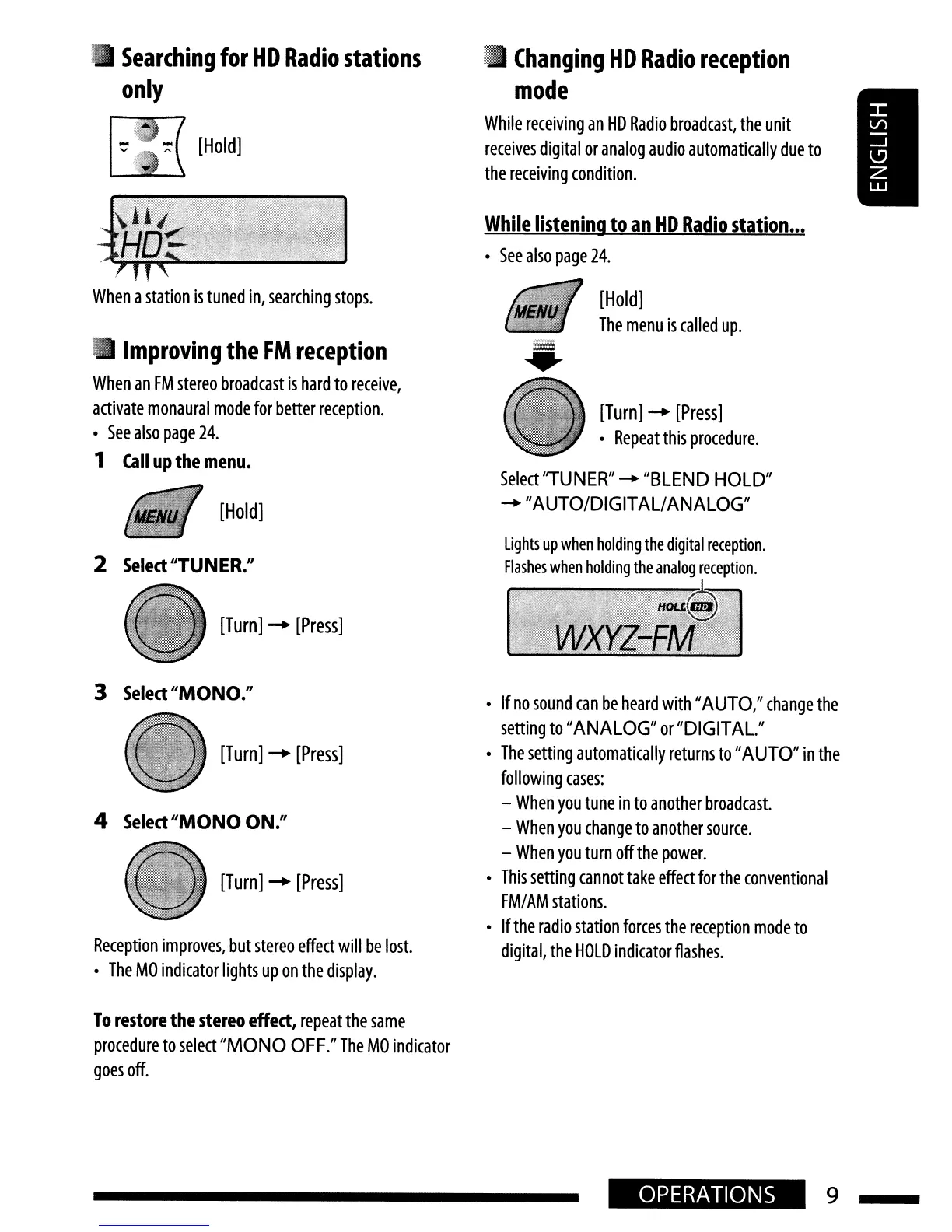
JVC KD-HDR20 - Radio Reception Settings; Searching HD Radio Stations; Improving FM Reception Mode; HD Radio Reception Mode

JVC KD-HDR20
51 pages
Print Icon
To Next Page IconTo Next Page
To Previous Page IconTo Previous Page
Loading...
[Turn]
-+
[Press]
•
Repeat
this
procedure.
[Hold]
The
menu
is
called
up
.
Lights
up
when
holding
the
digital
reception.
Flashes
when
holding
the
analog
reception.
Select''TUNER''
....
''BLEND
HOLD"
....
"AUTO/DIGIT
ALI
ANALOG"
While
listening
to
an
HD
Radio
station
...
•
See
also
page
24.
Changing
HD
Radio
reception
mode
While
receiving
an
HD
Radio
broadcast,
the
unit
receives
digital
or
analog
audio
automatically
due
to
the
receiving
condition.
[Hold]
[Hold]
2
Select
"TUNER."
When
a
station
is
tuned
in,
searching
stops.
•
Improving
the
FM
reception
When
an
FM
stereo
broadcast
is
hard
to
receive,
activate
monaural
mode
for
better
reception.
•
See
also
page
24.
1
Call
up
the
menu.
•
Searching
for
HD
Radio
stations
only
[Turn]
-+
[Press]
3
Select
"MONO/'
4
Select
"MONO
ON."
Reception
improves,
but
stereo
effect
will
be
lost.
•
The
MO
indicator
lights
up
on
the
display.
•
If
no
sound
can
be
heard
with
"AUTO,"
change
the
setting
to
"ANALOG"
or
"DIGITAL."
•
The
setting
automatically
returns
to
"AUTO"
in
the
following
cases:
-
When
you
tune
in
to
another
broadcast.
-
When
you
change
to
another
source.
-
When
you
turn
off
the
power.
•
This
setting
cannot
take
effect
for
the
conventional
FM/
AM
stations.
•
If
the
radio
station
forces
the
reception
mode
to
digital,
the
HOLD
indicator
flashes
.
[Turn]
-+
[Press]
[Turn]
-+
[Press]
To
restore
the stereo
effect,
repeat
the
same
procedure
to
select
"MONO
OFF."
The
MO
indicator
goes
off.
OPERATIONS
9

Table of Contents