SettingsSettings
<Balance>
Adjusts the left and right speaker output balance.
• L15 to R15 (Initial: 0)
To clear the adjustment: Touch [Center].
<Speaker/X’over>
Preparation:
Before making the adjustment for <Speaker/X'over>,
select the appropriate crossover network mode
according to the speaker system (2-way speaker
system or 3-way speaker system).
1 Turn off the AV source.
On the Home screen, touch as follows:
2 Display the <X’over Network> screen.
On the monitor panel, press the following buttons
at the same time:
• For KW-V340BT/KW-V340BTM:
and
• For KW-V440BT/KW-V440BTM:
FNC and – (volume)
3 Select the crossover network mode.
[2way] Select this when 2-way system
speakers are used (front/rear).
[3way] Select this when 3-way system
speakers are used (tweeter/mid
range/woofer).
A confirmation message appears. Touch [Yes].
Setting the speakers and crossover
frequency
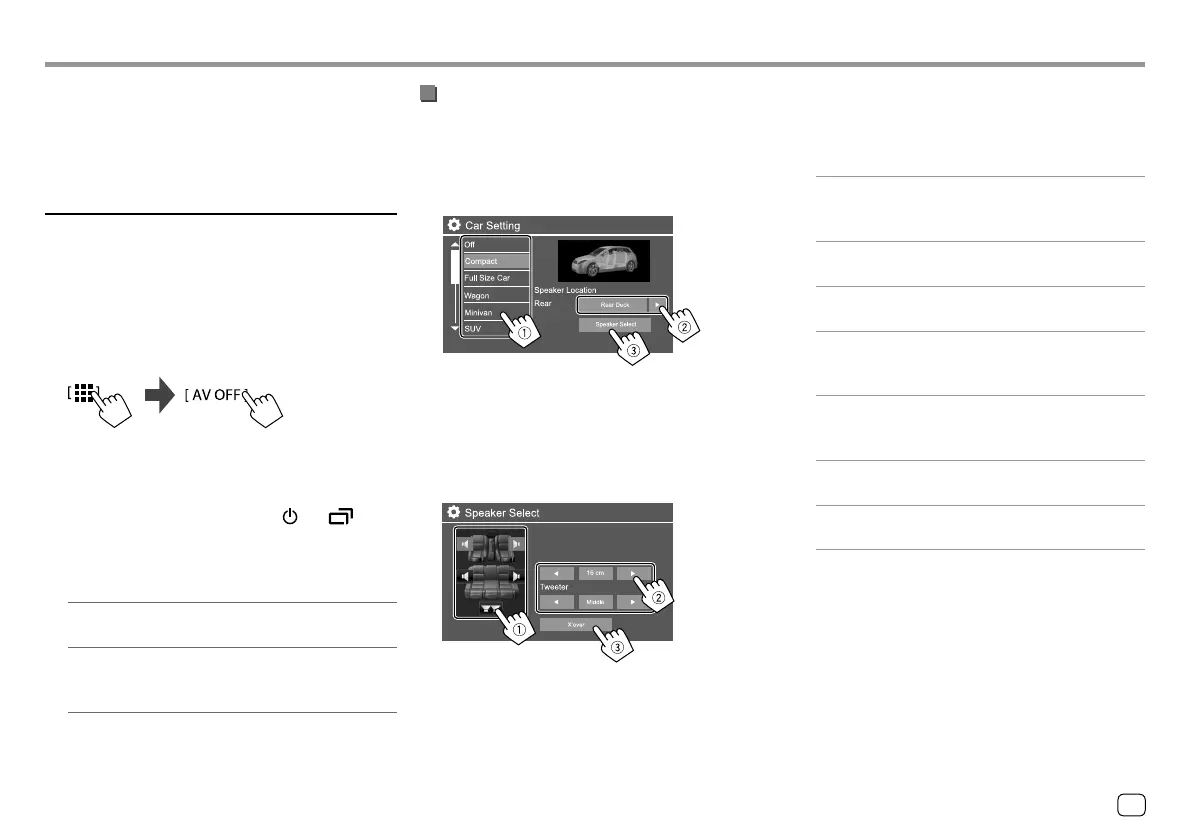
1 Select a car type (1), select the location
of the speakers (
2)*, then display the
<Speaker Select> screen (
3).
* Speaker location selection is available only when
<X’overNetwork> is set to [2way].
2 Select the speaker type (1), select the size
of the selected speaker (
2), then display
the <X’over> screen (
3).
• If a speaker is not connected, select <None>.
• When setting the front speakers, also select the
speaker size for <Tweeter>.
3 Adjust the crossover frequency of the
selected speaker.
• Adjustable items vary depending on the selected
speaker type/speaker size/crossover settings.
<TW Gain (L)>/<TW Gain (R)>
Adjusts the output volume of the tweeter (left/
right).
<TW FREQ>
Adjusts the crossover frequency for the tweeter.
<Gain>
Adjusts the output volume of the selected speaker.
<HPF FREQ>
Adjusts the crossover frequency for the front or rear
speakers (high pass filter).
<LPF FREQ>
Adjusts the crossover frequency for the speaker
(low pass filter).
<Slope>/<HPF Slope>/<LPF Slope>
Adjusts the crossover slope.
<Phase>
Selects the phase for the speaker.
33
ENGLISH
00_KW-V2018ST_M_ENG.indb 3300_KW-V2018ST_M_ENG.indb 33 17/6/2017 7:35:51 AM17/6/2017 7:35:51 AM



 To Next Page