KaControl for Door Air CurtainsINSTALLATION AND OPERATING INSTRUCTIONS
INSTALLATION AND OPERATING INSTRUCTIONS
1.96
28
Door air curtains
10. Operation and Systems
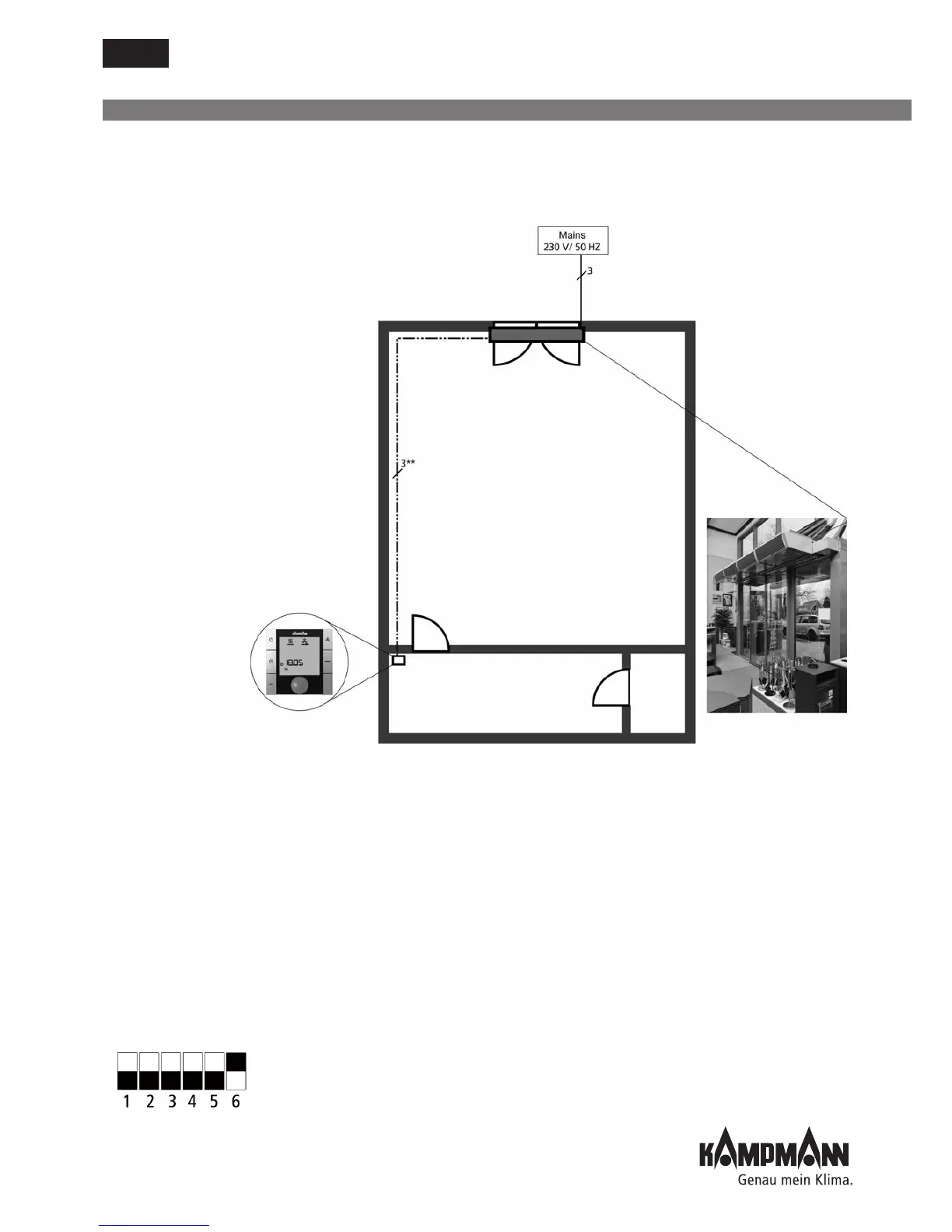
10.1 System 1/Factory Setting
Functional description
• Switching door air curtain on and off using the KaController
• Door air curtain switched on: shut-off valve opens, pre-set fan stage running continuously
• Operating options on the KaController: - ON/OFF
- Fan stage setting 1, 2, 3, 4, 5
- Summer / winter mode changeover
- Timer setting ON/OFF
Note:
• Temperature control is configured in such a way that it is not possible to set a target temperature
• Fan only switches off if the KaController on the door air curtain is set to OFF
Parameter setting: Standard
DIP switch setting:
DIP switch PCB
Sales floor
Door air curtain
Office
Cabling:
** Lay shielded, paired BUS cables, at least
Cat 5 (AWG 23), in a linear pattern
separately from high voltage cables!
The formation of star points, for instance,
in junction boxes is not permitted.
All other connections can be done in
NYM-J (or similar).
ON
OFF
KaController
Typ 3210001
or Type 3210002
Max. cable length 30 m



 To Next Page