1918
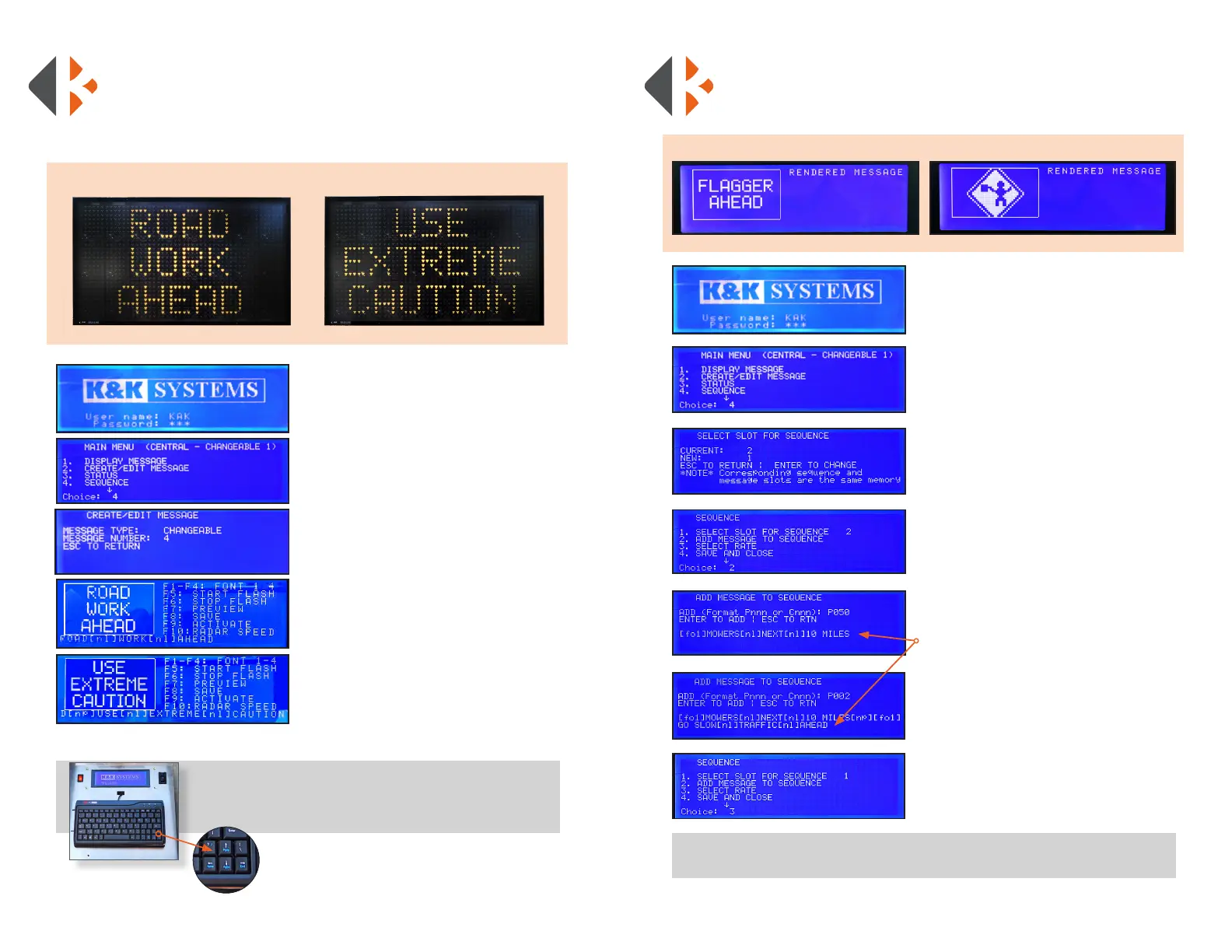
1) Login: Enter username: KAK
Press Enter
Enter Password: 123
Press Enter
2) Press #2 (CREATE/EDIT MESSAGE)
Press Enter
3) Enter the Message Number to edit or
a new number for a new message
Press Enter
4) Enter the 1st Message to display
Press Enter
5) Enter the 2nd Message to display
Press Enter to add another page.
6) Press F9 (ACTIVATE) when nished
* NOTE: This will SAVE and DISPLAY your message.
If you do not want to display the message
immediately, Press F8 to SAVE only.
CREATE/EDIT A CHANGEABLE
MULTI-PAGE MESSAGE SEQUENCE
The following steps will show you how to create a message that spans 2 or
more pages, assign a number 1-99 to it, and save it to the Quick Selection
Thumb Wheel.
Tip
* Use the Up and Down buttons to scroll through the Main Menu options.
EXAMPLE:
CREATE A MESSAGE SEQUENCE/ MULTI-PAGE
MESSAGE WITH PERMANENT AND
CHANGEABLE MESSAGES
Tip
* Once you create your Message Sequence, you will save it as a changeable message.
1) Login: Enter username: KAK
Press Enter
Enter Password: 123
Press Enter
2) Press #4 (SEQUENCE)
Press Enter
3) Enter the next available 1-99 number
on the list of changeable messages
Press Enter
Press ESC
4) Press #2 (ADD MESSAGE TO SEQUENCE)
Press Enter
5) Enter the message number you wish to
display. ** You must enter P (Permanent) or
C (Changeable) message and a 3 digit
number. (Ex: P050 = Permanent Message #50)
Press Enter
Repeat to enter another message
Press ESC
** Once you press Enter, the message you entered will
show here.
6) SAVE AND ACTIVATE saves your
message sequence to the number you
chose in step 2 and then activates the
message.
Press #4 (SAVE AND CLOSE)
Press #5 (SAVE AND DISPLAY)
EXAMPLE:



 To Next Page