5150
Low Prole Mini Fuse
CAUTION
DO NOT PULL ON
WIRES WHEN
OPENING THE
CROSSTALK
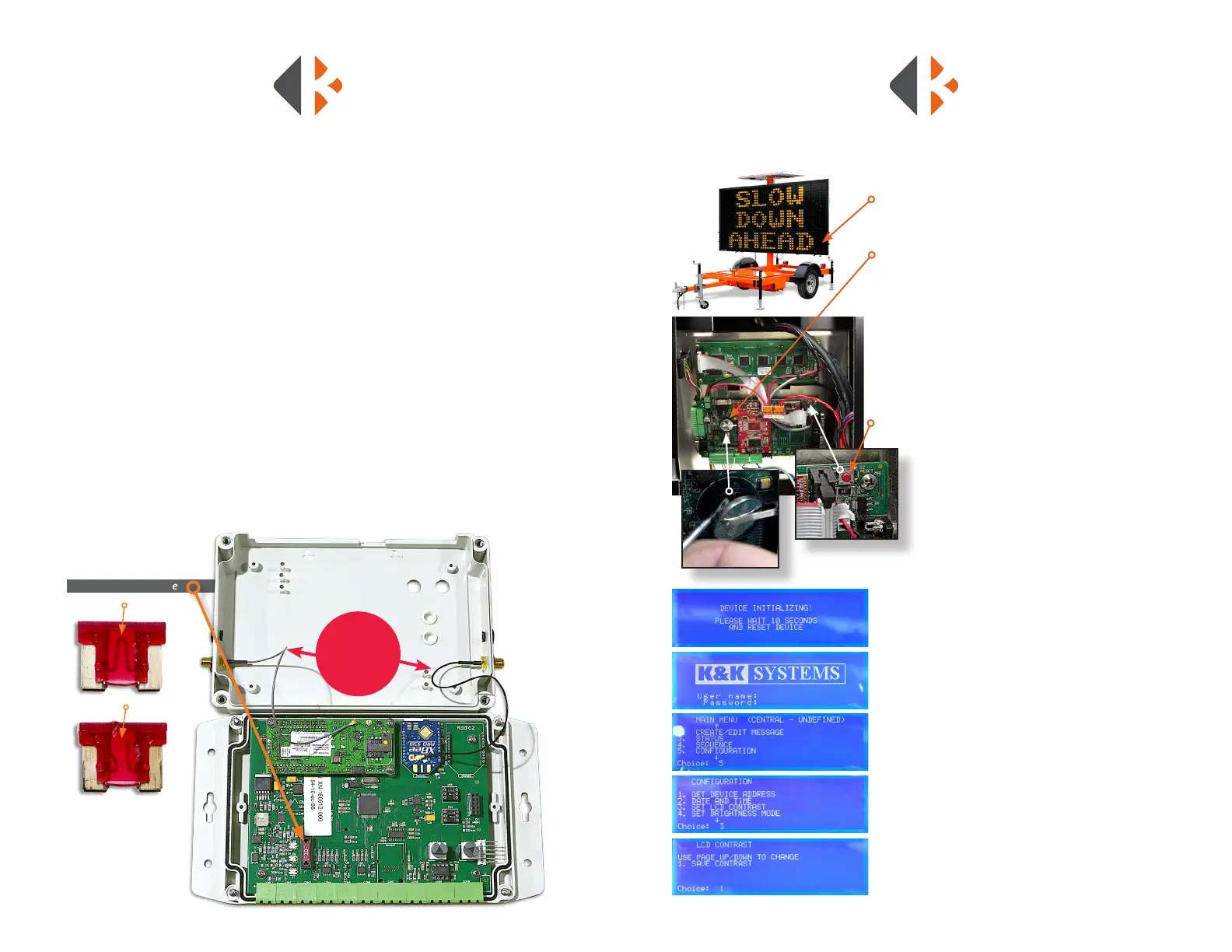
Good Fuse
Blown Fuse
Access the CrossTalk components by removing the CrossTalk from the control box.
1) Turn the CrossTalk over to remove 4 screws on the corners.
2) Loosen the screws until the face cover easily separates. The screws will remain in
the housing.
3) Carefully lay the cover over as to not to break the connection of the aerial wire.
4) Locate the 10 amp Low Prole Mini Fuse at the bottom left of the control panel.
5) Remove the fuse by grasping with ngers and gently rocking the fuse
side to side.
6) Inspect the fuse by looking through the translucent housing at at wire in
the center. If the wire is solid, the fuse is good. In a blown fuse, the wire will
be broken.
7) Replace the blown fuse with a new one by inserting into the port and rmly
pressing it into place.
8) Align the covers and tighten the screws until the cover is snug.
9) Remount the CrossTalk to control box.
CROSSTALK FUSE LOCATION & REPLACEMENT
1) Remove the bottom right LED board to
expose the rear of the control box.
2) Locate the CR2032 battery on the motherboard.
3) Use a athead screwdriver to lift the battery.
4) Slide the battery to the side to remove.
5) Insert a new battery under the holding clip
and slide it into place.
6) Press the reset button.
7) On the LCD screen in the control cabinet you will
see the “Device Initializing” message. Once this
process is complete the Login Page will open.
8) Login: Enter username: KAK
Press Enter
Enter Password: 123
Press Enter
9) Press #5 (Congure)
Press Enter
10) Press #3 (LCD Contrast)
Press Enter
11) Press #1(To Save the Contrast)
Press Enter
KEYBOARD BATTERY
LOCATION & REPLACEMENT



 To Next Page