3938
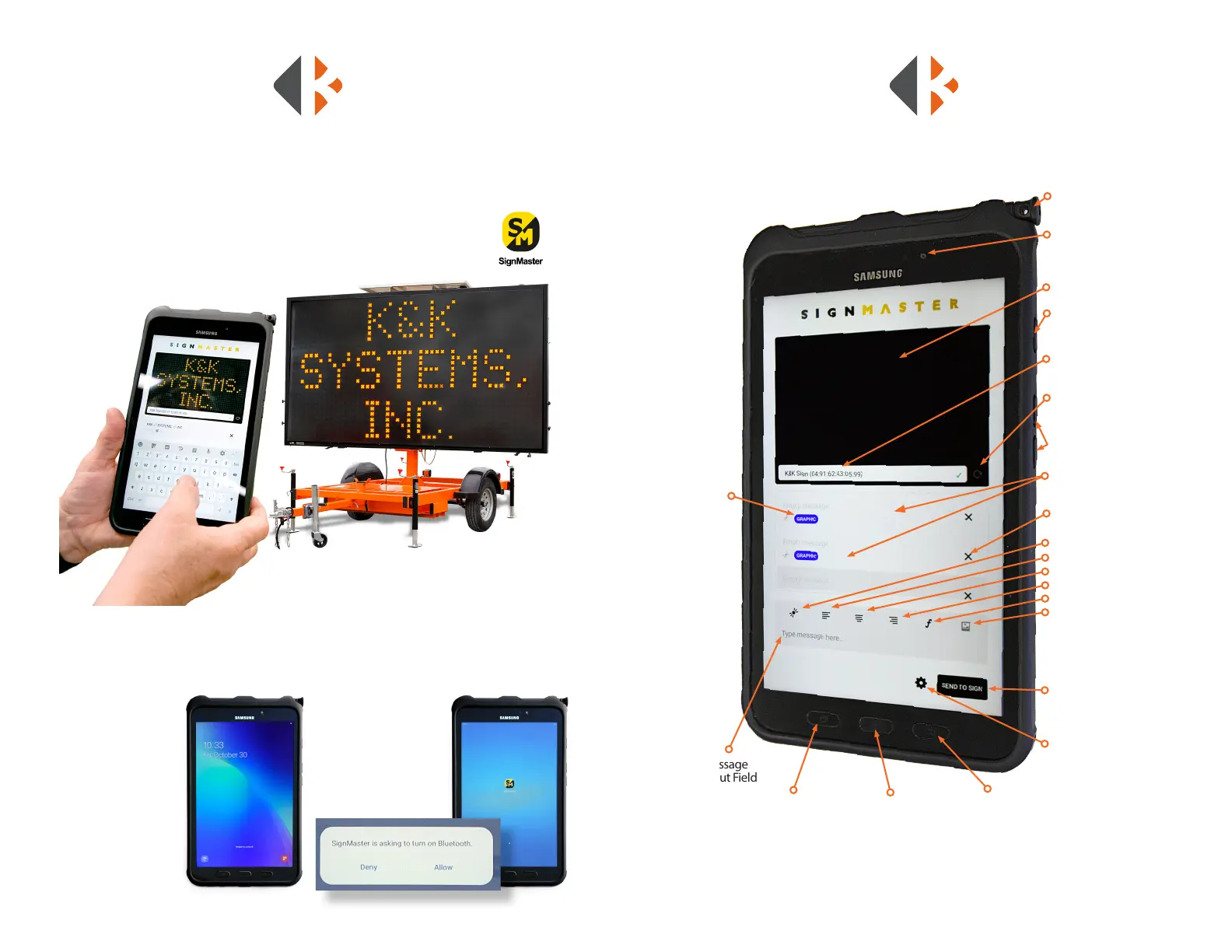
DESCRIPTION OF TABLET CONTROLS
Message
Input Field
Tablet Pages Home Button Back Button
Stylus Pen
Front Camera (not
used for message sign
control)
Message Sign Preview
Power ON/OFF Button
Message Sign
Connection
Message Sign Search/
Refresh
Volume Controls
(Not used)
Text/Graphic/Animation
Pages
Delete Page Message
Message Flash
Align Message Left
Align Message Center
Align Message Right
Font Menu
Graphic/Animation Menu
Send Message to
Sign for Display
Settings
Message Status:
- sent
- unsent
- graphic
BLUETOOTH TABLET PROGRAMMING
Bluetooth controlled units are equipped with a handheld tablet located inside the
control box. One of the advantages of Bluetooth is that is does not require cellular service
to operate. K&K proprietary software called SignMaster allows you to create
and send messages to your message sign. Your tablet has SignMaster installed
and ready to use upon delivery.
TABLET OPERATION
To use the tablet you must be within the range of the Bluetooth signal to
connect and operate your unit.
Power on the Tablet
Press the power
button located on the
side of the tablet.
Navigate to the
SignMaster App
Swipe up on the
tablet screen
Open SignMaster
App Tap on the
SignMaster logo
If the tablet’s Bluetooth is
turned o the message
below will popup. Press
Allow to continue.



 To Next Page