3736
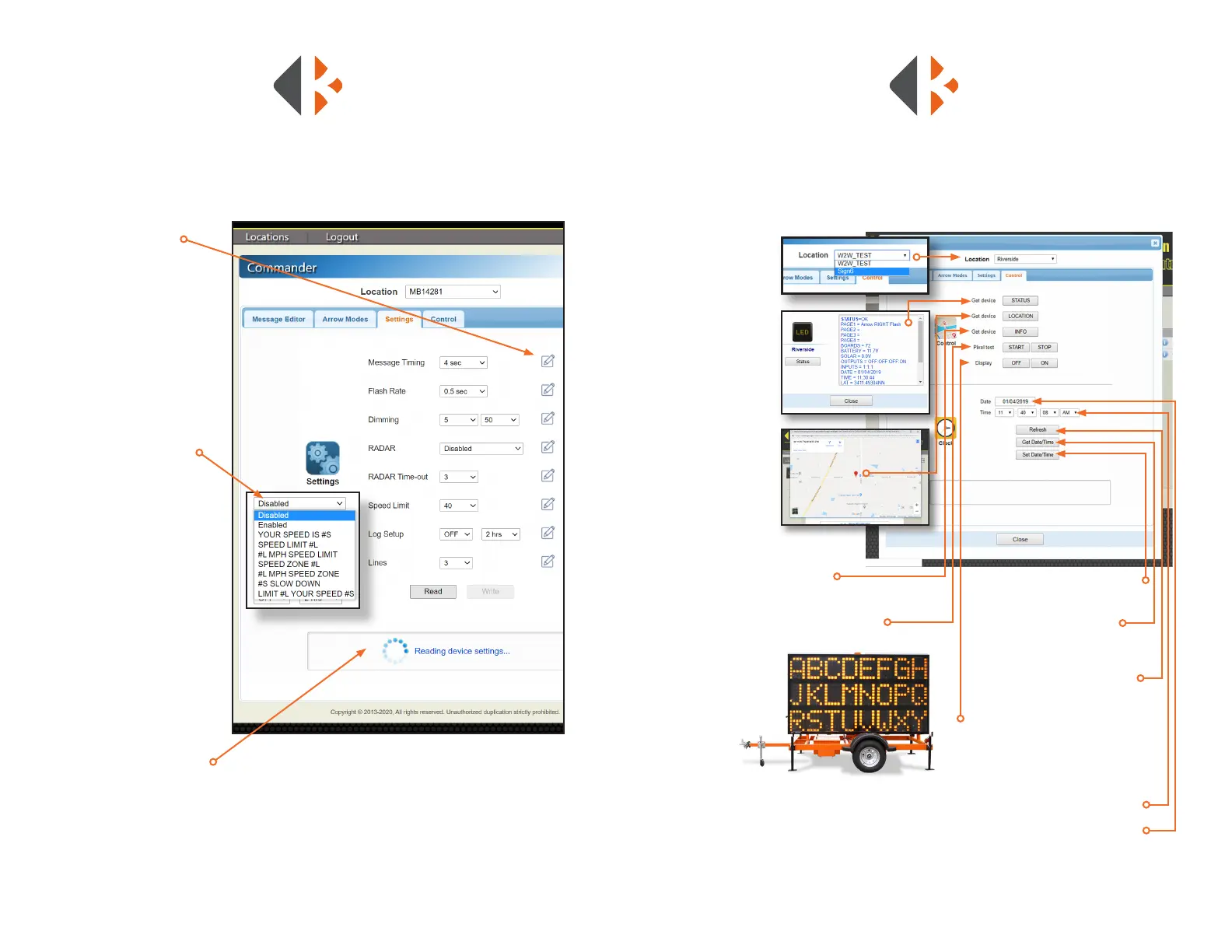
Under the Settings tab are all of the controls for how your message displays on your
message sign including message timing, ash rate, and dimming.
• Write Button - sends
command to display
• Message Timing - the
amount of time the page
displays in a multiple page
message
• Flash Rate - the amount of
time the page ashes
• Dimming - amounts.
Default setting are 1 and 200.
- Minimum Amount
- Maximum Amount
• Radar - Enable/Disable,
message selection
• Radar Time-out - amount of
time the message is displayed
after it detects a vehicle. This
is a safety measure so that a
speeder will no interrupt the
regular message.
• Speed Limit - Speed at which
the message is displayed.
• Log Setup - Not used
• Read - checks current
settings
• Write - sends all settings
changes to message sign
• Conrmation - displays
command when accepted
SETTINGS
• Location - select
unit in drop
down menu
• Status - provides
information
about unit current
working stats and
settings
• Device Location
- displays unit
location on a
map with GPS
coordinates
Map will not display
unless Pop-Ups are
enabled for this website.
• Info - displays rmware and
unit ID
• Pixel Test - displays one character per
message sign panel and lights all
LED diodes. Used
for troubleshooting.
• Set Date/Time - sets the unit’s
date and time to above settings
• Get Date/Time - gets the
unit’s current date and time
• Refresh - inputs the
computer’s date and time into
the CrossTalk settings above
• Display - turns display ON
and OFF. Display automatically
turns ON when message is sent
to it. Always turn OFF the display
for storage.
• Time - displays current time
• Date - displays month/day /year
CONTROL
The Control tab provides access to message signs to conrm date and time settings,
perform tests, and receive information including current working status and location.



 To Next Page