3534
ARROW MODES
ARROW MODE SELECTION - ONLY FOR FULL MATRIX DISPLAYS
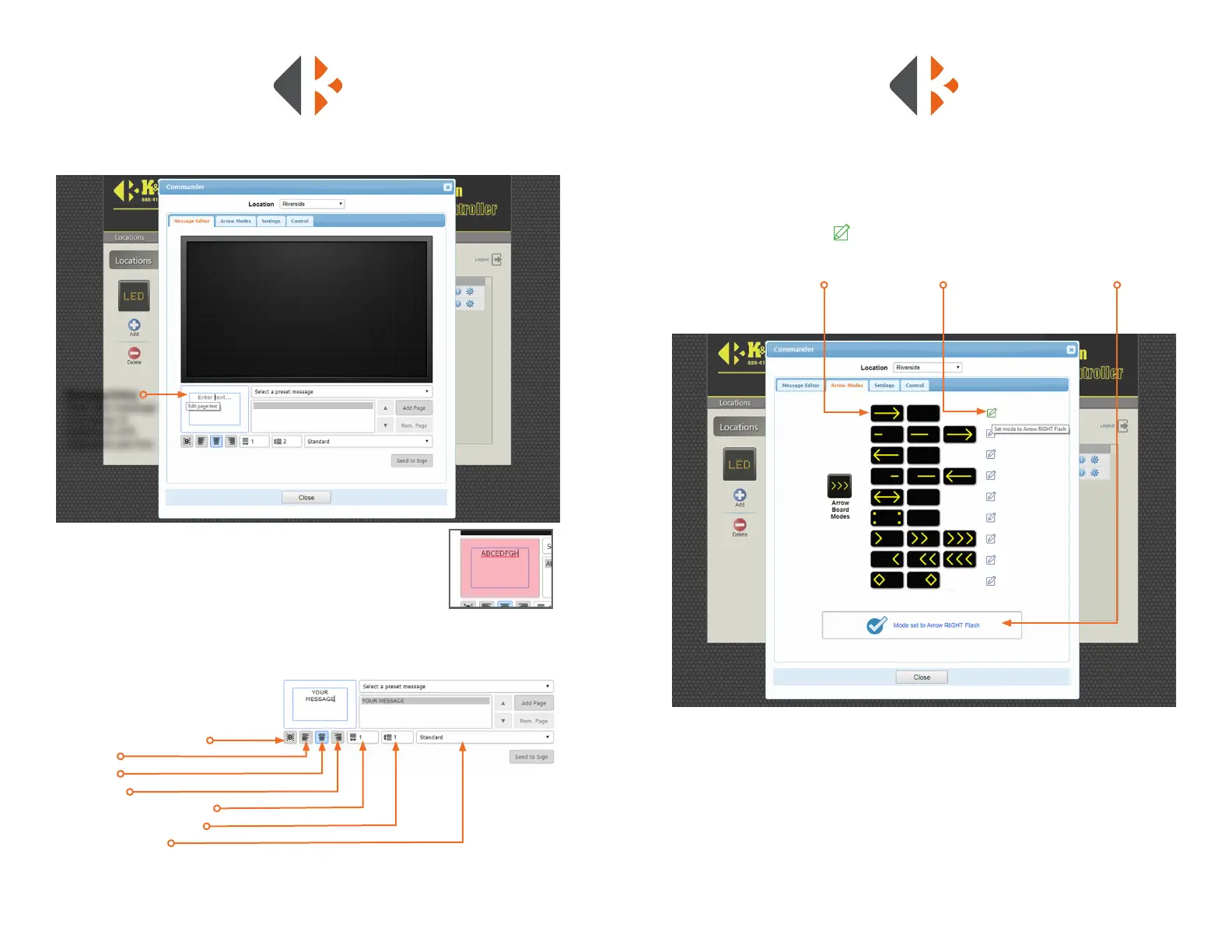
Under the Arrow Modes tab are the MUTCD approved arrow patterns. Each arrow diagram
previews the series of congurations that animate the arrow. Select the desired arrow
pattern by clicking the pencil at the right of the diagram. The selection is conrmed in
the window below the arrow diagrams. Click the Close button when nished.
• Arrow Pattern Preview • Send Command • Command Conrmation
FORMATTING TEXT
After entering your message, click the
desired button make the text:
• Blink. Selected on each page separately.
• Flush left
• Centered
• Flush Right
• Letter Spacing Horizontally
• Text Line Vertical Spacing
• Text Size and Style
ENTERING A CUSTOM MESSAGE
Locate the Message Entry window below the preview window. Type
your message. All caps and lowercase text can be used. Your message
is automatically centered on the display. If the maximum number of
characters (8) per line is exceeded the window will ash red. Press the
ENTER key to go to the next line. Click the Send to Sign button when
ready to display.
Message Entry window
with number of characters
exceeded.
Message Entry
Type new message
in window. A
maximum of 8
characters per line.
CUSTOM MESSAGES



 To Next Page