23KANE 458s MANUAL
VIEWING/PRINTING
Press button to send your Pressure and Temperature report to our
optional KANE IRP-2 printer or KANE’s App via Wireless module.
Press & hold button for 2 seconds to log a pressure and temperature
report. Page 20 explains how to view & print stored reports.
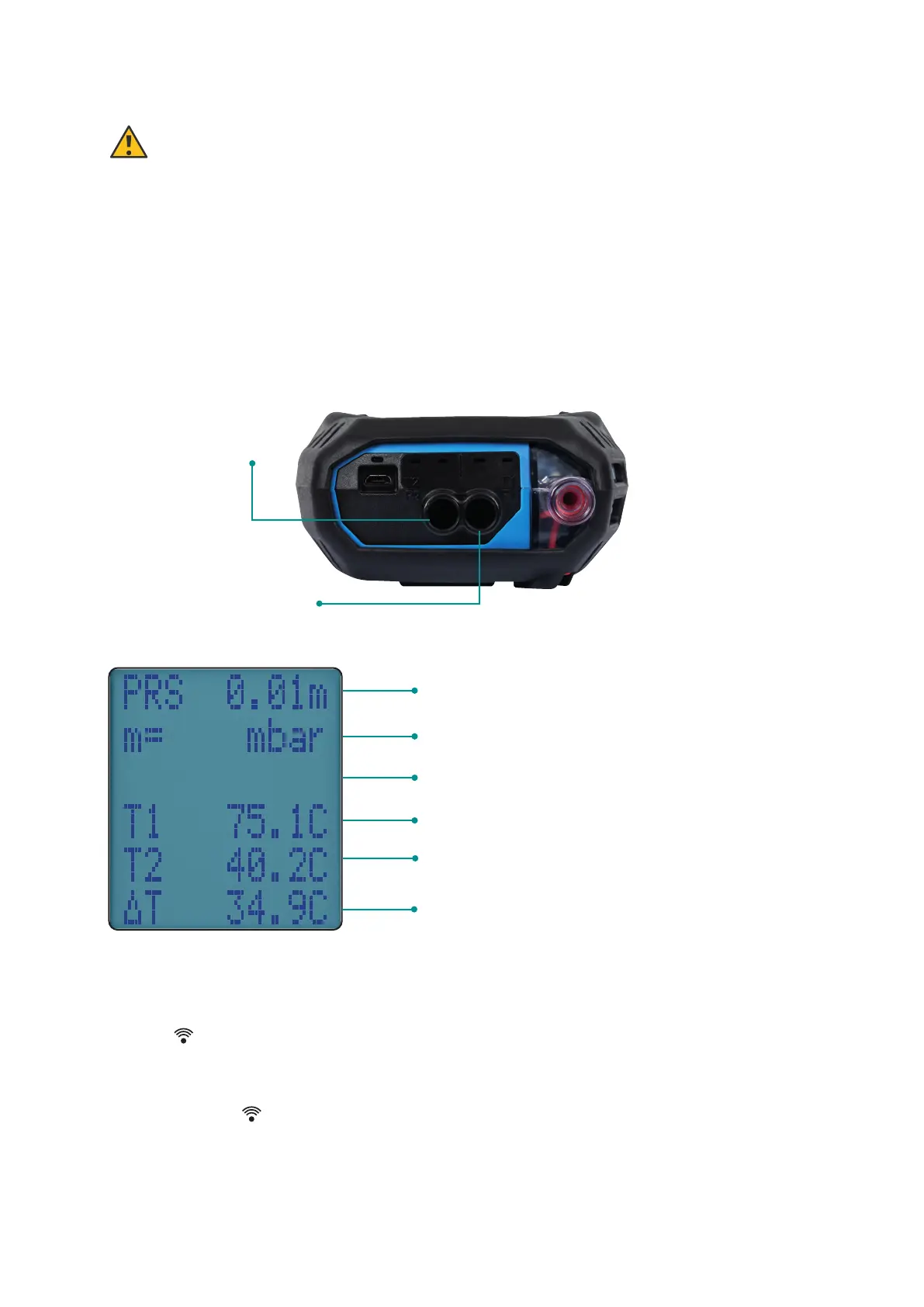
Normal response – smoothed (damped)
response can be selected via “Menu”
‘High’ or ‘Low’ resolution readings can
be selected via “Menu”
Pressure units can be selected via “Menu”
Eg Flow Temp
Eg Return Temp
Differential Temp
PRESSURE & TEMPERATURE TESTING
WARNING
Never attempt to take a pressure reading without knowing maximum
pressure that might be present. The Analyser’s pressure transducer is
rated at 80 mbar with a maximum over range of 400 mbar.
Rotate dial to Prs/Temp. Using the black connectors and the manometer
hose, connect to P1 for single pressure or P1 and P2 for
dierential pressure.
Pressure
connection P1
Pressure
connection P2
– differential



 To Next Page