Rotate dial to TIGHTNESS then press ENTER to zero pressure sensor.
Using black connectors, connect your manometer hose from appliance test
point to analyser P1 input.
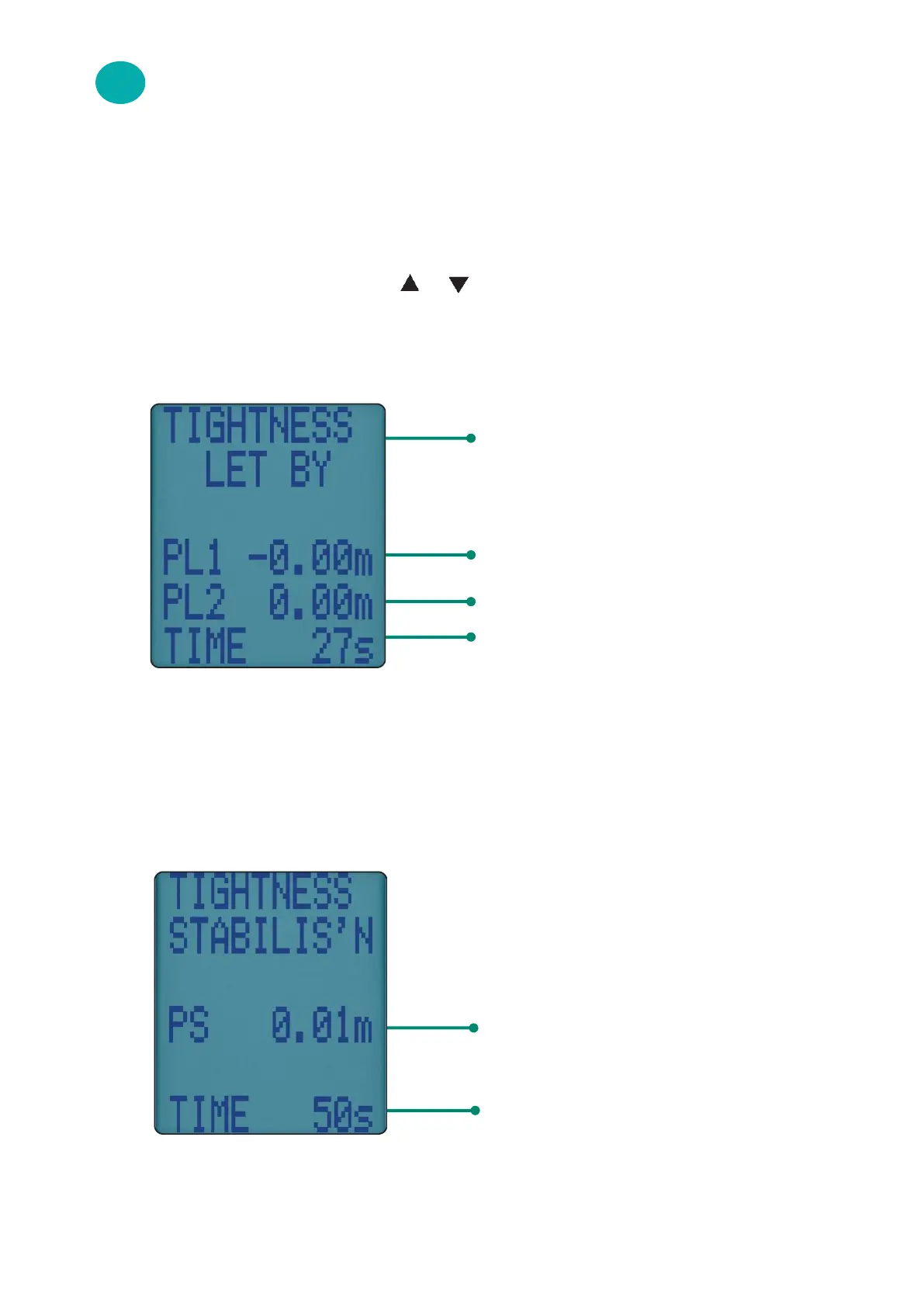
Display shows “LET BY?” - use or & ENTER to select YES or NO.
If YES selected, set let-by pressure then press ENTER to start let-by
test:
If let-by test fails rotate dial to another position to stop test.
If let-by test passes, adjust gas pressure for tightness test & press ENTER
to start stabilisation test - display shows:
When complete press ENTER to start tightness test:
32 KANE458s MANUAL
Let-by test automatically stored in
memory
Pressure at start of let-by test
Real time reading
Let-by default time: 60 seconds - can be
changed via “Menu”
Real time pressure reading
Stabilisation default time: 60 seconds
12.3
LET-BY / TIGHTNESS TESTING & EDITING TIMES



 To Next Page