SECTION V. SATIN, DECORATIVE
STITCHES AND
MONOGRAMMING
Key Functions
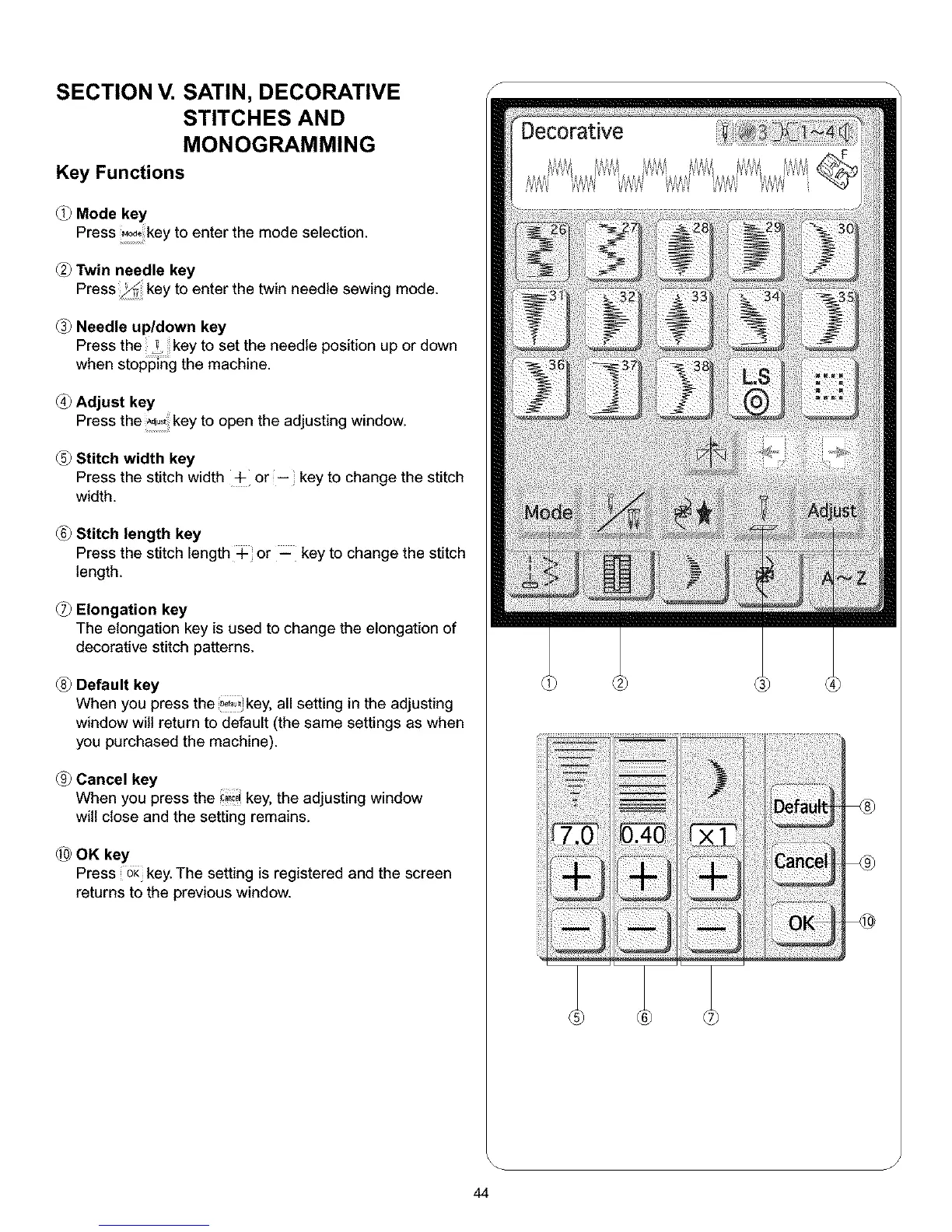
Mode key
Press ,_ key to enter the mode selection.
Twin needle key
Press key to enter the twin needle sewing mode.
Needle up/down key
Press the ! key to set the needle position up or down
when stopping the machine.
Adjust key
Press the key to open the adjusting window.
Stitch width key
Press the stitch width + or -- key to change the stitch
width.
Stitch length key
Press the stitch length + or _ key to change the stitch
length.
Elongation key
The elongation key is used to change the elongation of
decorative stitch patterns.
Default key
When you press the _f_!_key, all setting in the adjusting
window will return to default (the same settings as when
you purchased the machine).
Cancel key
When you press the _c, key, the adjusting window
will close and the setting remains.
OK key
Press oK key. The setting is registered and the screen
returns to the previous window.
J
44



 To Next Page