Built-in Embroidery Designs
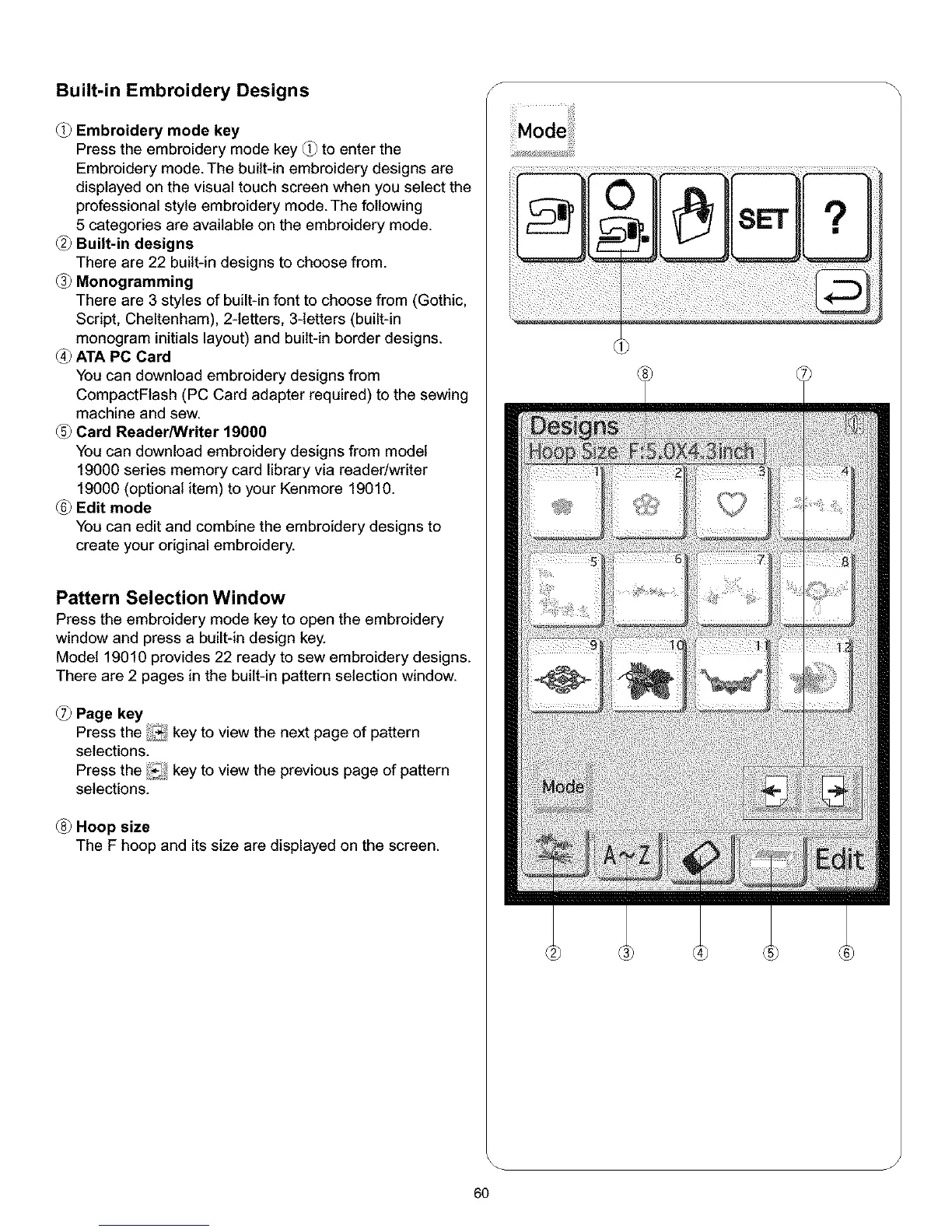
(_ Embroidery mode key
Press the embroidery mode key (_ to enter the
Embroidery mode. The built-in embroidery designs are
displayed on the visual touch screen when you select the
professional style embroidery mode. The following
5 categories are available on the embroidery mode.
Built-in designs
There are 22 built-in designs to choose from.
Monogramming
There are 3 styles of built-in font to choose from (Gothic,
Script, Cheltenham), 2-letters, 3-letters (built-in
monogram initials layout) and built-in border designs.
ATA PC Card
You can download embroidery designs from
CompactFlash (PC Card adapter required) to the sewing
machine and sew.
Card Reader/Writer 19000
You can download embroidery designs from model
19000 series memory card library via reader/writer
19000 (optional item) to your Kenmore 19010.
Edit mode
You can edit and combine the embroidery designs to
create your original embroidery.
Pattern Selection Window
Press the embroidery mode key to open the embroidery
window and press a built-in design key.
Model 19010 provides 22 ready to sew embroidery designs.
There are 2 pages in the built-in pattern selection window.
Page key
Press the i._I key to view the next page of pattern
selections.
Press the !_._ key to view the previous page of pattern
selections.
Hoop size
The F hoop and its size are displayed on the screen.
6O
S
ii, iiiilili !ii i!!i!!iiiiiiiiiiii!! i!i!i!iiiii!!ill i!i i iii i!i !iii!i ii!i!iiii! !!iii!iilii iii! iii !ii!ii!ii!!iiii
J



 To Next Page