Opening a Saved File
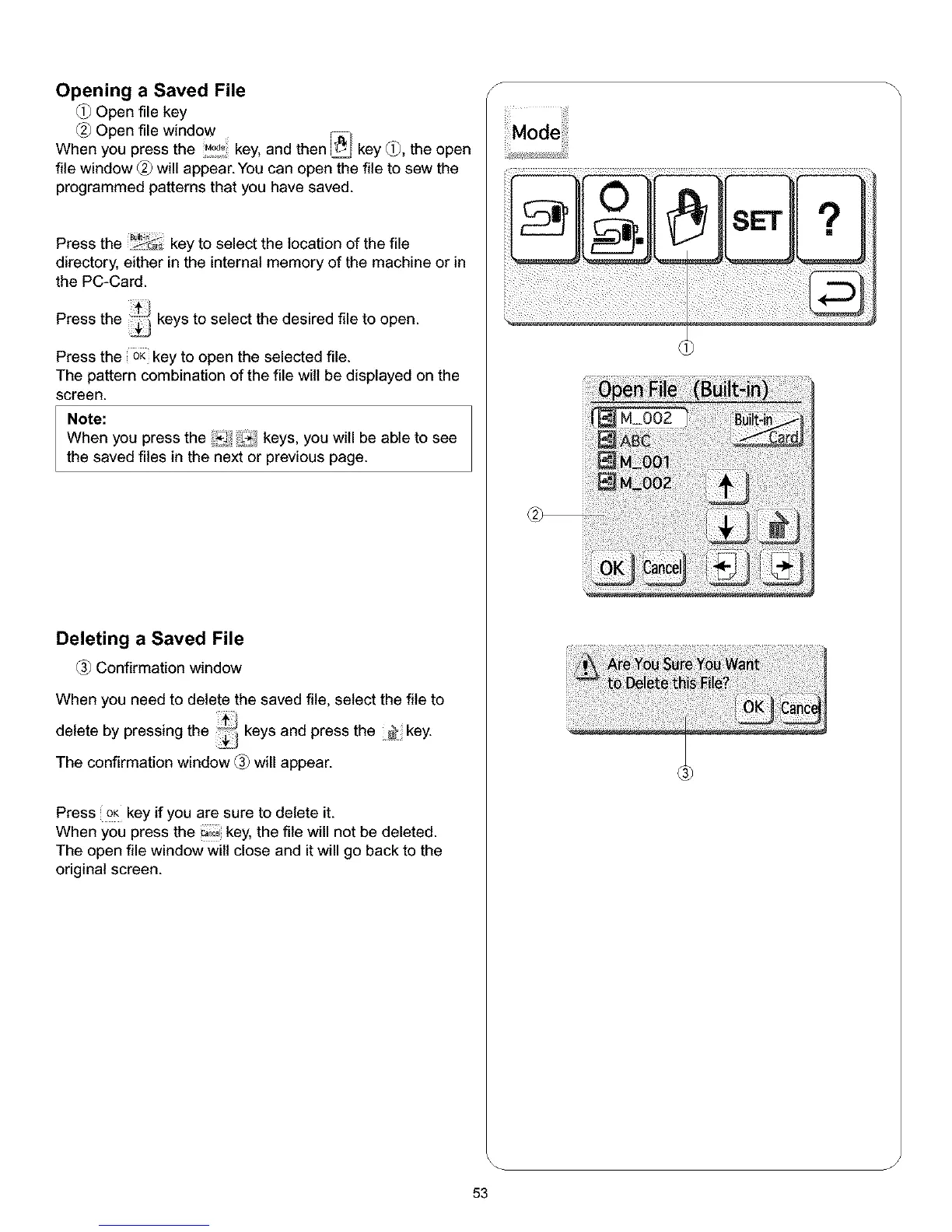
Open file key
Open file window
When you press the .o_o;key, and then _ key _, the open
file window _ will appear. You can open the file to sew the
programmed patterns that you have saved.
Press the _&_ key to select the location of the file
directory, either in the internal memory of the machine or in
the PC-Card.
Press the _ keys to select the desired file to open.
Press the OKkey to open the selected file.
The pattern combination of the file will be displayed on the
screen.
Note:
When you press the !_!!f_ keys, you will be able to see
the saved files in the next or previous page.
Deleting a Saved File
Confirmation window
When you need to delete the saved file, select the file to
delete by pressing the _i keys and press the _ key.
The confirmation window _ will appear.
Press oK key if you are sure to delete it.
When you press the _,,cokey, the file will not be deleted.
The open file window wilt close and it will go back to the
original screen.
S
J
53



 To Next Page