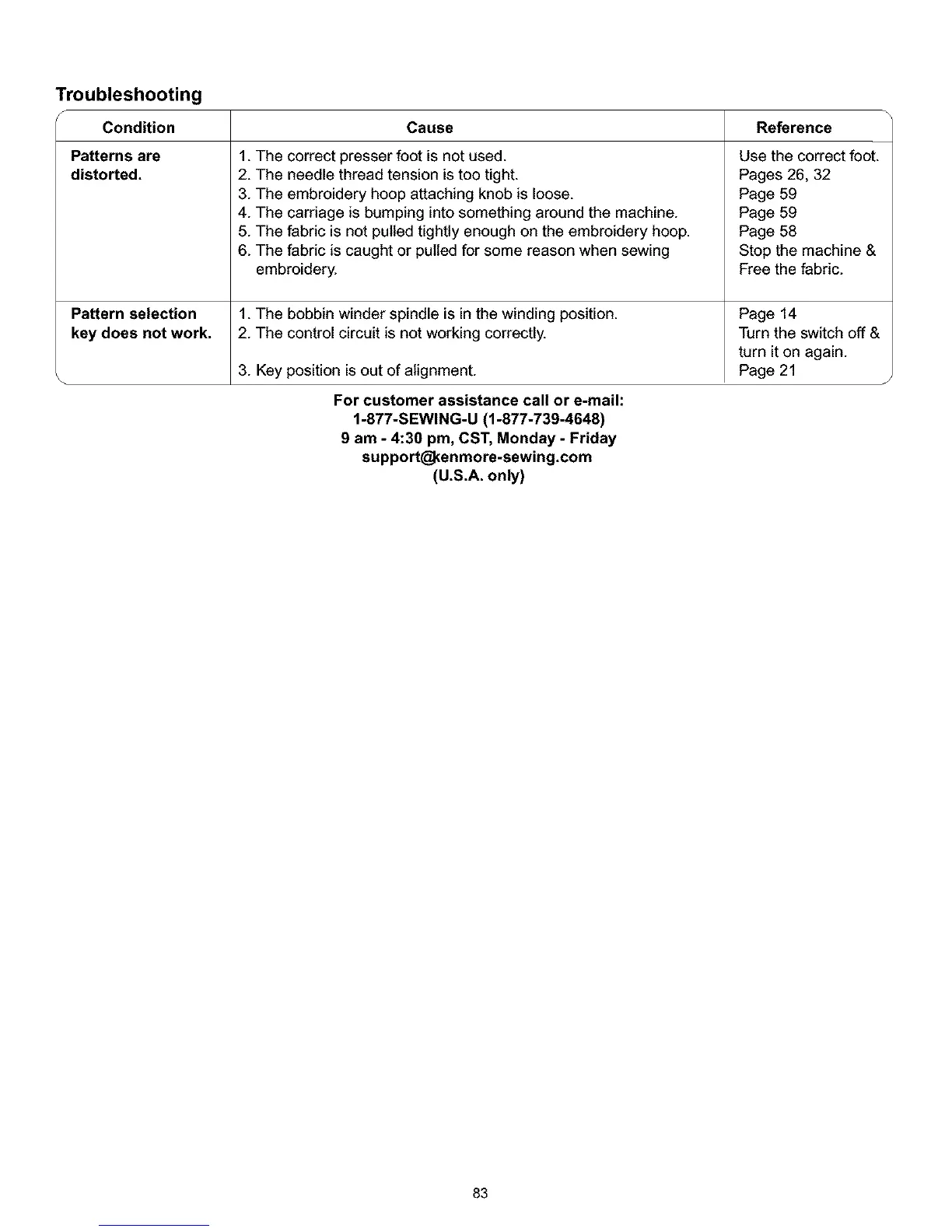
Troubleshooting
A
Condition
Patterns are
distorted.
Pattern selection
key does not work.
Cause Reference
1. The correct presser foot is not used.
2. The needle thread tension istoo tight.
3. The embroidery hoop attaching knob is loose.
4. The carriage is bumping into something around the machine.
5. The fabric is not pulled tightly enough on the embroidery hoop.
6. The fabric is caught or pulled for some reason when sewing
embroidery.
1. The bobbin winder spindle is in the winding position.
Use the correct foot.
Pages 26, 32
Page 59
Page 59
Page 58
Stop the machine &
Free the fabric.
Page 14
2. The control circuit is not working correctly.
3. Key position is out of alignment.
Turn the switch off &
turn it on again.
Page 21
For customer assistance call or e-mail:
1-877-SEWING-U (1-877-739-4648)
9 am - 4:30 pm, CST, Monday - Friday
support_enmore-sewing.com
(U.S.A. only)
83



 To Next Page