2-letter Monogram
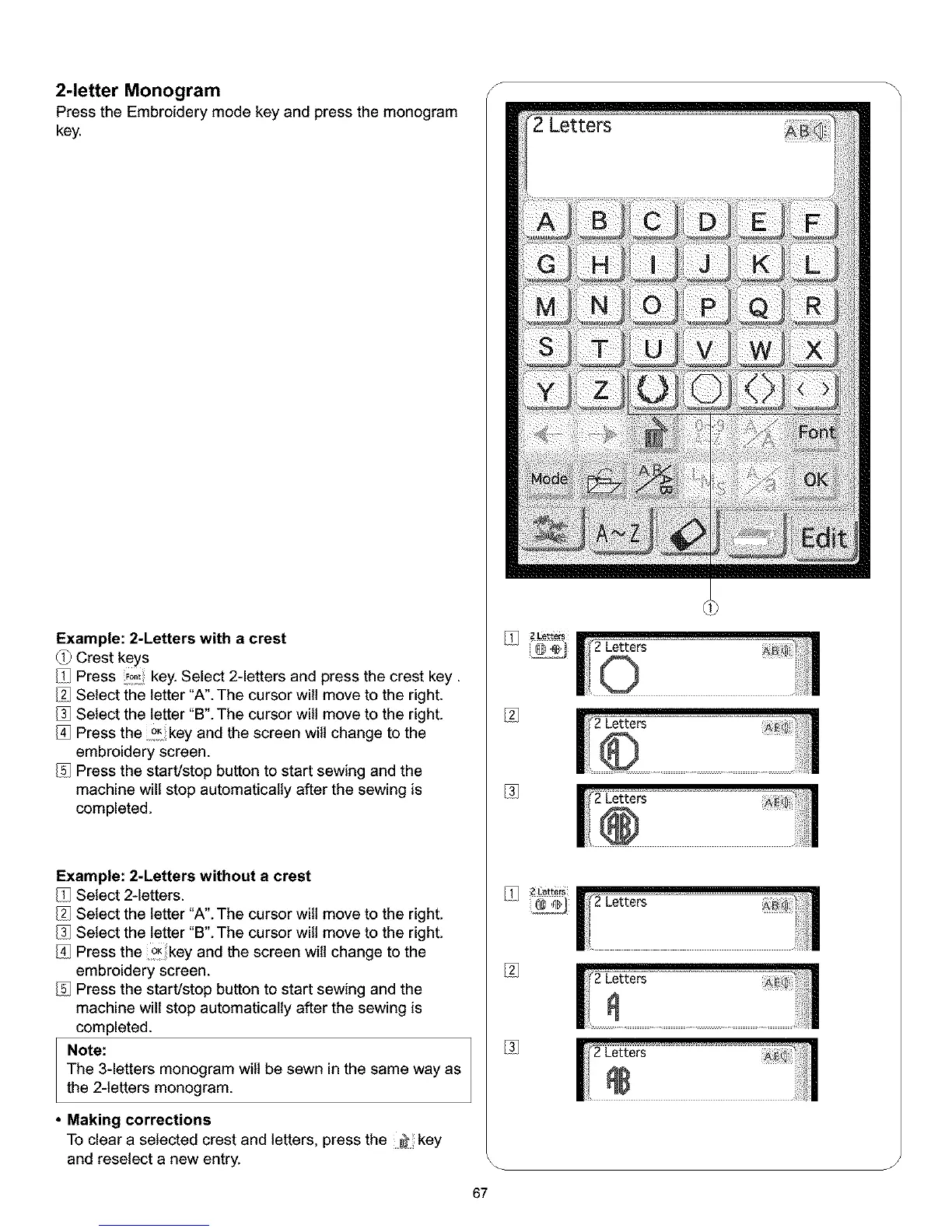
Press the Embroidery mode key and press the monogram
key.
Example: 2-Letters with a crest
Crest keys
Press !_ key. Select 2-letters and press the crest key.
Select the letter "A". The cursor wilt move to the right.
Select the letter "B". The cursor will move to the right.
Press the °Kkey and the screen will change to the
embroidery screen.
Press the start/stop button to start sewing and the
machine will stop automatically after the sewing is
completed.
Example: 2-Letters without a crest
Select 2-letters.
Select the letter "A". The cursor wilt move to the right.
Select the letter "B". The cursor will move to the right.
Press the _key and the screen will change to the
embroidery screen.
Press the start/stop button to start sewing and the
machine will stop automatically after the sewing is
completed.
Note:
The 3-letters monogram will be sewn in the same way as
the 2-letters monogram.
• Making corrections
To clear a selected crest and letters, press the key
and reseiect a new entry.
S
zLetter_
%
%
J
67



 To Next Page