Embroidery Mode Set
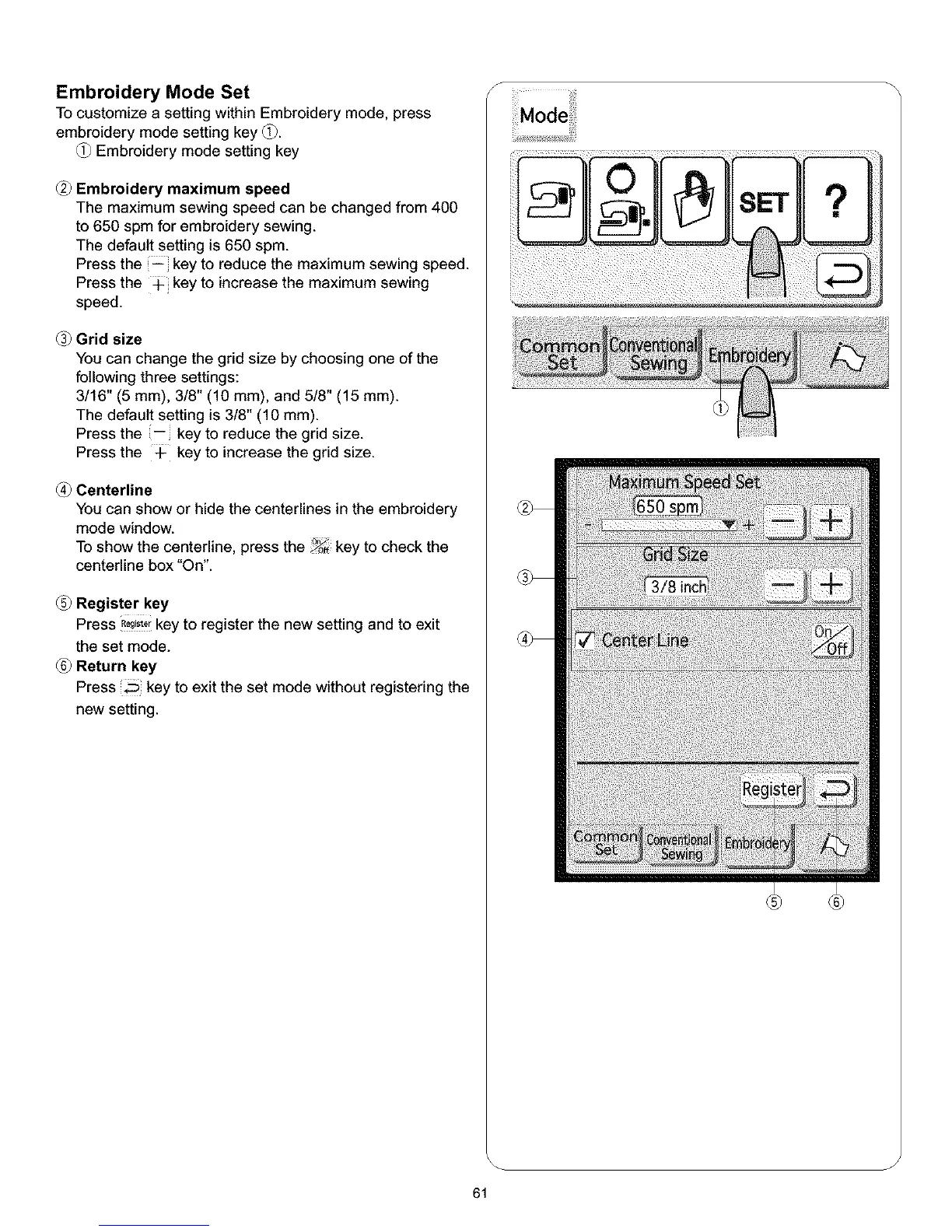
To customize a setting within Embroidery mode, press
embroidery mode setting key (_.
Embroidery mode setting key
Embroidery maximum speed
The maximum sewing speed can be changed from 400
to 650 spm for embroidery sewing.
The default setting is 650 spm.
Press the -- key to reduce the maximum sewing speed.
Press the _ key to increase the maximum sewing
speed.
Grid size
You can change the grid size by choosing one of the
following three settings:
3/16" (5 mm), 3/8" (10 ram), and 5/8" (15 ram).
The default setting is 3/8" (10 mm).
Press the -- key to reduce the grid size.
Press the 4- key to increase the grid size.
Centerline
You can show or hide the centerlines in the embroidery
mode window.
To show the centerline, press the _ key to check the
centerline box "On".
(_ Register key
Press R_,_,rkey to register the new setting and to exit
the set mode.
(_ Return key
Press key to exit the set mode without registering the
new setting.
S
i_ii__ _!i!!iiii
J
61



 To Next Page