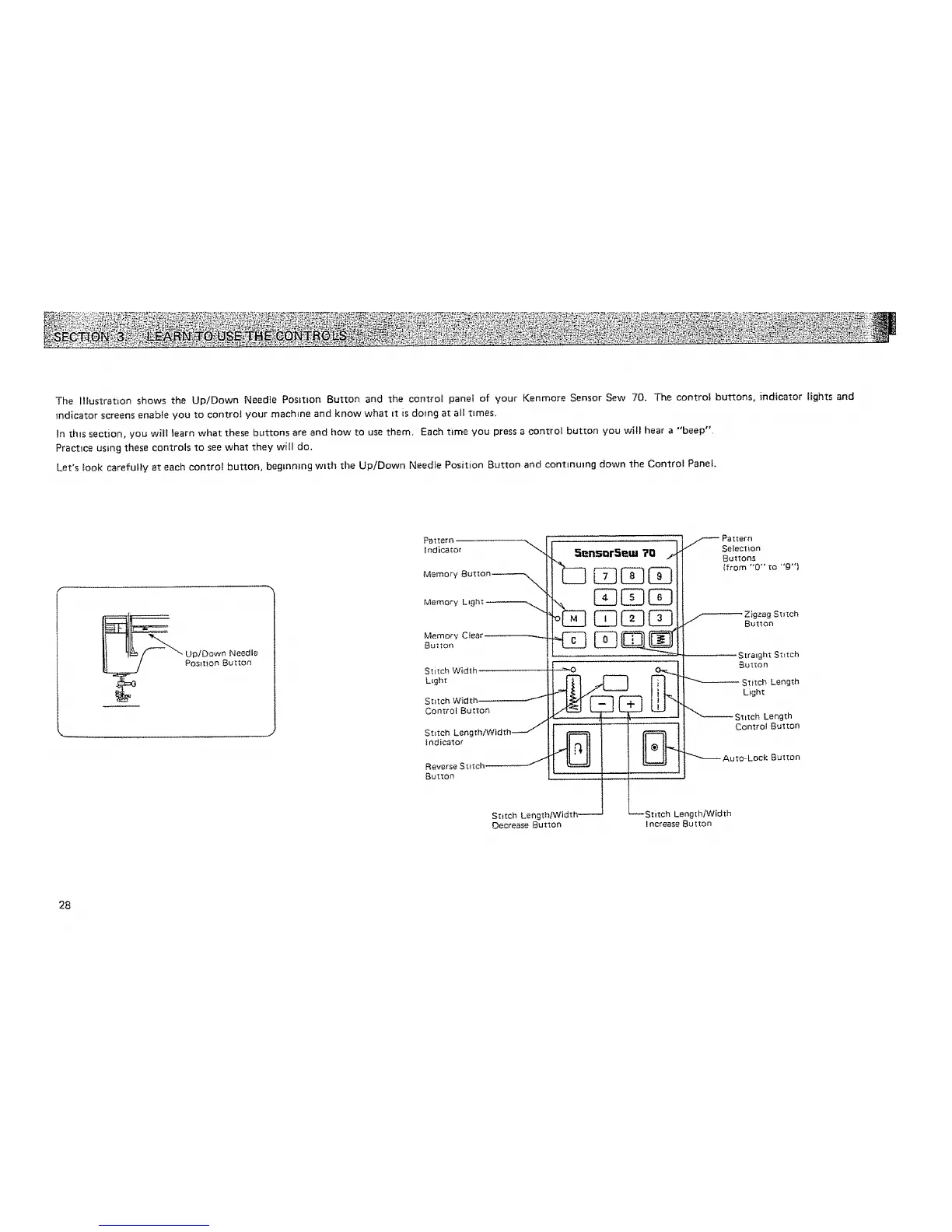
The Illustration shows the Up/Down Needle Position Button and the control panel of your Kenmore Sensor Sew 70. The control buttons, indicator lights and
indicator screens enable you to control your machine and know what tt is doing at all t_mes,
In th_s section, you will learn what these buttons are and how to use them, Each t_me you press a control button you will hear a "'beep"
Practice using these controls to see what they witl do.
Let's Iook carefully at each control button, begmmng wLth the Up/Down Needle Position Button and continuing down the Control Panel
Pattern,
Indicator "_
Memory But to n _--,_
Memory L_ght _.,_
Memory Clear _
Button
Stitch Width
L_gh_
Stztch Width _"_--'---'_
Control Button
Stitch Length/Width _-_
Indicator
Reverse Stitch _
Button
5ensarSetu ?Q f
[1-
Stitch Length/Width--
Oecrease Button
._ Pattern
Selection
Buttons
{from "0" tO "g"I
_ Zigzag Stitch
Button
-- Straight Stitch
Stitch Length
Licjht
_ Stitch Length
Control Button
""_ Auto- Lock Button
_Stitch Length!Width
ncrease Button
28






 To Next Page