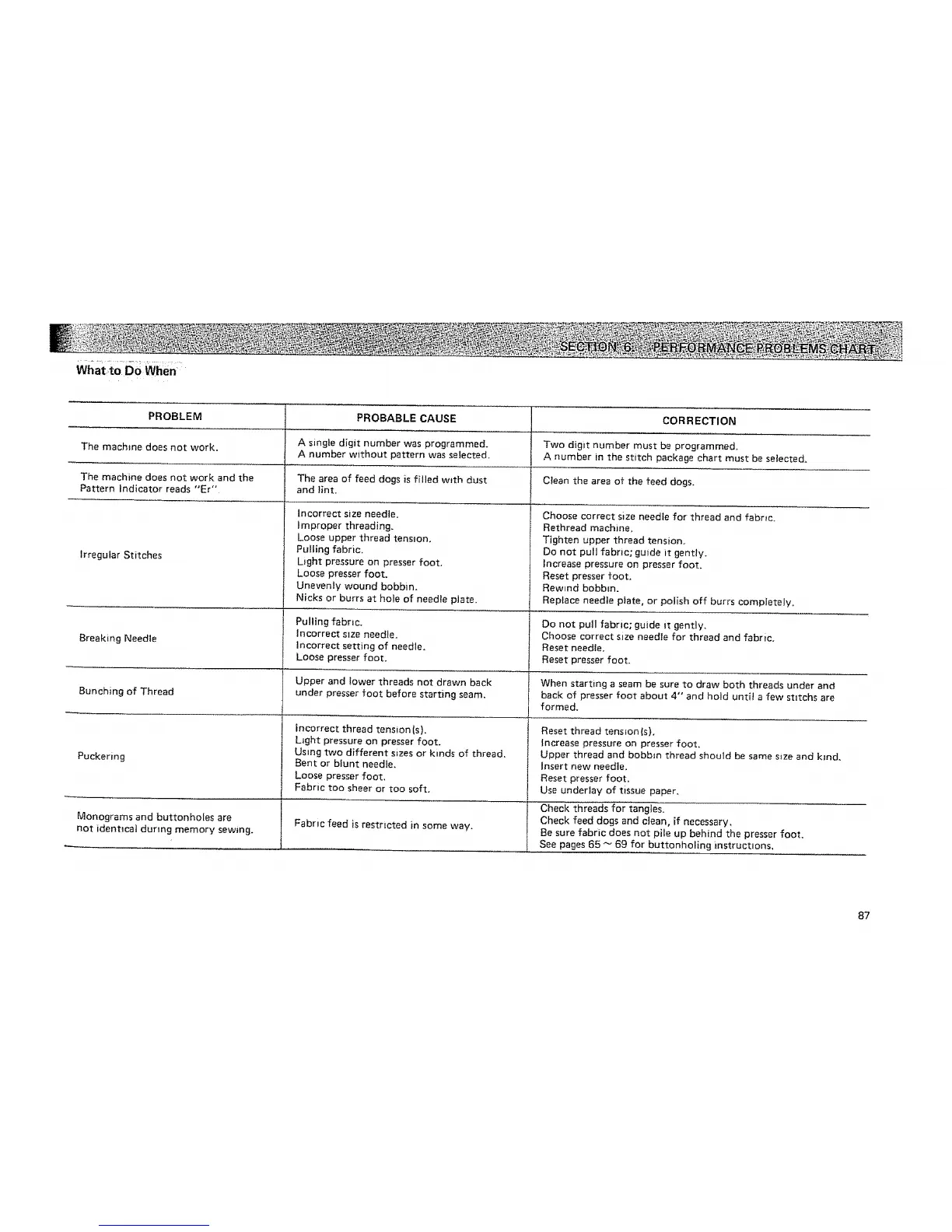
PROBLEM PROBABLE CAUSE CORRECTION
The machine does not work, A single digit number was programmed. Two digit number must be programmed.
A number without pattern was selected. A number in the stitch package chart must be selected.
The machine does not work and the The area of feed dogs is filled with dust Clean the area of the feed dogs.
Pattern Indicator reads "Er" and lint,
Irregular Stitches
Breaking Needle
Incorrect size needie.
Improper threading,
Loose upper thread tension.
Pu_ling fabric.
Light pressure on presser foot.
Loose presser foot.
Unevenly wound bobbin.
Nicks or burrs at hole of needle plate.
Pulling fabric.
Incorrect stze needte.
incorrect setting of needle,
Loose presser foot.
Choose correct size needle for thread and fabric.
Rethread machine.
Tighten upper thread tension.
Do not pull fabric; guide it gently.
lncrease pressure on presser foot.
Reset presser foot.
Rewind bobbin.
Replace needle plate, or po{ish off burrs completely.
Do not pull fabric; guide it gently.
Choose correct size needte for thread and fabric.
Reset needle.
Reset presser foot,
Upper and lower threads not drawn back I When starting a seam be sure to draw both threads under and
Bunching of Thread under presser foot before starting seam. I back of presser foot about 4" and hold until a few stltchs are
1 formed.
incorrect thread tension (s).
L_ght pressure on presser foot.
Using two different sizes or kinds of thread,
Bent or blunt needle.
Loose presser foot.
Fabric too sheer or too soft.
Fabric feed is restricted in some way.
Puckering
Monograms and buttonholes are
not identical during memory sewing.
Reset thread tension (s).
increase pressure on presser foot.
Upper thread and bobbin thread should be same size and kind.
Insert new needle,
Reset presser foot.
Use underJay of tissue paper.
Check threads for tangles.
Check feed dogs and clean, if necessary.
Be sure fabric does not pi_e up behind the presser foot.
See pages 65 _ 69 for buttonholing instructions.
87



 To Next Page