16
3
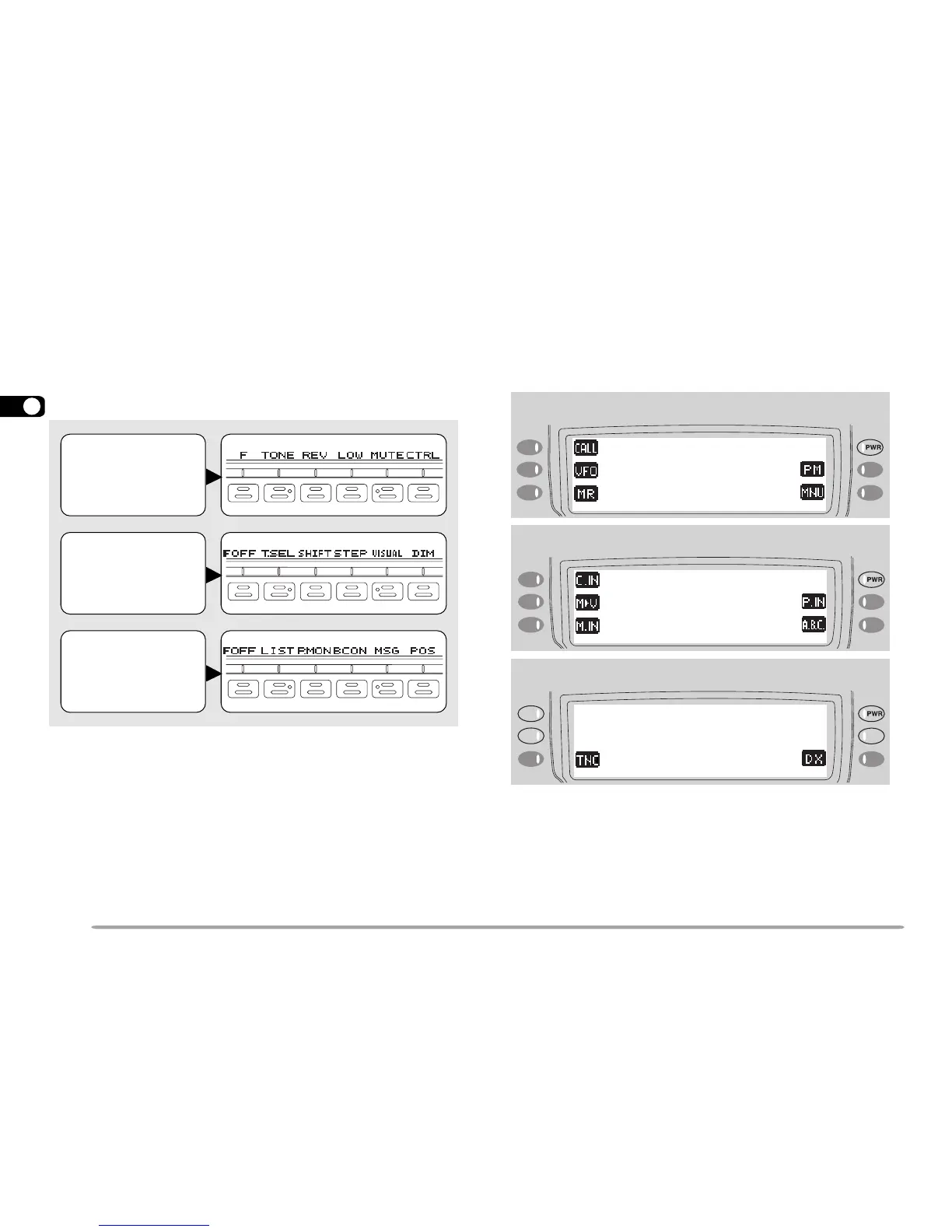
BUTTON FUNCTION DISPLAY
The functions of the 6 buttons below the display can be
identified through the labels shown at the bottom of the
display. After pressing [F] or [F] (1 s), pressing
[F]
([OFF]) again restores the basic state.
Note:
◆
When selecting Programmable Memory (PM) mode, you will see
different labels. See “Programmable Memory (PM) mode” {page 15}.
◆
You can also select different combinations of buttons labels. See
“CHANGING MULTI-FUNCTION BUTTON LABELS ” {page 67}.
The labels of the 5 buttons beside the display are shown
at the left end or right end of the display. These labels
will change depending on the current mode.
Basic State
Display Labels
Labels after
Pressing [F]
Labels after
Pressing [F] (1 s)
Basic State Display Labels
Labels after Pressing [F]
Labels after Pressing [F] (1 s)









 To Next Page