71
14
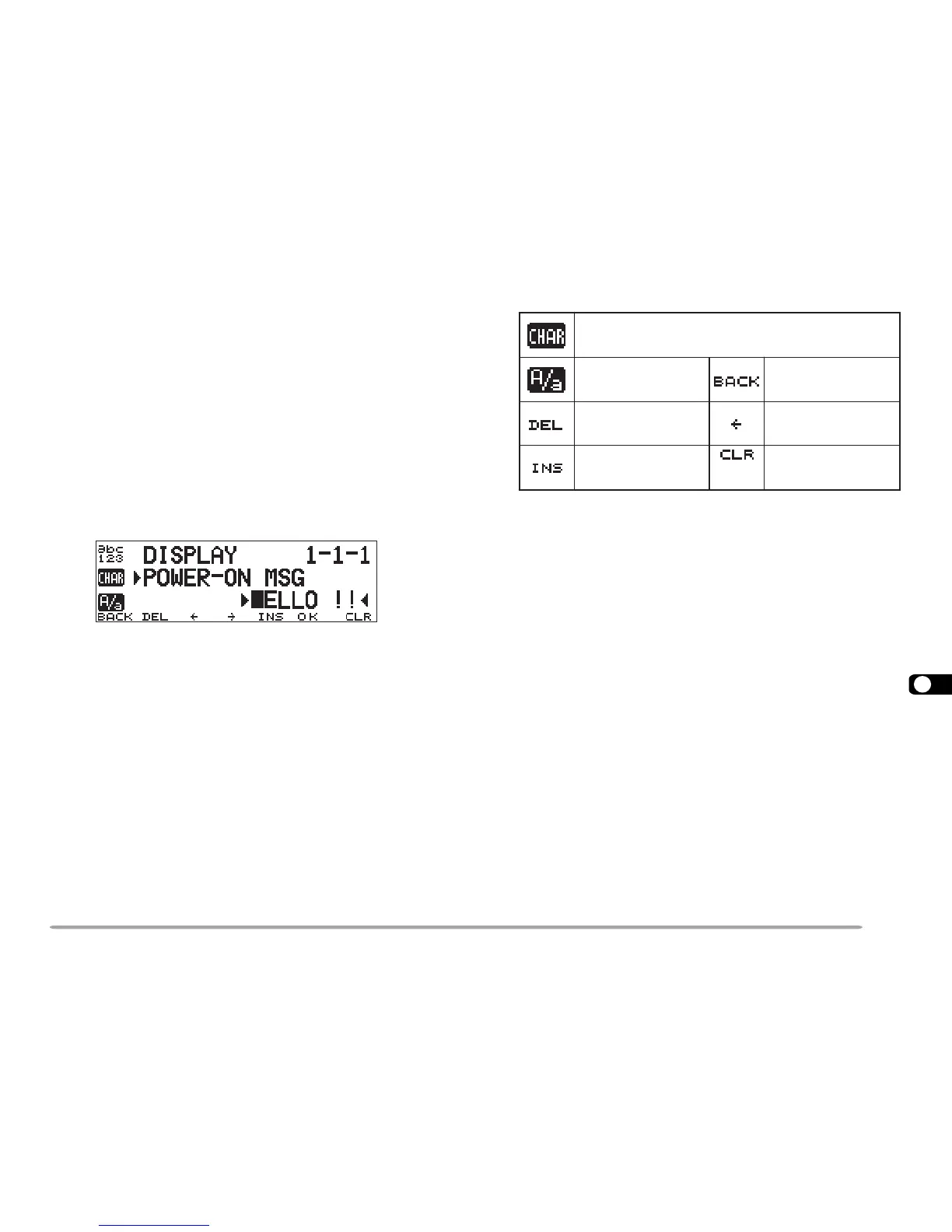
POWER-ON MESSAGE
Each time you switch the transceiver ON, “HELLO !!”
appears and stays for approximately 2 seconds. You
can program your favorite message in place of the
factory default.
1 Press [MNU] to enter Menu mode.
2 Select Menu 1–1–1 (POWER-ON MSG), then press
[OK].
• The display for entering a message appears; the first
digit blinks.
3 Turn the Tuning control to select a character.
• You can enter alphanumeric characters plus special
ASCII characters.
4 Press [
aa
aa
a].
• The cursor moves to the next digit.
5 Repeat steps 3 and 4 to enter up to 8 digits.
6 Press [OK] to complete the setting.
7 Press [MNU] to exit Menu mode.
The keypad on the MC-53DM also is available to enter
alphanumeric characters in step 3. See page 18.
DISPLAY DEMONSTRATION
By initiating this function, various preprogrammed
displays appear. You still can normally use the
transceiver in this mode. Pressing a front panel button
or Mic key, or turning the Tuning control restores the
operating display immediately. If there is no button/key
entry or Tuning control adjustment for approximately
10 seconds, the transceiver reverts back to
Demonstration mode.
Press [F]+ POWER ON to switch the function ON (or
OFF).
ciremunahplafostesehtgnomasehctiwS
,)ylnoE007D-MT(sretteldetnecca,sretcarahc
.sretcarahcIICSAlaicepsdna
neewtebsehctiwS
latipacdnallams
.srettel
egasseMslecnaC
.yrtnE
tatigidehtseteleD
sirosrucehthcihw
.gniknilb
rosrucehtsesuaC
.drawkcabevomot
yltnerrucehtstresnI
.retcarahcdetceles
DNABtfel(
)LES
dnastigidllasraelC
otrosrucehtskcab
.tigidtsrifeht





 To Next Page