85
21
INSTALLING THE VS-3 VOICE SYNTHESIZER UNIT
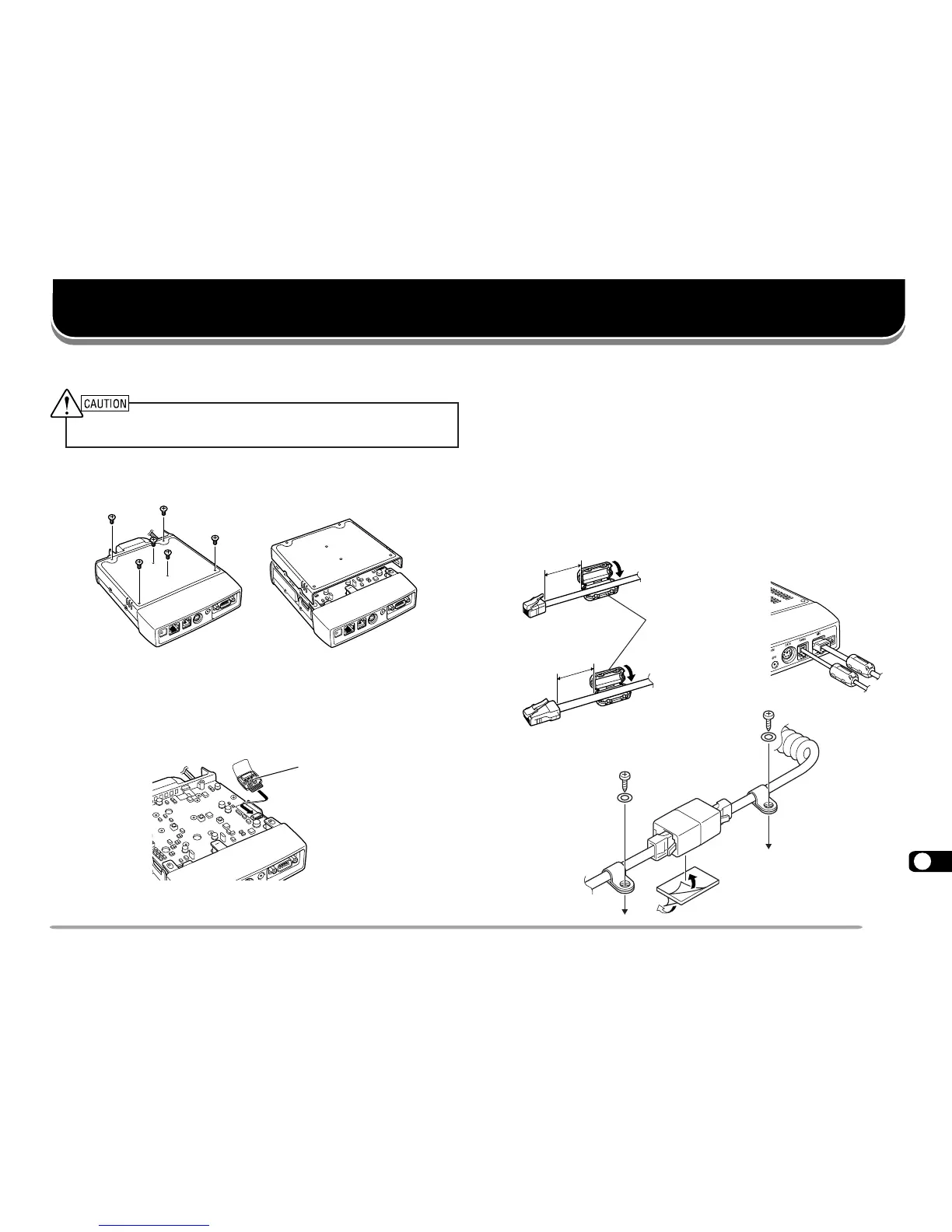
Always switch off the power and unplug the DC power cable first.
1 Remove the 6 screws from the lower cover of the
main unit.
2 Hold the VS-3 unit with the component side facing
upward, and insert the VS-3 connector into the
corresponding transceiver connector; the component
side must not face downward.
3 Replace the lower cover (6 screws).
INSTALLING THE PG-4X EXTENSION CABLE KIT
The PG-4X kit is available to extend the various
connection cables. For the cable connections, see the
next page. With two sets of PG-4X kits, you can extend
the cables to the maximum length.
The PG-4X kit also includes noise filters, modular plug
adapter cushions, and cable clamps. The following
diagrams illustrate how to install these accessories.
Component side
Approx. 3 cm
Approx. 3 cm
From front panel
From
microphone
Noise filter
INSTALLING OPTIONS







 To Next Page