33
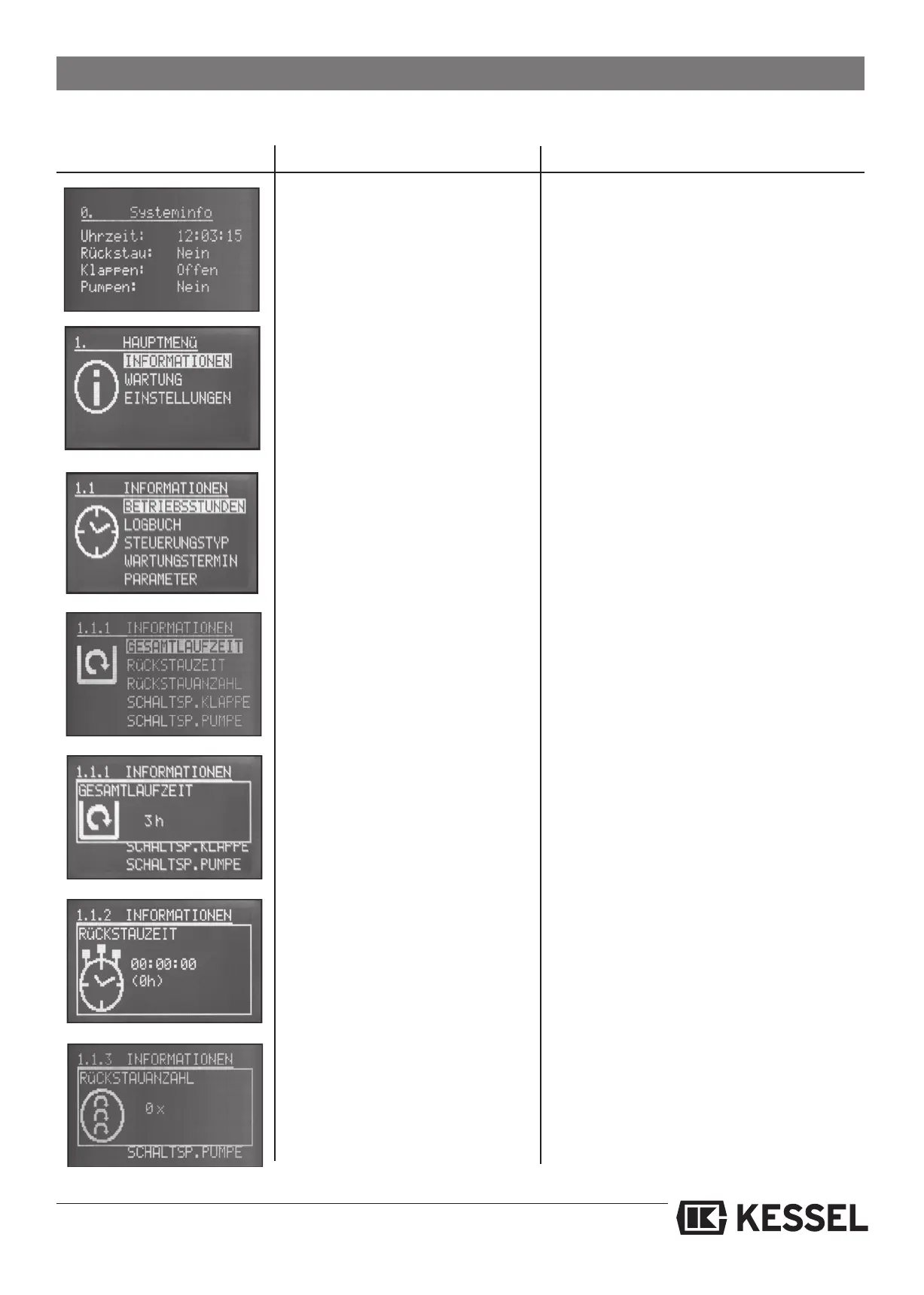
4.4.3 Display menu description
Digital display in normal operating
mode
Pressing a control unit button will activate the
display back lighting
The menu is comprised of 3 main
menu settings
1. Information
2. Maintenance
3. Settings
The main menu setting Information is
comprised of 5 sub-menus. Here
maintenance information can be
seen but not changed.
1.1 Hours of operation
1.2 Log book
1.3 Control types
1.4 Maintenance dates
1.5 Parameters
Display Description Information
Pressing the OK button will select
the highlited information
1.1.1Total hours of operation
1.1.2 Backwater time
1.1.3 Amount of backwaters
1.1.4 Number of backwater flap closures
1.1.5 Number of pump activations
1.1.6 Power outage
Total running time of backwater
pump
Display of total operating time of control unit
Total backwater time
Total number of backwater occurrences
4. Control unit operation
All backwater occurrences are
displayed
Sum of all optical sensor activations






 To Next Page