37
Display Description Information
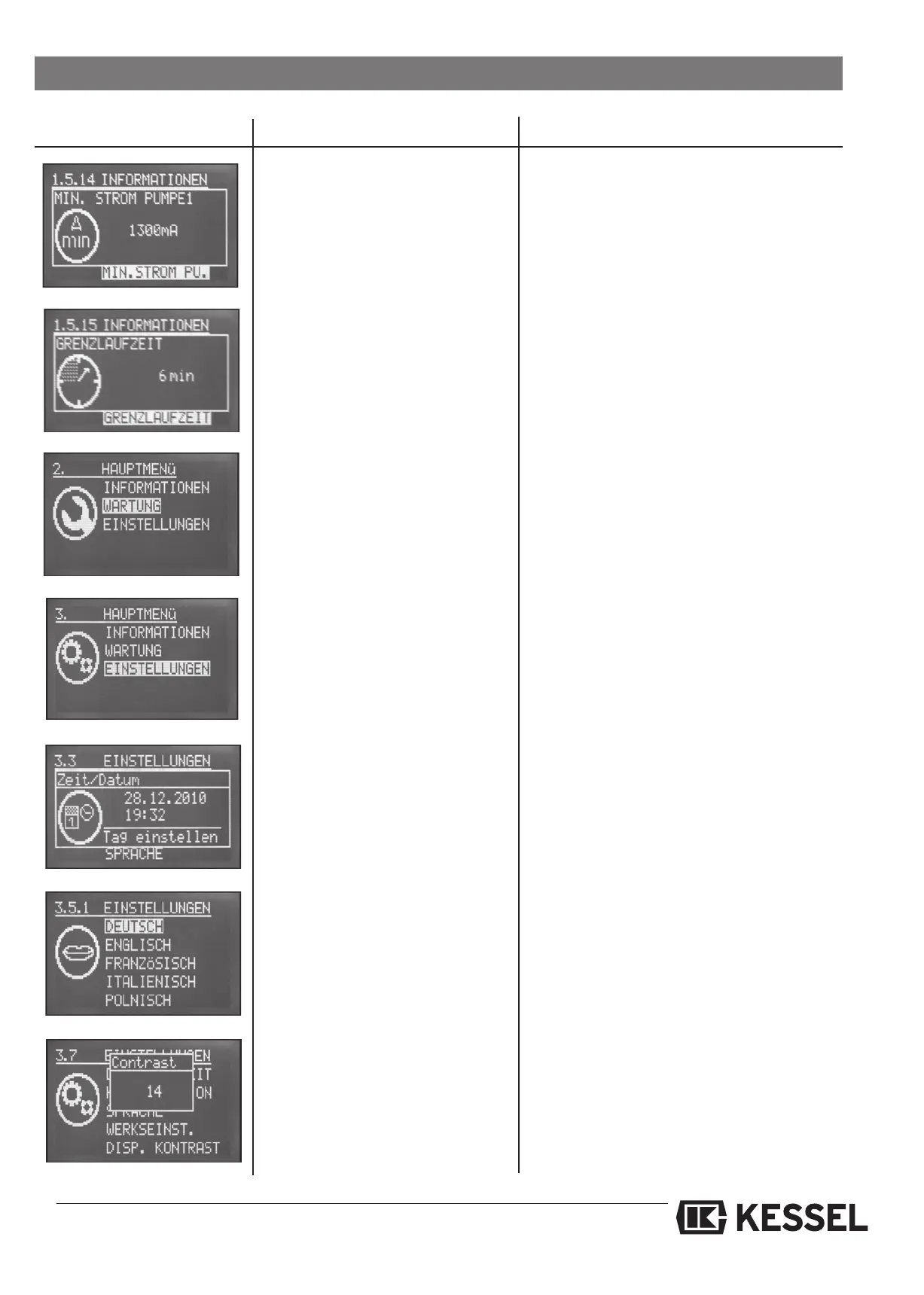
The Settings (Einstellungen) menu is
comprised of 7 sub-menus – of these
3.1, 3.2, 3.4 and 3.6 are password
protected. The other portions of this
menu can be accessed and changed
without the use of a password.
3.3 Date / Time of day
3.5 Language
3.7 Contrast
Changes can be made in these menus.
Access to password protected menus is only
for KESSEL Customer Service Partners.
Date and time of day can be chan-
ged in this setting
See section 7.4.1 – Initial commissioning
The control unit language can be
chosen
See section 7.4.1 – Initial commissioning
4. Control unit operation
The digital display contrast can be
changed
Default value is 14. Settings from 5 to 20 can
be chosen
The minimum pump current is dis-
played
An incorrect installation has been noticed
The maximum running time of the
pump is displayed
Helpful instructions:
- Clean optical sensor / probe
- Clean pump
The Maintenance section of the
menu is password protected. Values
in this menu can be changed.
Access to this menu is only for KESSEL
Customer Service Partners






 To Next Page