10
4-3 Display
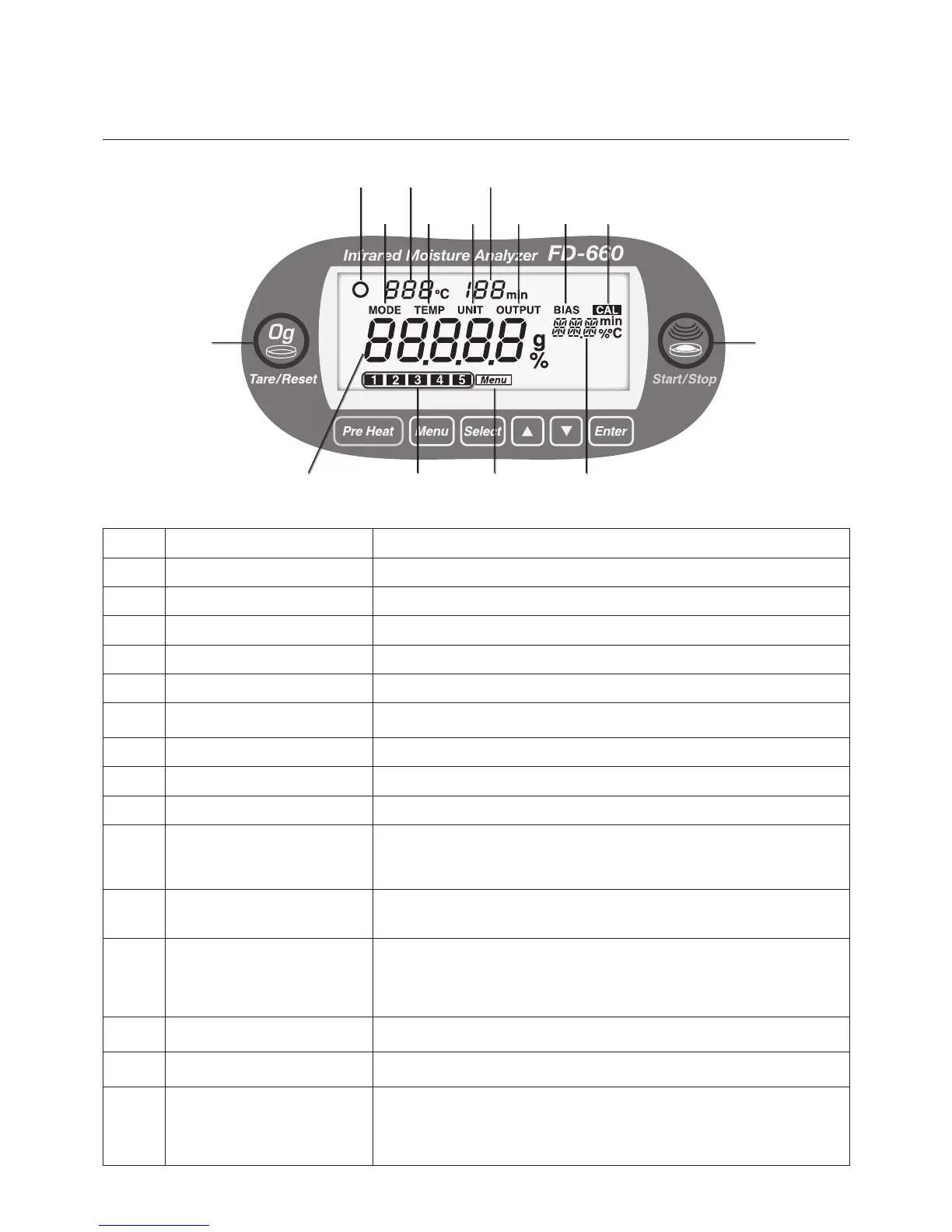
Item No. Name Description
1
Stability indicator Displayed when the internal scale becomes stable.
2
Temperature display Used to display the temperature under the heater lid.
3
Measuring time display Used to display the amount of elapsed time during measuring.
4
Mode setting display Displayed when the measuring mode is selected.
5
Drying temperature setting display Displayed when the drying temperature is specied.
6
Display for measurement standard
and minimum display digit
Displayed when the measurement standard and minimum display digit are
selected.
7
Measurement data output display Displayed when a measurement data output format is selected.
8
Bias setting display Displayed when the offset value of the moisture (or solid) is specied.
9
Calibration display Displayed when the scale is calibrated.
0
Tare/Reset display
Lights up when taring (zero adjustment) can be performed.
Blinks during taring (zero adjustment).
Lights up when the screen can be returned to the weight display screen after
measurement.
!
Start/Stop display
Lights up when the unit can start measuring.
Blinks during measurement.
Lights up when measurement can be forcibly terminated.
@
Moisture/Solid/Weight display
When measuring weight (i.e., when in idling mode), used to display the weight
in grams. When performing measurements, used to display the moisture content
and solids content as percentages.
"oL" is displayed when the weight exceeds the measurable range at measuring
a weight.
#
Measuring settings area number
display
Used to display the number of the currently selected measuring settings area
number.
$
Menu display
Displayed when a measuring setting number, a measuring mode, a
measurement standard, an output format, or an offset value is specied.
%
Setting value display
Each item and its value are displayed when a measuring mode, a drying
temperature, a measurement standard, measurement data output format, or an
offset value is specied.
The measuring mode is displayed during measurement.
When an offset value is specied, the value is displayed after the measurement.
1
4
6
8
5
7
9
0
!
@ # $ %
2 3


 To Next Page