34
8-5. Setting for BIAS (offset value)
At times, it may be necessary for measurements to be corrected for bias.
The bias may be specied with a value between -9.9 and 9.9% in 0.1% increments. A bias should be specied in
cases like those described below.
• There are numerous reasons why measured values with this unit do not completely agree with expected values
measured with the official method (standard method). When this happens, adjusting the difference between
measured value using this unit and measured value using the ofcial method (standard method) with an offset
value allows the measured value using this unit to be used as a value in accordance with the ofcial method
(standard method).
* In most cases, it is possible to change the measuring settings used to make the measurements obtained using
this unit to match the expected values measured with the ofcial method (standard method). But if such settings
would cause the sample to be burned, would cause the time required for measurement to become too long, or
otherwise result in problems, a bias (offset) should be specied instead.
• When using more than one unit, there may be times when it is impossible to obtain identical measurements even
when the same measuring settings are used, because of differences in the locations where the units are placed
or because of differences in the surrounding environment. In such cases, the offset value of the unit that is to
serve as the standard should be set to zero and the offset value of the other units set to account for any such
differences.
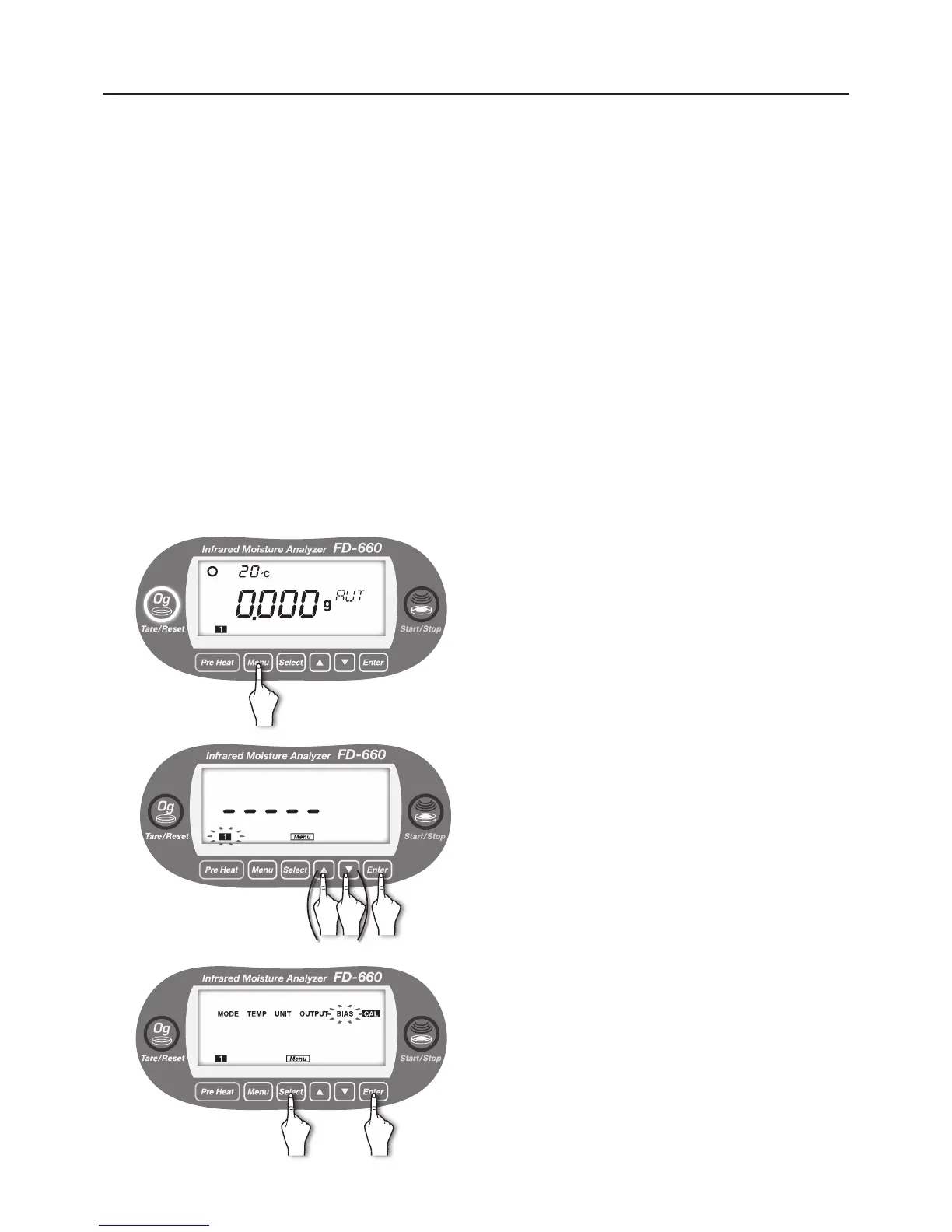
● Setting procedure
1
With the display showing the weight in grams, press the
[
Menu
] key.
2
[Menu] lights up, and the number of the current measuring
setting storage area blinks.
To change the number, use the [▲] or [▼] key (see "7.
Specifying Measuring Settings" on page 20).
When the desired measuring settings area number starts
ashing, press the [
Enter
] key.
3
Move to menu item selection.
Every time the [
Select
] key is pressed, the menu items
alternately blinks in the order of “MODE” → “TEMP” →
“UNIT” → “OUTPUT” → “BIAS” → “CAL” → “MODE” → ….
①
Press the [
Select
] key.
②
Press the [
Enter
] key after “BIAS” blinks.
① ②


 To Next Page