36
8-6. CAL (scale calibration)
The scale calibration is performed with 0-point and 50-gram weight.
Separately prepare a weight of 50 g with one-thousandth (mg) indication described and less than 28 mm in height.
* The power to the unit should be turned on at least 30 minutes before calibration is performed in order to ensure
accurate calibration.
* This unit is significantly sensitive to ambient environment such as vibration, wind, and the like. Calibration
should be performed after stabilizing the operating environment.
* It is impossible to accurately calibrate the scale immediately after performing measurements or at any other time
when the heater lid is hot. Allow the temperature of the heater lid to cool down to ambient temperature before
performing calibration.
* The weights used should consist of standard OIML weights or some other type of non-magnetic weights.
* The heater lid must be closed during calibration to avoid wind effects. If you wish to abort a calibration already
in progress, press the [
Tare/Reset
] key.
* An ‘Abort’ message will be displayed and the screen will return to a weight display.
CAL is performed for all measuring setting storage areas.
● Setting procedure
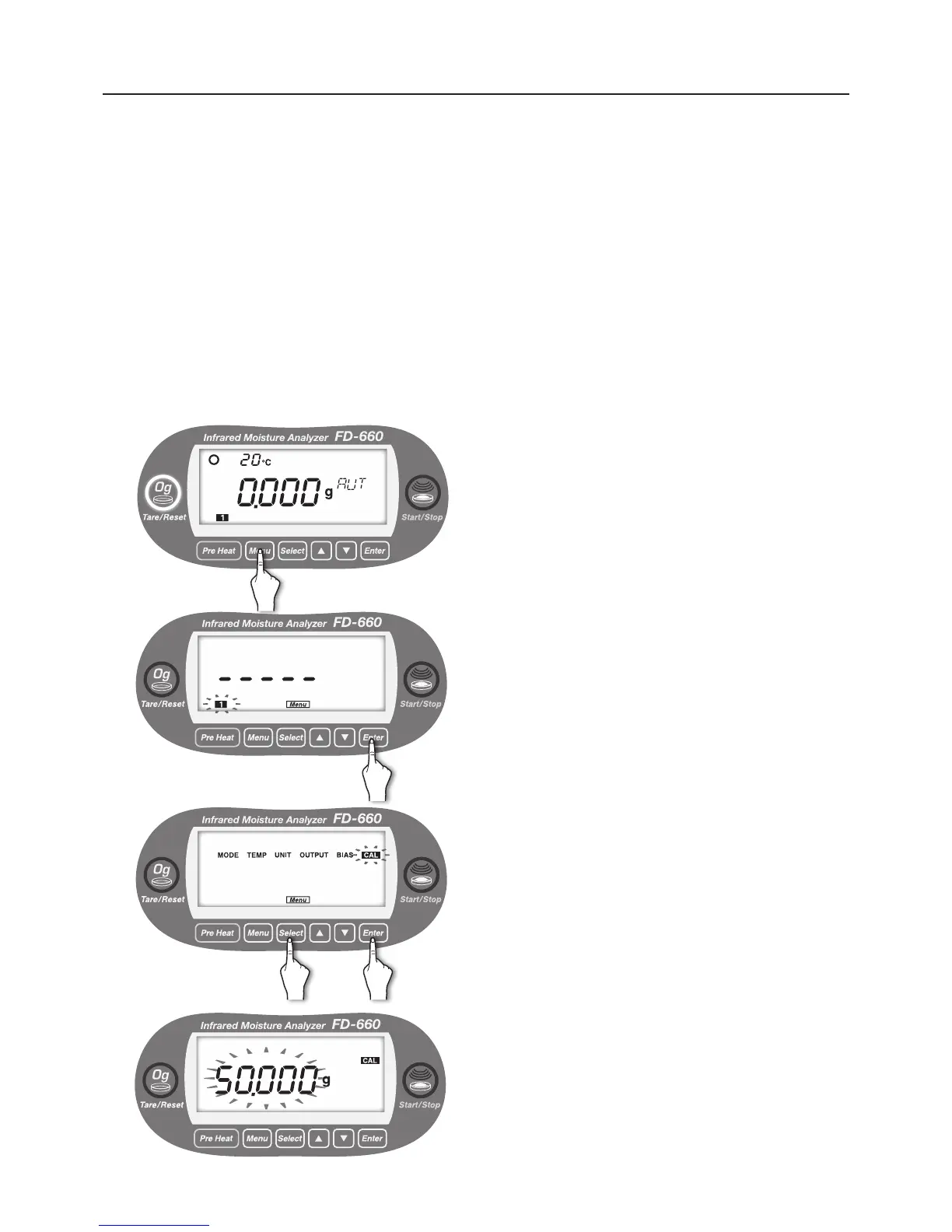
1
With the display showing the weight in grams, press the
[
Menu
] key.
2
[Menu] lights up, and the number of the current measuring
setting storage area blinks.
The CAL setting is common to all measuring storage
areas, and therefore, selection is not required.
Just press the [
Enter
] key.
3
Move to the selection of menu item.
Every time the [
Select
] key is pressed, the menu items
alternately blinks in the order of “MODE” → “TEMP” →
“UNIT” → “OUTPUT” → “BIAS” → “CAL” → “MODE” → ….
①
Press the [
Select
] key.
②
Press the [
Enter
] key after “CAL” blinks.
4
"CAL" turns to lit, and other items are turned off.
"50.000g" blinks.
Calibration with 50 grams is started.
When the weight to be used is 50.000 grams, proceed to
the step
5 on page
38.
When the weight to be used is not 50.000 grams, refer to
the right page to perform the setting.
① ②


 To Next Page