32
Output which may be generated includes data consisting of intermediate or nal measurements, sample codes,
and measurement times.
* A dot-matrix printer can also be used. In that case, however, graphical output cannot be obtained. Please contact
Kett if you require further information.
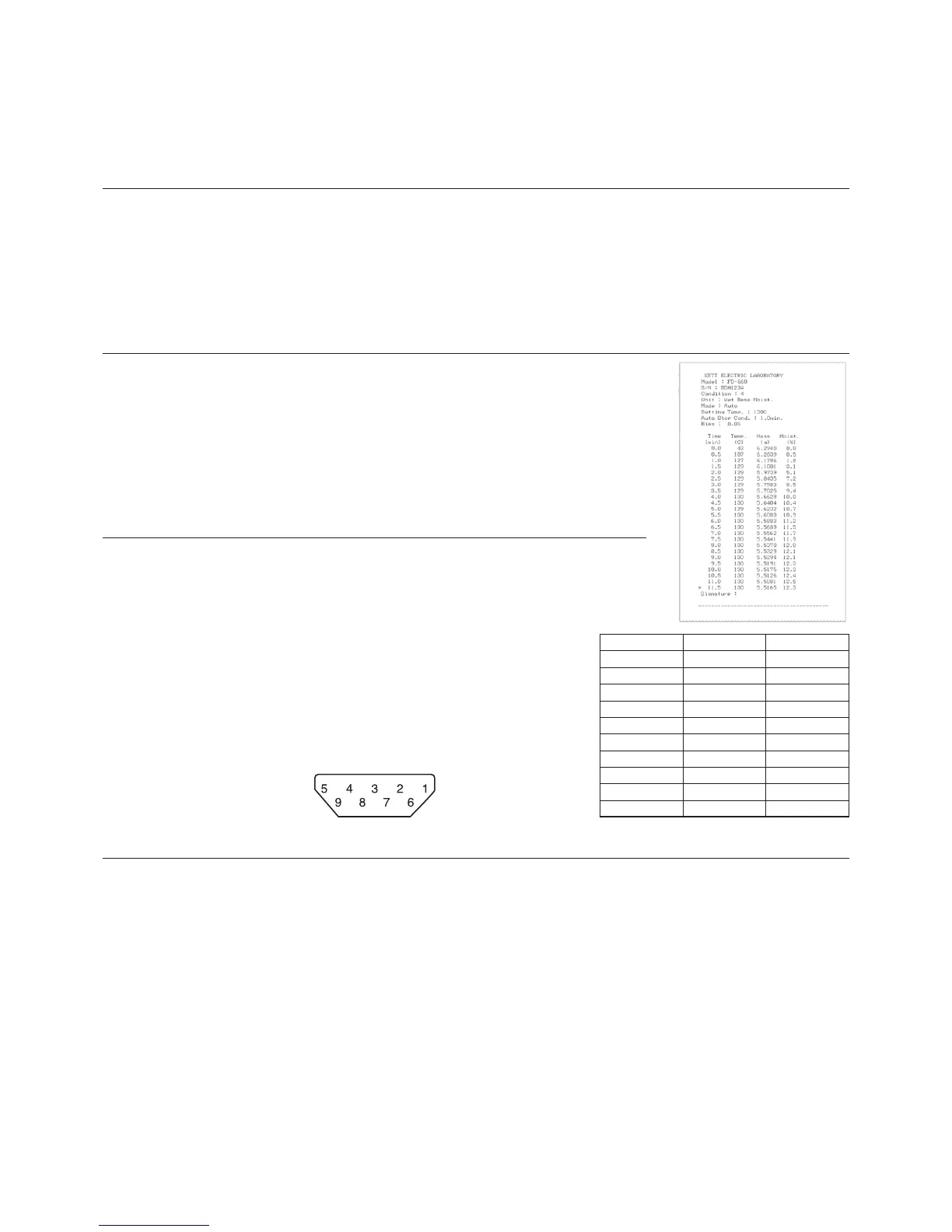
■ Sample Printer Output
* Note on the decimal precision of printed weight data
Although the minimum weight which may be displayed by the FD-660 is 0.005
grams, weights (Mass) are printed to a precision of 4 decimal points because
the values printed consist of averages from 7 measurements taken over each
30-second interval for each set of weight data output.
Pin number Direction Description
1 Not used
2 Output TXD
3 Input RXD
4 Not used
5 GND
6 Not used
7 Not used
8 Not used
9 Not used
Frame Shield
n
Computer Interface
The RS-232C interface may be used to connect the FD-660 to a computer with an
RS-232C interface and output measurement data to that computer.
l
RS-232C Interface Specications
Interface type : RS-232C
Communications method : Asynchronous communication
Baud rate : 1200/2400/4800/9600 bps
Data bits : 8 bits
Parity : None
Stop bits : 1 bit
Connector : Female D-SUB9 pins
Pin layout :
n
Setting Up and Transmitting Data
l
Connecting the RS-232C cable
With the power to the FD-660 and the computer both turned off, connect the RS-232C cable. Insert the
connector at the end of the RS-232C cable into the RS-232C port located at the rear of the FD-660 and then
tighten the screws located at both sides of the cable connector. Follow the same procedure to insert the RS-
232C cable into the RS-232C port of the computer.
l
FD-660 settings
Turn on the power to the FD-660 and set the measurement data output destination to ‘PC’. (See “8-4 Selection
of OUTPUT” on page 30)
l
Starting up the computer
Turn on the power to the computer and, when Windows has started, start the Data Logger software FDL-02 or
whatever software is to be used to read in data from the RS-232C interface.
* For instructions on how to use your computer, operating system (Microsoft Windows), or software being used,
see the user manuals provided with your computer, operating system, or software.
* The Microsoft Windows name and logo are the trademarks and registered trademarks of the Microsoft
Corporation in the United States and other countries.
■ Outputting Past Measurement Data
Record are stored of up to 50 past measurements in sequence from the most recent to the oldest. This data can be
output to a printer or computer.
1 Follow the directions given on page 30 “8-4 Selection of OUTPUT” to set the output format to either ‘TBL’ or ‘PC’.
2 From the weight display, press the [Select] key and hold the [Select] key down while pressing the [Start/Stop] key.
3 The data will then be output (in order) beginning from the most recently measured data. To stop printing while
printing is still in progress, press the [Start/Stop] key.


 To Next Page