30
8-4 Selection of OUTPUT (output format)
Connection to a PC or an optional printer allows for measurement data output.
● PC (“PC” displayed on the screen of the main unit)
The use of the data logger software, “FDL-02”, allows users to load data onto a PC.
Refer to the operating instructions of “FDL-02” for further information.
● Printer (“PRT” displayed on the screen of the main unit)
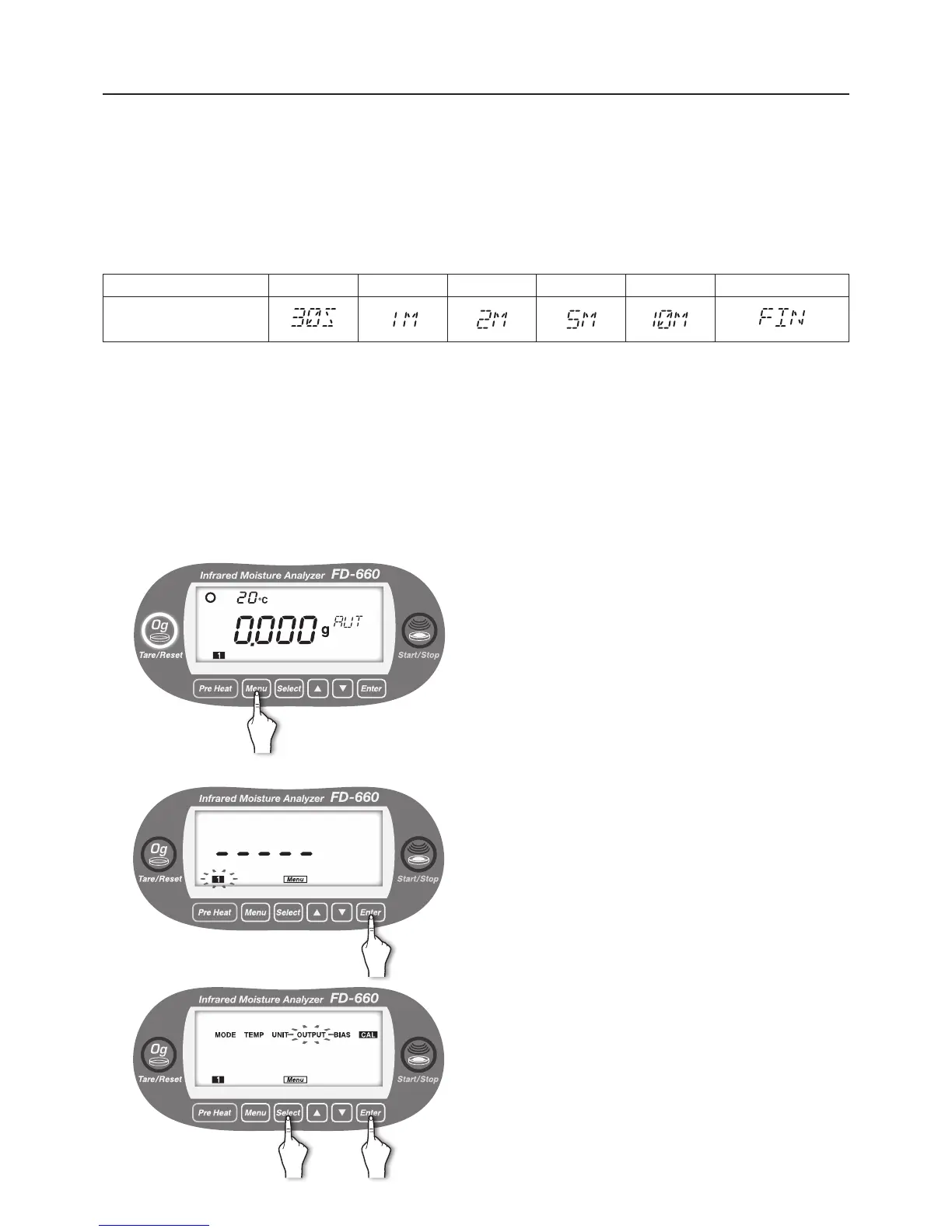
The following 6 kinds of output intervals are selectable.
Output interval 30 sec. 1 min. 2 min. 5 min. 10 min. Final results only
Display during
specication of setting
* If it is set to [FIN], measurement settings and measurement conditions are output when the rst measurement
from carried out the following operations. Measurement conditions are not output after second or later
measurements.
● Turned on the power again
● Entered the Menu (see “8 Menu Settings" on p.22).
● Printed the signature eld (see “6 Measurement Procedure
5
" on p.16).
The setting contents of UNIT are common in all measuring setting storage areas.
● Setting procedure
1
With the display showing the weight in grams, press the
[
Menu
] key.
2
[Menu] lights up, and the number of the current measuring
setting storage area blinks.
The OUTPUT setting is common to all measuring storage
areas, and therefore, selection is not required.
Just press the [
Enter
] key.
3
Move to the selection of menu item.
Every time the [
Select
] key is pressed, the menu items
alternately blinks in the order of “MODE” → “TEMP” →
“UNIT” → “OUTPUT” → “BIAS” → “CAL” → “MODE” → ….
①
Press the [
Select
] key, and
②
Press the [
Enter
] key after “UNIT” blinks.
* For OUTPUT, the measuring setting storage areas
1
to
5
are specied in common.
① ②


 To Next Page