29
4
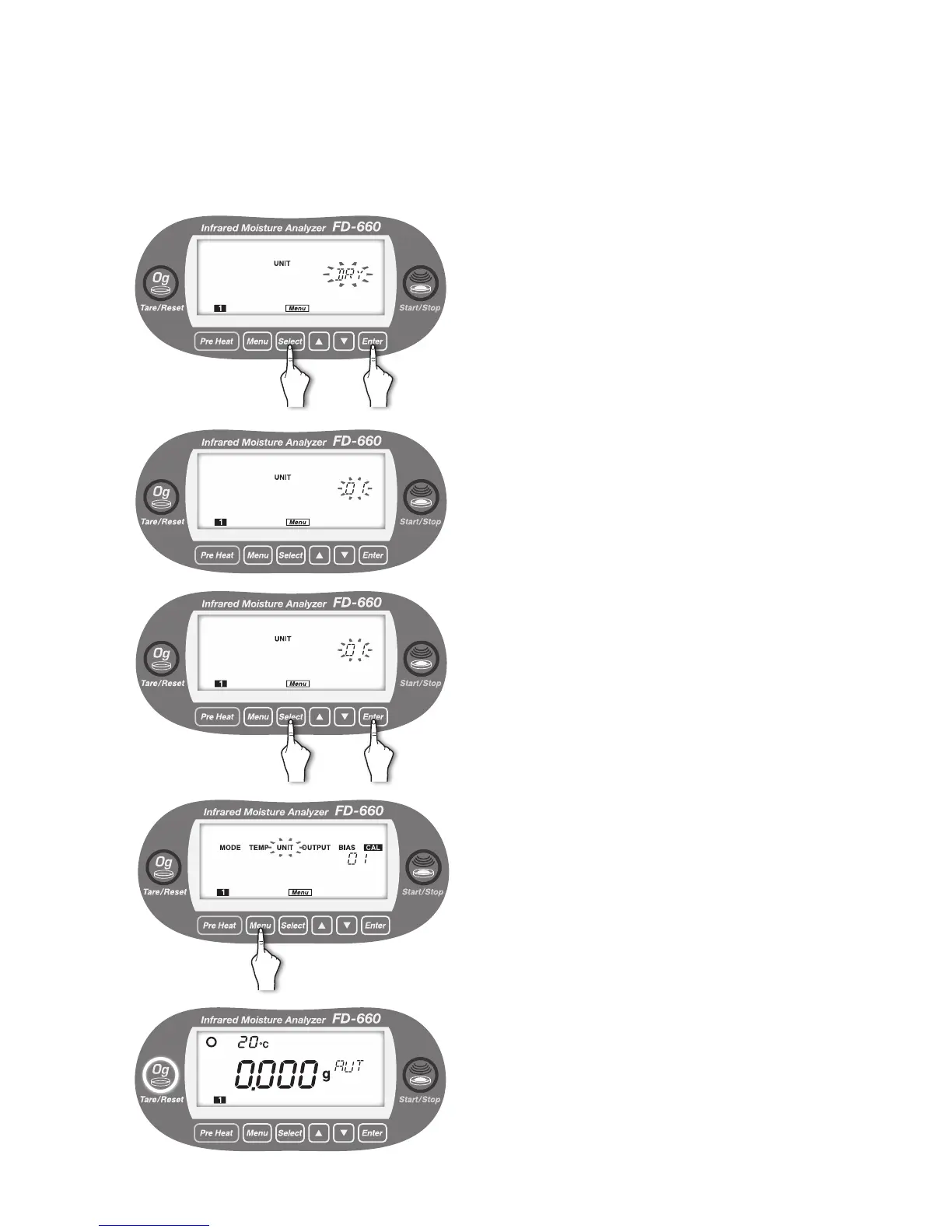
Every time the [
Select
] key is pressed, “WET” → “DRY” →
“SOL” → “WET” → ... alternately blink.
①
Press the [
Select
] key.
②
Press the [
Enter
] key after the desired measurement
standard blinks (“DRY” is selected in the example on
the left).
The measurement standard is now selected.
5
The minimum display digit is automatically lit.
The currently selected minimum display digit blinks.
6
Every time the [
Select
] key is pressed, “01” and “001”
alternately blink.
①
Press the [
Select
] key.
②
Press the [
Enter
] key after the desired minimum dis-
play digit blinks (“0.1%” is selected in the example on
the left).
7
The measurement standard and minimum display digit are
specied, and "UNIT" starts to blink.
To exit from the "UNIT" menu setting, press the [
Menu
]
key. The screen returns to the weight display screen.
To specify other menu items, press the [
Select
] key.
8
① ②
① ②


 To Next Page