24
● Setting for TIME (timed) mode
In timed mode, the test time is specied before the test and the sample is dried to determine its moisture content.
When the specied measuring time is reached, the test is halted.
The measurement time can be specied from 1 to 120 minutes in steps of 1 minute.
● Setting procedure
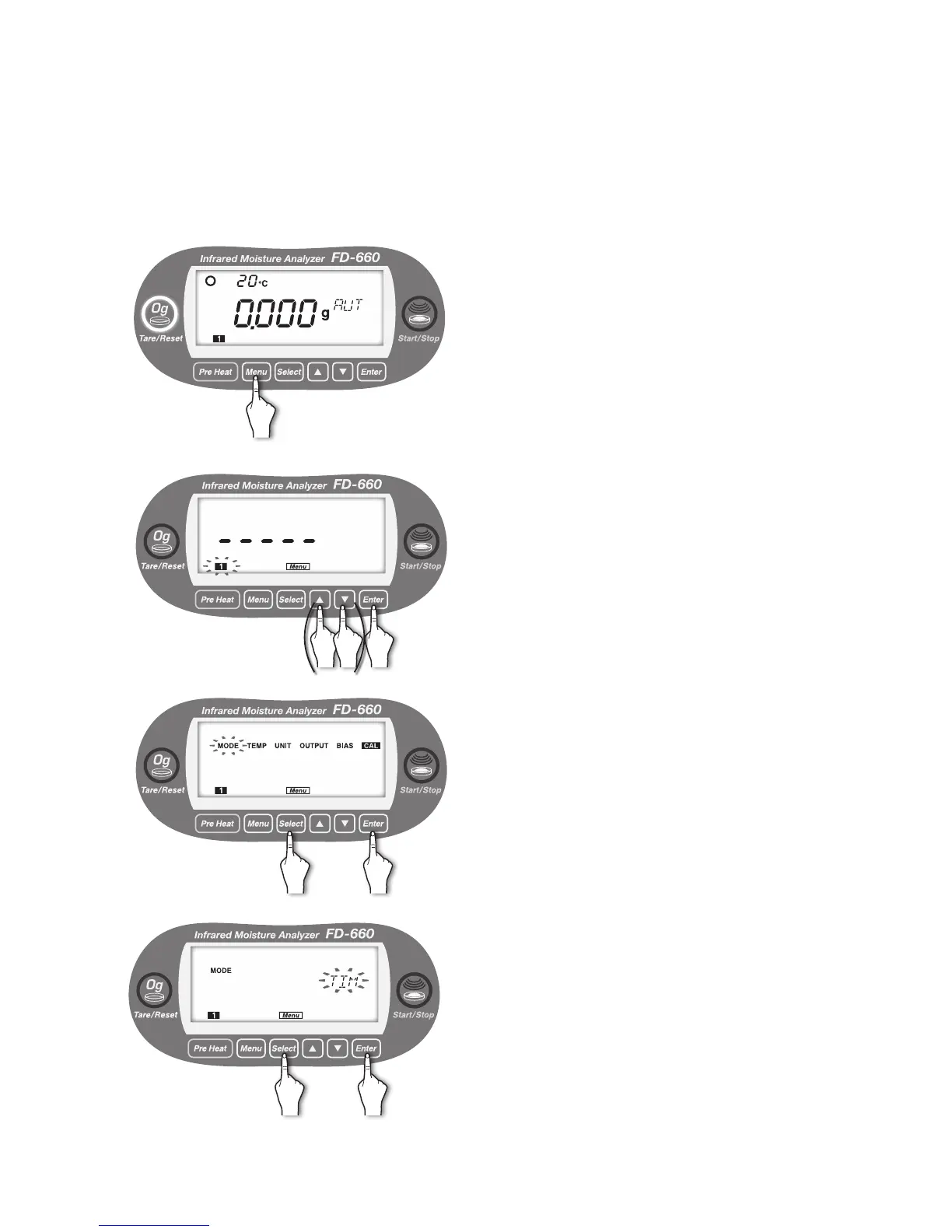
1
With the display showing the weight in grams, press the
[
Menu
] key.
2
[Menu] lights up, and the number of the current measuring
setting storage area blinks.
To change the number, use the [▲] or [▼] key (see "7.
Specifying Measuring Settings" on page 20).
When the desired measuring settings area number starts
ashing, press the [
Enter
] key.
3
Move to the selection of menu item.
Every time the [
Select
] key is pressed, the menu items
alternately blinks in the order of “MODE” → “TEMP” →
“UNIT” → “OUTPUT” → “BIAS” → “CAL” → “MODE” → ….
①
Press the [
Select
] key.
②
Press the [
Enter
] key after “MODE” blinks.
4
Move to the selection of a measuring mode.
The currently selected measuring mode blinks.
Every time the [
Select
] key is pressed, “AUTO (automatic
mode)” and “TIME (timed mode)” alternately blink.
①
Press the [
Select
] key.
②
Press the [
Enter
] key after “TIME” blinks.
Timed measurement mode is now selected.
① ②
① ②


 To Next Page