26
8-2. Setting for TEMP (drying temperature)
The following describes the optimal procedure to be followed to specify the drying temperature to be used in drying
samples when conducting measurements.
The factory default drying temperature is set to 120°C. However, depending on the type of sample, its moisture
content, or other settings, the proper drying temperature to use may vary. To nd the proper drying temperatures to
be used for different types of materials, conduct repeated measurements until you nd the correct temperature to
use for each type of material.
The temperature may be set to a temperature of anywhere from 30 to 180ºC in 1 degree increments.
* Note that the drying temperature does not refer to the temperature of the material being tested but is instead
the temperature on the dish calculated from the temperature detected by the temperature sensor. The drying
temperature may differ from the temperature of the material being dried depending on the material’s color,
moisture content, type, or shape.
* Generally speaking, drying is performed more quickly when a higher drying temperature is specied, but if the
temperature specied is too high it might result in the sample becoming scorched or burned, thus making it
impossible to obtain accurate measurements.
* Note that the meaning of the term ‘drying temperature’ as it is specified here differs from that of the drying
temperature for our other models because of a structural design differences between the models.
* If the ambient temperature is close to the drying temperature, the heater may not work.
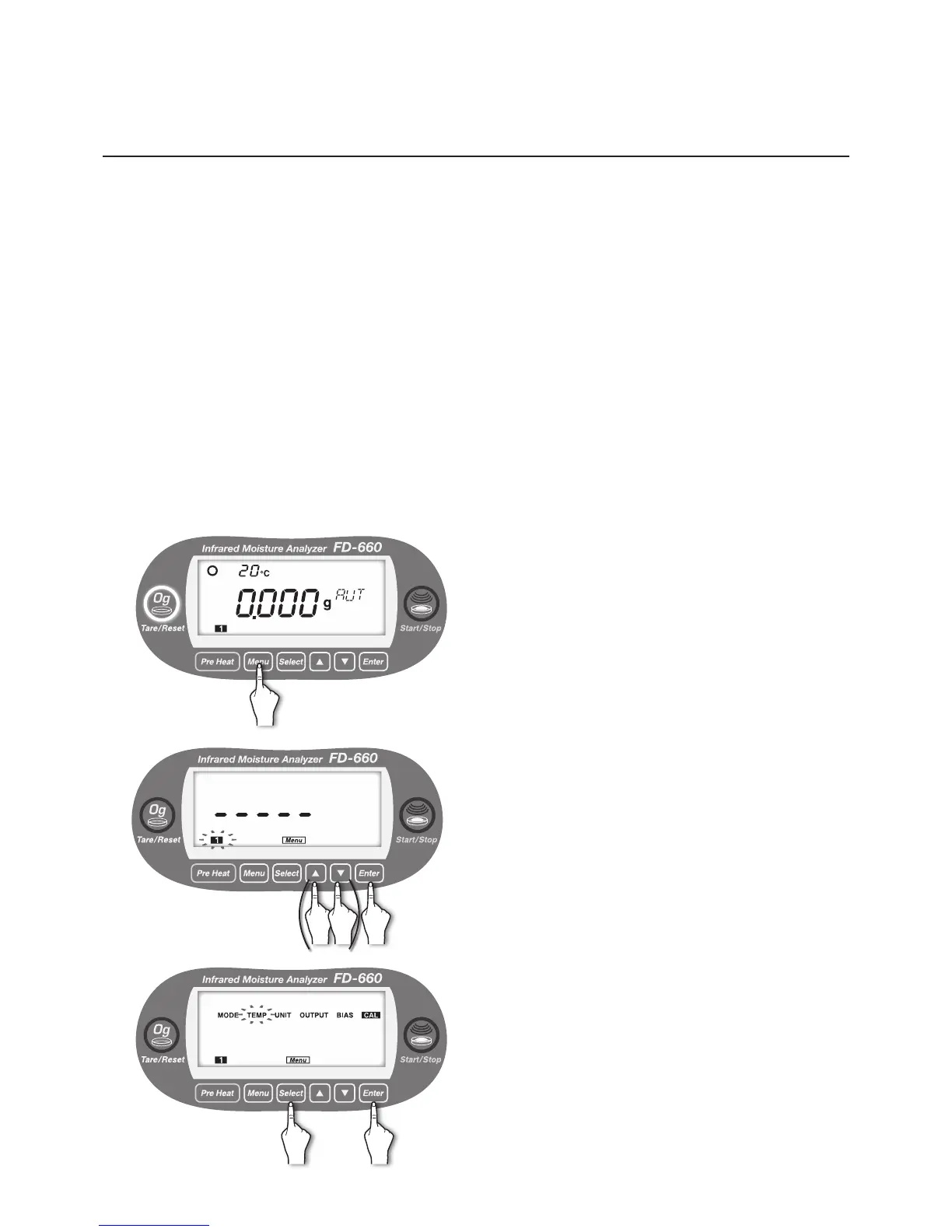
● Setting procedure
1
With the display showing the weight in grams, press the
[
Menu
] key.
2
[Menu] lights up, and the number of the current measuring
setting storage area blinks.
To change the number, use the [▲] or [▼] key (see "7.
Specifying Measuring Settings" on page 20).
When the desired measurement settings area number
starts ashing, press the [
Enter
] key.
3
Move to the selection of menu item.
Every time the [
Select
] key is pressed, the menu items
alternately blinks in the order of “MODE” → “TEMP” →
“UNIT” → “OUTPUT” → “BIAS” → “CAL” → “MODE” → ….
①
Press the [
Select
] key.
②
Press the [
Enter
] key after “TEMP” blinks.
① ②


 To Next Page