31
4
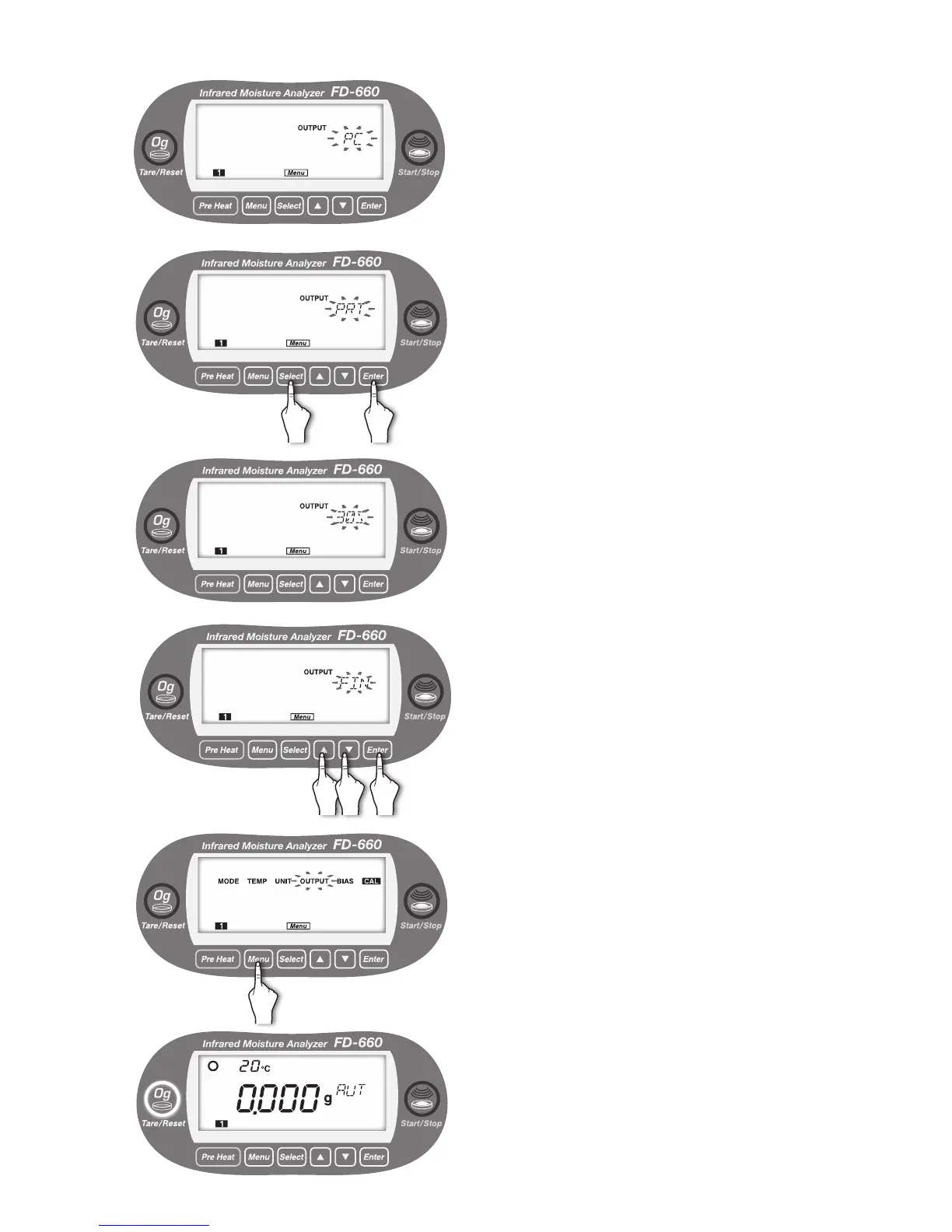
The currently selected output format blinks.
Every time the [
Select
] key is pressed, “PC” and “PRT”
alternately blink.
5
①
Press the [
Select
] key.
②
Press the [
Enter
] key after the desired output format
blinks (“PRT” is selected in the example on the left).
An output format is selected.
When the printer (PRT) is selected, move to the selection
of output interval.
6
The currently selected output interval blinks.
Every time the [▲] or [▼] key is pressed, "30 S" → "1
M" → "2 M" → "5 M" → "10 M" → "FIN" → "30 S"...
alternately blink.
7
①
Press the [▲] or [▼] key.
②
Press the [
Enter
] key after the desired output interval
blinks (“FIN” is selected in the example on the left).
8
The output format is now specied, and "OUTPUT" starts
to blink.
To exit from the "OUTPUT" menu setting, press the
[
Menu
] key. The screen returns to the weight display
screen.
To specify other menu items, press the [
Select
] key.
9
① ②
②①


 To Next Page