ENGLISH
Copyright by Keyline - Italy 994 LASER Man. cod. B409619FG Keyline S.p.A. 15
MODIFY AND CUT
7Modify and cut
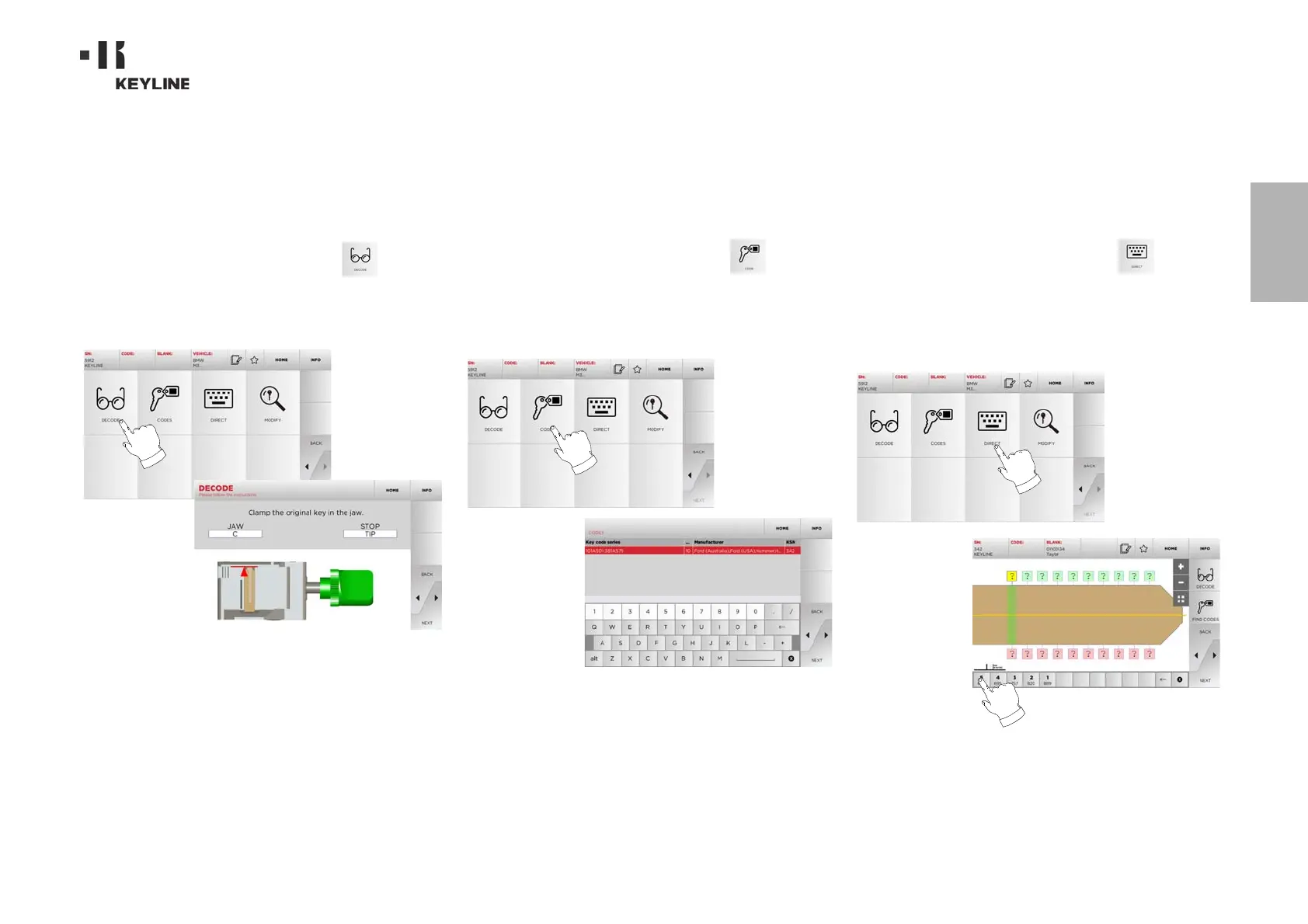
7. 1 .0 D ec od e
This function makes it possible to decode the key using the selected
key system.
How to proceed:
• From the key search sub-menu, select “ ”.
• Insert the original key in the jaws and lock it in place.
• Then follow the instructions on screen until the end of the
decoding process.
7.2 .0 C o de
This function makes it possible to search for a specific code con-
tained in the data base and obtain the relevant coding.
How to proceed:
• From the key search sub-menu, select “ ”.
• Input the blind code.
•Then press
►” to go to the following screen, the key “CUT-
TING” one (for additional information, please refer to para-
graph7.5.0 on page16).
7. 3. 0 Di re ct
This function makes it possible to insert the bitting code for the key
directly.
How to proceed:
• From the key search sub-menu, select “ ”.
• Input a value for each cut that shall correspond to the bit-
ting code.
•Then press
►” to go to the following screen, the key “CUT-
TING” one (for additional information, please refer to para-
graph7.5.0 on page16).


 To Next Page