24 Keysight Models 6811C, 6812C, and 6813C Quick Start Guide
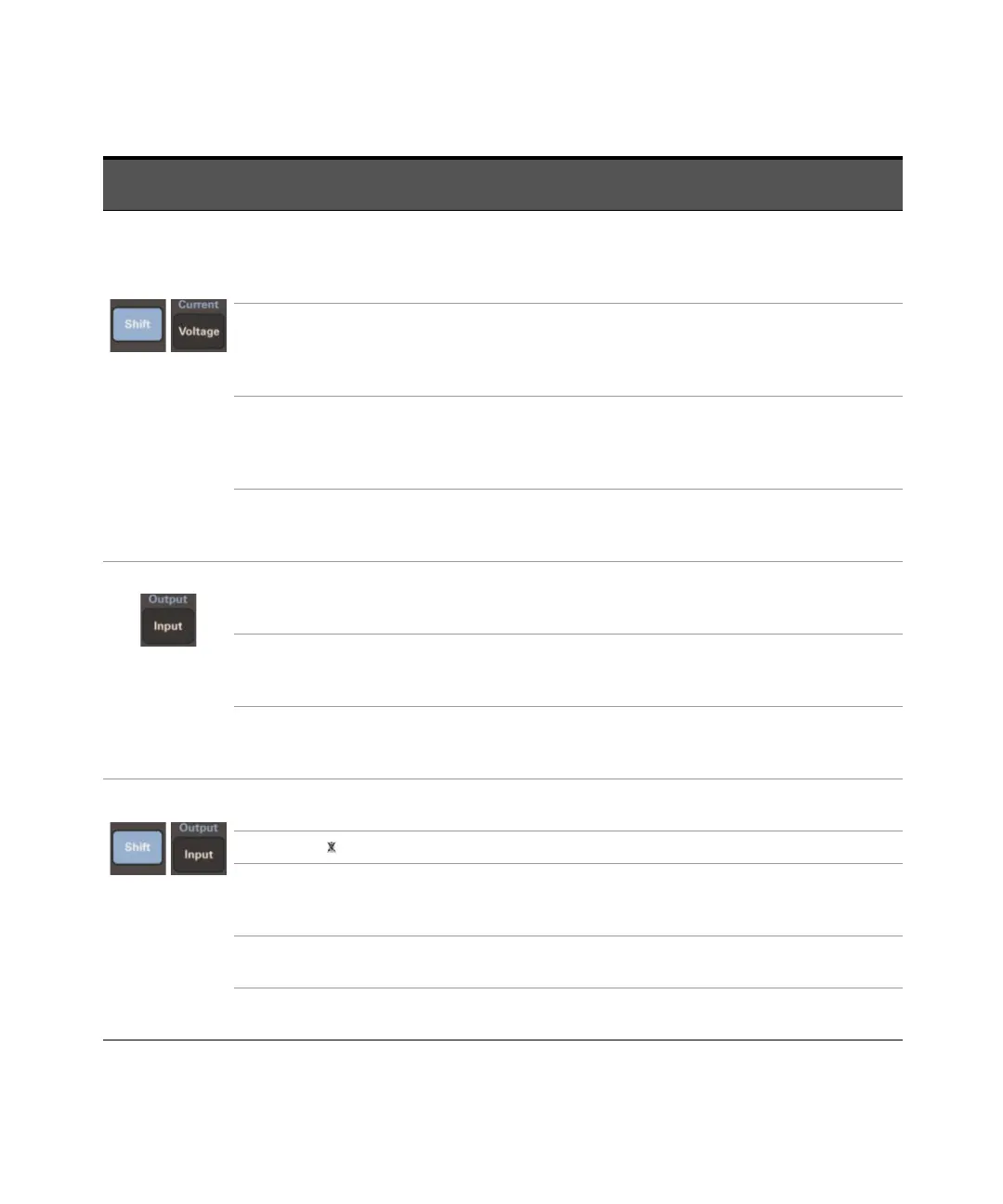
Use ▲ or ▼ to
navigate between
the Current
function
commands.
CURR:LEV <value>
Use keypad to key in an exact
value, alternatively use ▲ to
increment or ▼ to decrement.
Press [Enter] to save.
Set immediate rms current limit.
CURR:PEAK <value>
Use keypad to key in an exact
value, alternatively use ▲ to
increment or ▼ to decrement.
Press [Enter] to save.
Set immediate peak current limit.
CURR:PEAK:T <value>
Use keypad to key in an exact
value, alternatively use ▲ to
increment or ▼ to decrement.
Press [Enter] to save.
Set triggered peak current limit.
CURR:PEAK:M FIXED | LIST |
PULSE | STEP
Use ▲ or ▼ to navigate between
FIXED | LIST | PULSE | STEP. Press
[Enter] to save.
Select the peak current limit
mode.
Use ▲ or ▼ to
navigate between
the Input function
commands.
INP:COUP AC | DC | ACDC
Use ▲ or ▼ to navigate between
AC | DC | ACDC. Press [Enter] to
save.
Select meter coupling.
CURR:RANGE HIGH | LOW
Use ▲ or ▼ to navigate between
HIGH | LOW. Press [Enter] to
save.
Select current measurement
range.
WINDOW KBESSEL | RECT
Use ▲ or ▼ to navigate between
KBESSEL | RECT. Press [Enter] to
save.
Select harmonic measurement
window meter.
Use ▲ or ▼ to
navigate between
the Output
function
commands.
OUTP:COUP AC | DC
Use ▲ or ▼ to navigate between
AC | DC. Press [Enter] to save.
Select output coupling.
RST
Press [Enter] to execute. Execute the *RST command
TTLT:SOUR BOT | EOT | LIST
Use ▲ or ▼ to navigate between
BOT | EOT | LIST. Press [Enter] to
save.
Select trigger out source
coupling.
TTLT:STATE ON | OFF
Use ▲ or ▼ to navigate between
ON | OFF. Press [Enter] to save.
Set trigger out state.
IMP:STATE ON | OFF
Use ▲ or ▼ to navigate between
ON | OFF. Press [Enter] to save.
Set output impedance
programming.
Function
key press
Function command on
the front panel display
Entry key press Description






 To Next Page