N5186A MXG and X-Series SA Measurement Guide 49
Corrections
Corrections/De-embedding Using PathWave E7653APPC Software
On the MXG:
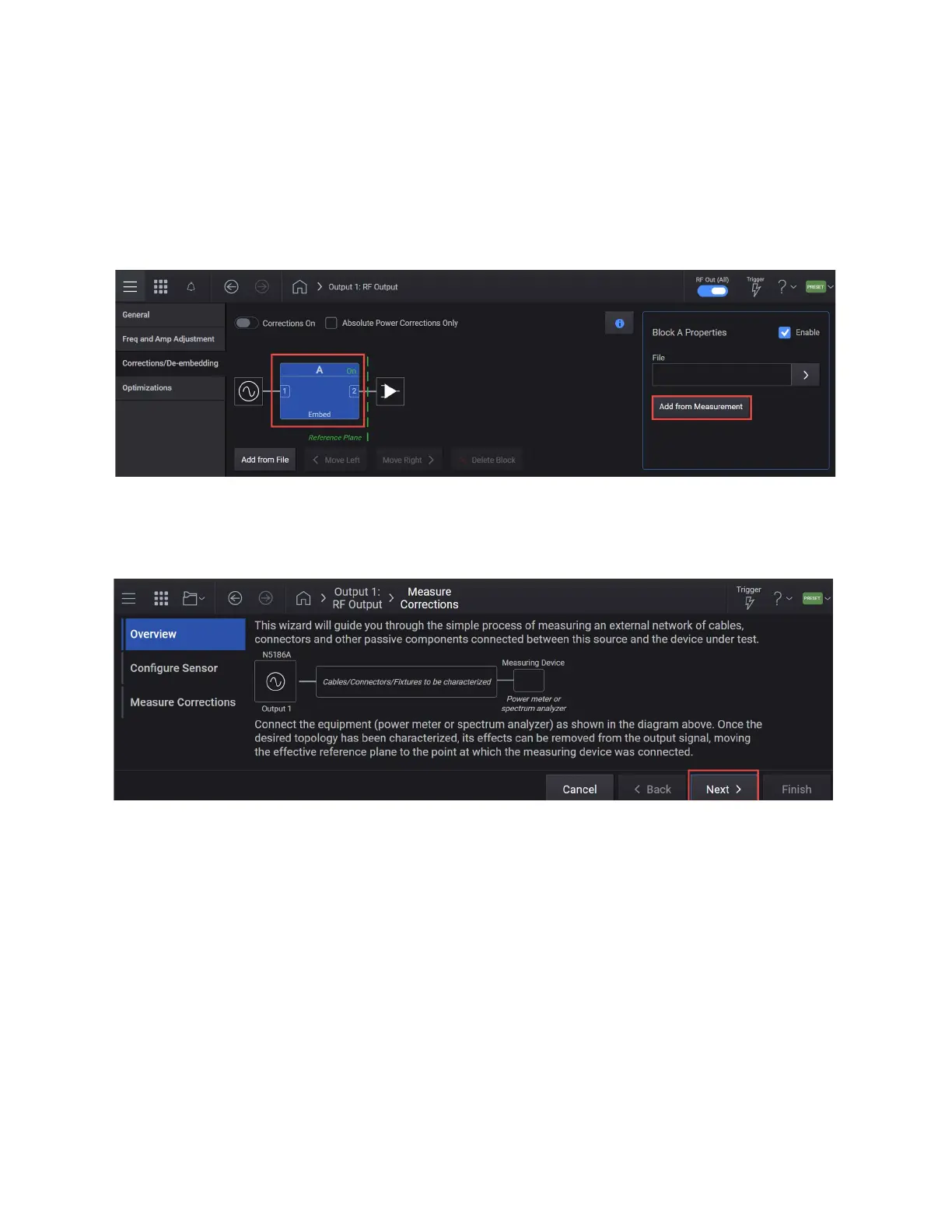
1. Select the RF Output block > Corrections/De-embedding tab to open the
Correction Setup.
2. Select Block A to highlight > Add from Measurement to open the Measure
Corrections Block Wizard.
3. Connect the power sensor (in this case, the X-Series signal analyzer) as
shown in the diagram below. After reading the overview, select Next to
move to the Configure Sensor setup.
4. In the Configure Sensor setup, select the Device Type dropdown and
select Spectrum Analyzer.
5. Set the Start and Stop Freq, Amplitude, and the Num Steps. For this
example Start Freq 2.5 GHz, Stop Freq 3.5 GHz, Amplitude to the highest
power used in your measurement (For this example, -10 dBm, which we



 To Next Page