N5186A MXG and X-Series SA Measurement Guide 63
5G New Radio (NR) Measurements
5G Waveform, EVM, and ACP Analysis
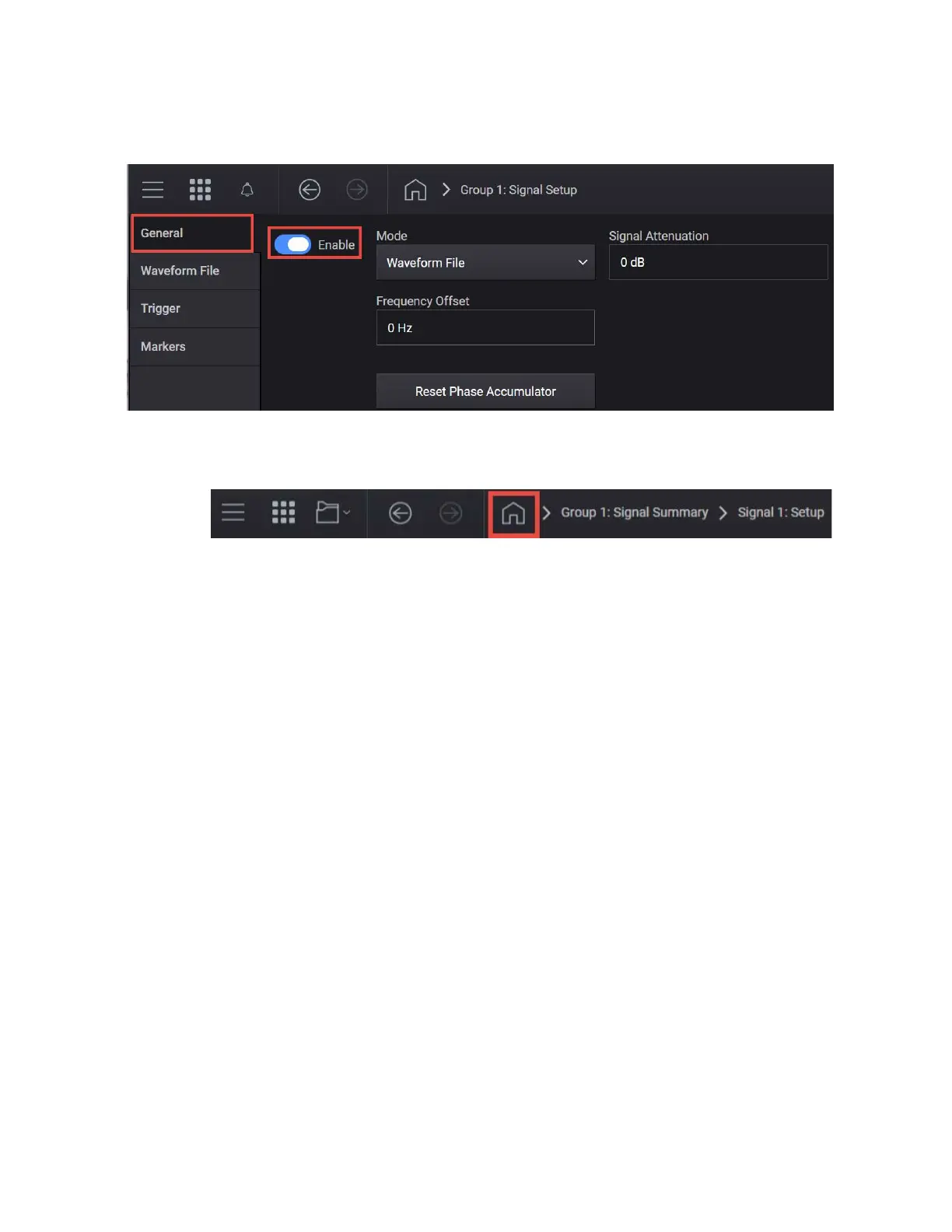
7. Select the General tab > Enable.
8. Close the Vector Modulation Signal Setup by selecting the Home icon at
the top of the display.
9. Select the Adjustments block and select Optimize Dynamic Range with
OBW and Enable System RF Flatness Correction.
Optimize Dynamic Range with OBW This setting filters the system
RF flatness correction coefficients over the instantaneous bandwidth
indicated in the waveform header (or in the “Occupied Bandwidth”
settings area under the Signal block > Occupied Bandwidth setting).
This has the potential to improve EVM performance by not having to
correct for flatness errors outside the requested bandwidth. For
example, if RF flatness correction was done at 960 MHz, but you are
only interested in an 800 MHz section, then applying the correction
flatness to that portion only can improve signal to noise ratio, and
therefore EVM when there is a lot of hardware roll off.
Enable System RF Flatness Correction - Disabling this function
disables the factory calibrated RF channel flatness equalizer.
Depending on the hardware channel response, this may hurt or
improve the EVM. This is due to the dynamic range implications as it
relates to signal to noise ratio. The greater the RF hardware
variations in flatness, the greater the amount of correction is
required, the greater the correction effectively reduces the number of



 To Next Page