12
K5 FEATURES & FUNCTIONS GUIDE
*IF EQUIPPED †LEGAL DISCLAIMERS ON BACK INSIDE COVER
ADVANCED DRIVER ASSISTANCE SYSTEMS (ADAS)
ADAS
The RCCA Warning Volume can be adjusted in the User Settings in the
Instrument Cluster or the Vehicle Settings* on the audio head unit
QUICK TIP
REMINDERS:
• The RCCA feature can be turned OFF/ON in User Settings, under Driver Assistance, Parking Safety
• When vehicle power is cycled, RCCA will remain in the previous state
• When a vehicle is approaching within the sensing range, and traveling 3 mph or faster, the RCCA
system will show a warning
• The RCCA system is a supplemental system. Do not solely rely on these systems and always pay
attention to the road and its conditions
Rear Cross-Traffic Collision-Avoidance Assist (RCCA)*
†6a
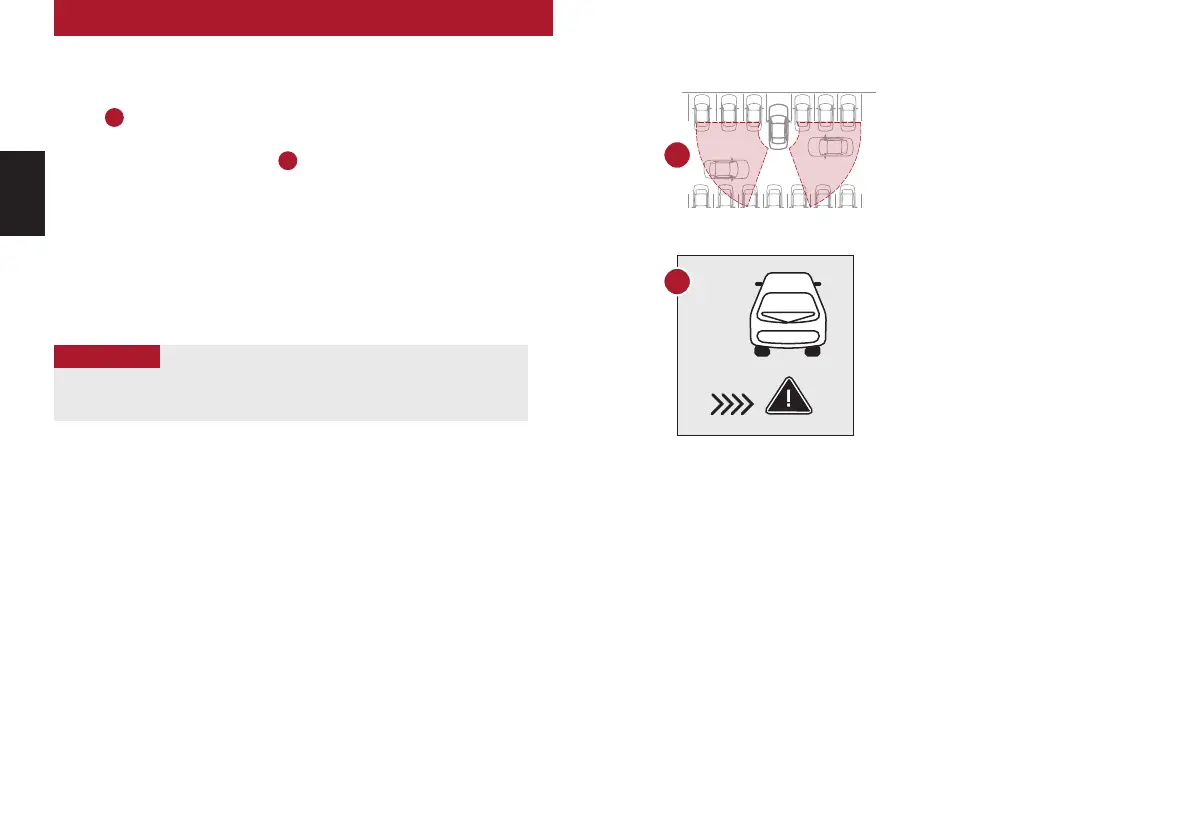
If RCCA sensors detect approaching vehicles from the rear left or rear right side of the
vehicle
A
, the system will sound an audible warning, the warning indicators on the
outside rearview mirror will illuminate and a message will appear
on the Instrument Cluster screen
B
.
RCCA may activate the Electronic Stability Control (ESC) to help avoid an imminent
collision. RCCA may temporarily apply braking power when an approaching vehicle is
detected within a certain distance next to or behind the vehicle.
RCCA is designed to operate under the following conditions:
• When the gear shift is in Reverse
• When the vehicle is moving 5 mph or slower
A
(Warning to apply braking)
Images are for illustrative purposes
only and may not reflect actual
feature or operation.
See section 5 in the Owner’s Manual for more information.
B



 To Next Page
 Loading...











