19
ALWAYS CHECK THE OWNER’S MANUAL FOR COMPLETE OPERATING INFORMATION AND SAFETY WARNINGS. *IF EQUIPPED †LEGAL DISCLAIMERS ON BACK INSIDE COVER
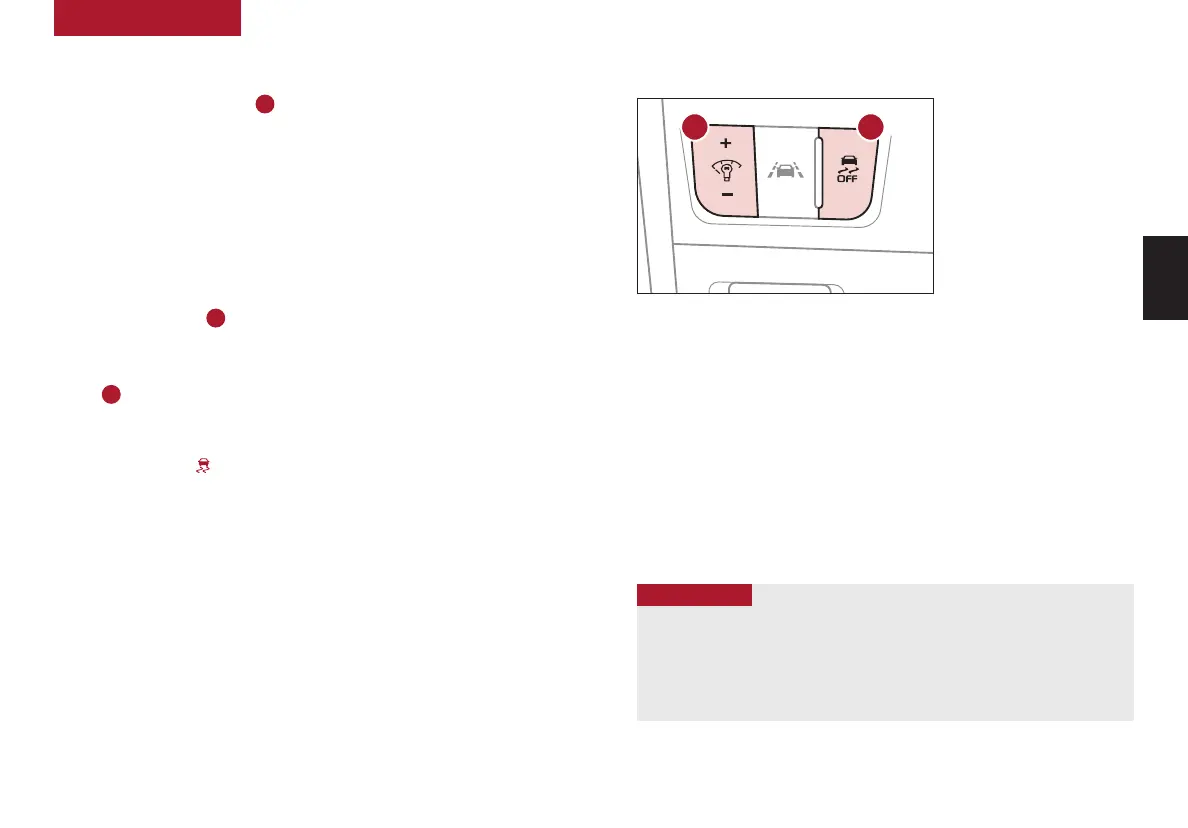
(Located left of Steering Wheel)
Instrument Cluster Control
Press left/right side of switch
A
to adjust the display brightness of the
instrument panel illumination.
REMINDER: Instrument Cluster Control does not change brightness when lights are turned off.
See section 5 in the Owner’s Manual for more information.
Electronic Stability Control (ESC)
†7
ESC is designed to help stabilize the vehicle during certain cornering maneuvers.
It is a good idea to keep ESC turned ON for daily driving whenever possible.
Press ESC OFF button
B
to disable Traction Control in ESC (ESC OFF indicator
will illuminate).
To turn both Traction Control and Stability Control off, press and hold ESC OFF
button
B
(ESC OFF indicator will illuminate, and an alert sounds).
REMINDERS:
• ESC is active by default at vehicle startup. When ignition is cycled, ESC will turn ON again
• The ESC Indicator Light in the Instrument Cluster will illuminate whenever ESC is in operation
See section 5 in the Owner’s Manual for more information.
For illustrative purposes only. Your actual display, buttons and/or features may vary.
Hill-Start Assist Control (HAC)
†7
HAC can help prevent the vehicle from rolling backward, for two seconds,
when accelerating from a stop while on a steep incline.
HAC automatically activates whether the ESC is OFF or ON but does NOT
activate when the ESC has malfunctioned.
REMINDERS:
• HAC does not operate when the gear shift is in the P (Park) or the N (Neutral) position
• In the event of HAC system malfunction, see an authorized Kia dealer for service
• HAC does not replace the need to apply brakes while the vehicle is stopped on an incline
• When HAC is active (e.g., accelerating from a stop on an incline), you may
notice that the brakes will momentarily remain engaged after you depress the
accelerator
• HAC provides a two-second delay before the vehicle may start rolling
backward
QUICK TIPS
A B
See section 5 in the Owner’s Manual for more information.
DRIVER'S PANEL
DRIVER’S
PANEL



 To Next Page
 Loading...











