KIC 2000 v2.4.0.x
KIC 2000 User Manual 7
KIC Explorer:
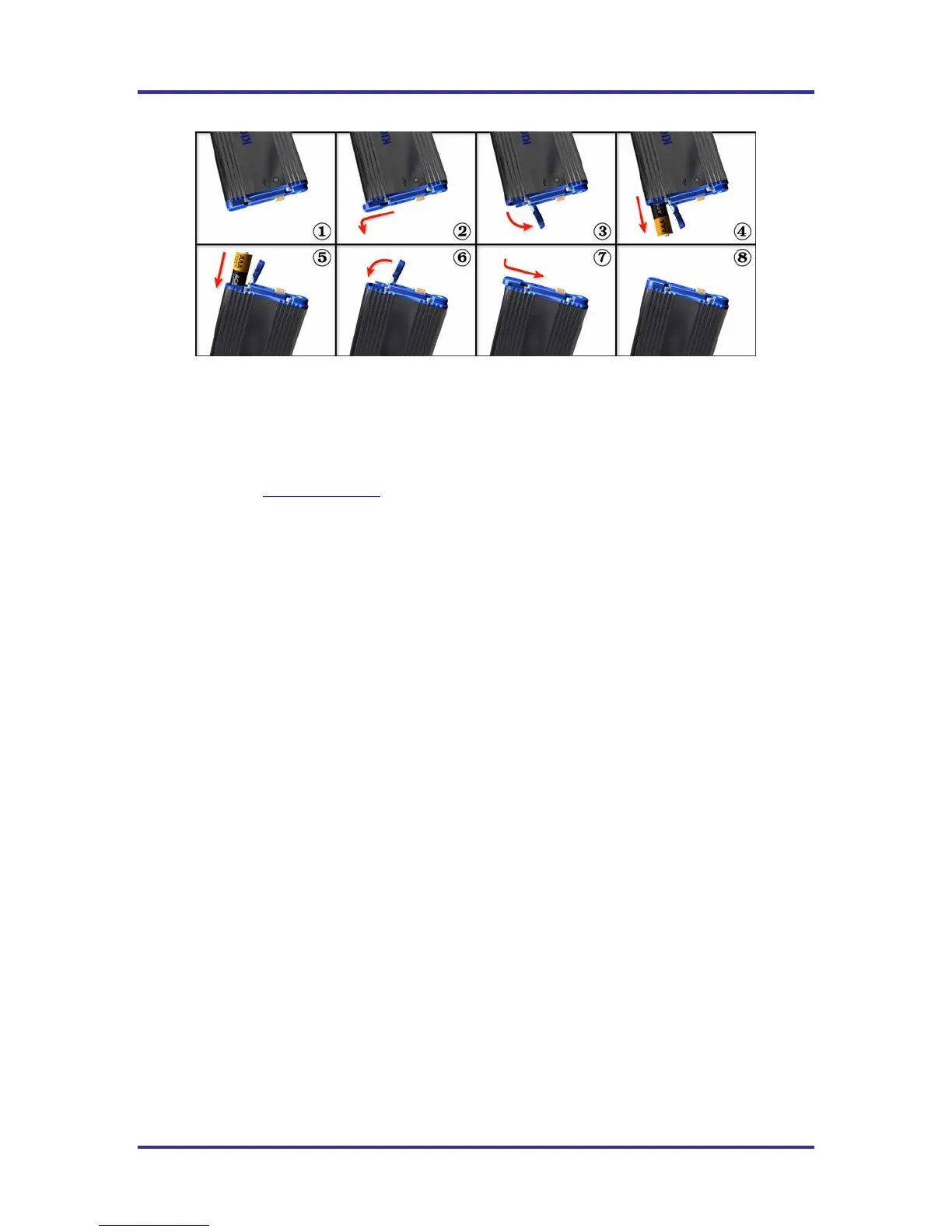
Figure 6: KIC Explorer Battery install/replacement
The KIC Explorer uses 3 standard alkaline AAA sized batteries. KIC recommends the use of standard
alkaline batteries; however you can use other types including rechargeable batteries.
If you experience negative effects using other types of batteries or discover your KIC Explorer is not
operating properly, then switch back to standard alkaline batteries. If problems persist, contact KIC
Technical Support: tech@kicmail.com
.
Battery Life
The KIC Explorer is very efficient on battery usage. Independent tests show that a standard set of alkaline
batteries will last more than 25 hours while operating at room temperature. Operating temperatures can
affect battery performance.
Batteries and Temperature
The KIC Explorer is designed to pass through ovens that will cause the batteries inside the KIC Explorer to
heat up. Since the batteries have a high heat capacity they will tend to continue to heat even after the
KIC Explorer has exited the oven.
Even if the KIC Explorer has cooled sufficiently to allow the user to run another profile, the battery may
not have cooled down as low as the KIC Explorer.
In the event the KIC Explorer batteries become heated during use and you wish to run another profile, KIC
suggests substituting a different (room temperature) cooler set of batteries before the next profile is run.
This will allow the user to run more frequent profiles without the chance of overheating the batteries or the
KIC Explorer.
Note:
• Lead-Free (hot) thermal profiles can cause the battery packaging to un-wrap. This is normal
and should be monitored to ensure the batteries condition is intact and operational before each
use.
• In the event the batteries become heat damaged or corrosive, replace them immediately. Failing
to do so can lead to KIC Explorer damage and or personal injury.
KIC Explorer Power On/Off
Power On – Press/hold the Amber colored On/Off button for 1 second (located at the back of the KIC
Explorer). When power in on, the LED indicators will power on. The LED color/pattern will represent the
current KIC Explorer hardware state/status. See Figure #158.
Power Off – Press/hold the Amber colored On/Off button for 1 second (located at the back of the KIC
Explorer). See Figure #158. When the power is turned off, the LED indicators will be off.



 To Next Page