KIC 2000 v2.4.0.x
KIC 2000 User Manual 27
Run a Profile
The Run a Profile button will guide you through 6-7 screens, which will finish at a completed and graphed
profile. To move through these screens you can use the Back, Next, or Cancel buttons. The Cancel button
will take you back to the Main Menu.
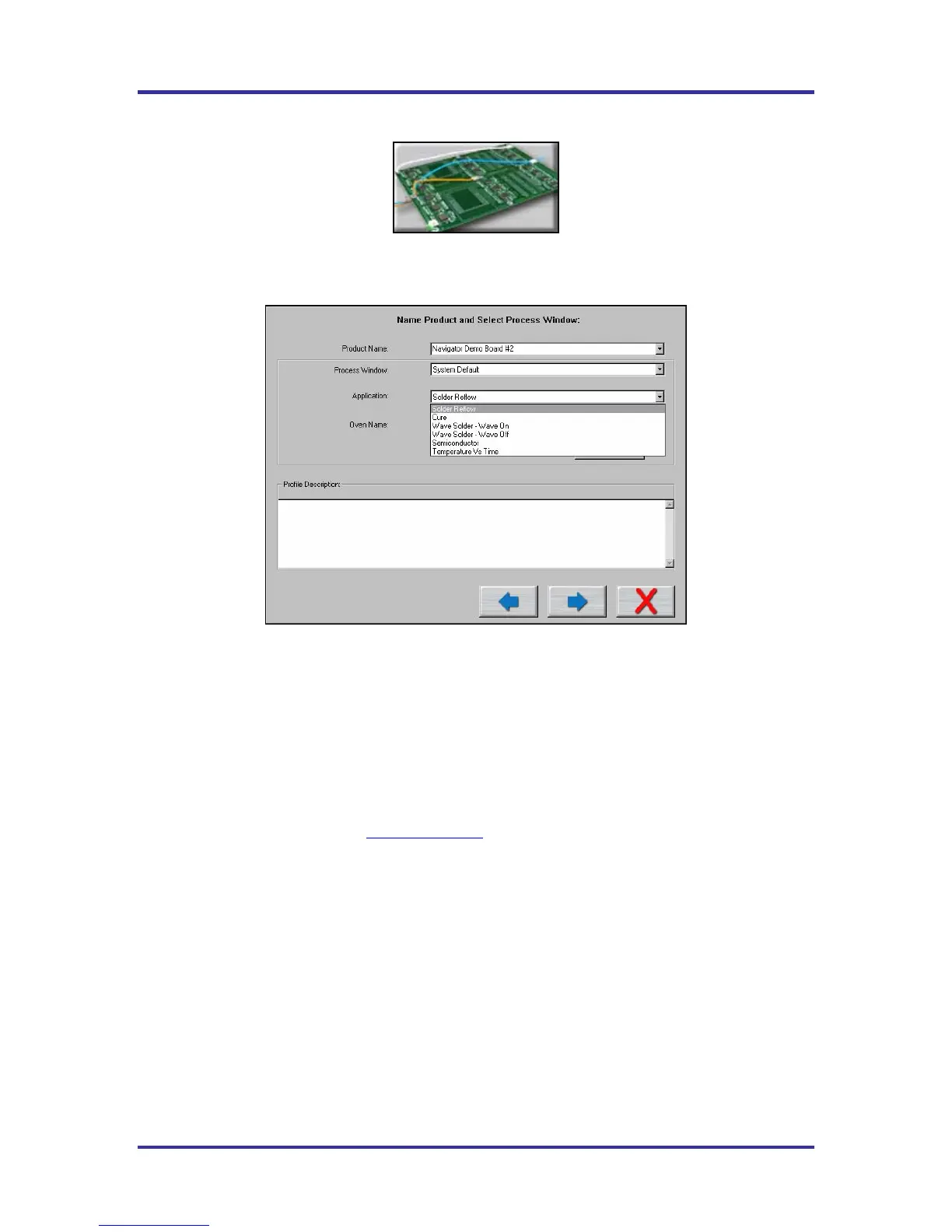
Figure 36: Run a Profile Screen #1
Name Product and Select Process Window
• Product Name – Enter in a unique product name (long file names are acceptable) or choose an
existing product name from the drop down list.
• Process Window – Choose a Process Window from the drop down list. These Process Windows are
created in the Define/Edit Process Window screen which is accessed from the KIC 2000 main screen.
• Application – Select your Application type from the list. The KIC 2000 software will function
depending on the selected Application type. Some variables that might change depending on the
selected Application type are: data-sample rate, profile temperature trigger values, and specific
artwork. It is very important to choose the correct Application type. If you are unsure, you can contact
KIC technical support for help, tech@kicmail.com
.
o For wave solder profiles see page 53.
o For Cure profiles see page 81.
o For Temperature vs. Time profiles see page 82.
o For Wave Surfer information see page 53.
• Oven Name – Enter a unique oven name or choose an existing oven from the drop down list. The
oven will have information about the number of zones saved with it as well as other zone information.
This is entered on the next screen. Remove Oven button will delete the oven name currently displayed
in the field.
If you are running the software on an oven controller computer that is communication compatible with the
KIC 2000 software the number of zones is already known and the oven name will be entered in the Global
Preferences screen, not on this screen. Also the Entering Oven Recipe screen is skipped because the
KIC 2000 software already has the recipe information from the oven controller.
• Enable Auto-Focus – Enables or disables the Auto Focus tool for the current profile.
• Profile Description – Allows for freehand typing of any notes you may want to include with this
profile.



 To Next Page