KIC 2000 v2.4.0.x
KIC 2000 User Manual 33
Instructions on attaching TC’s
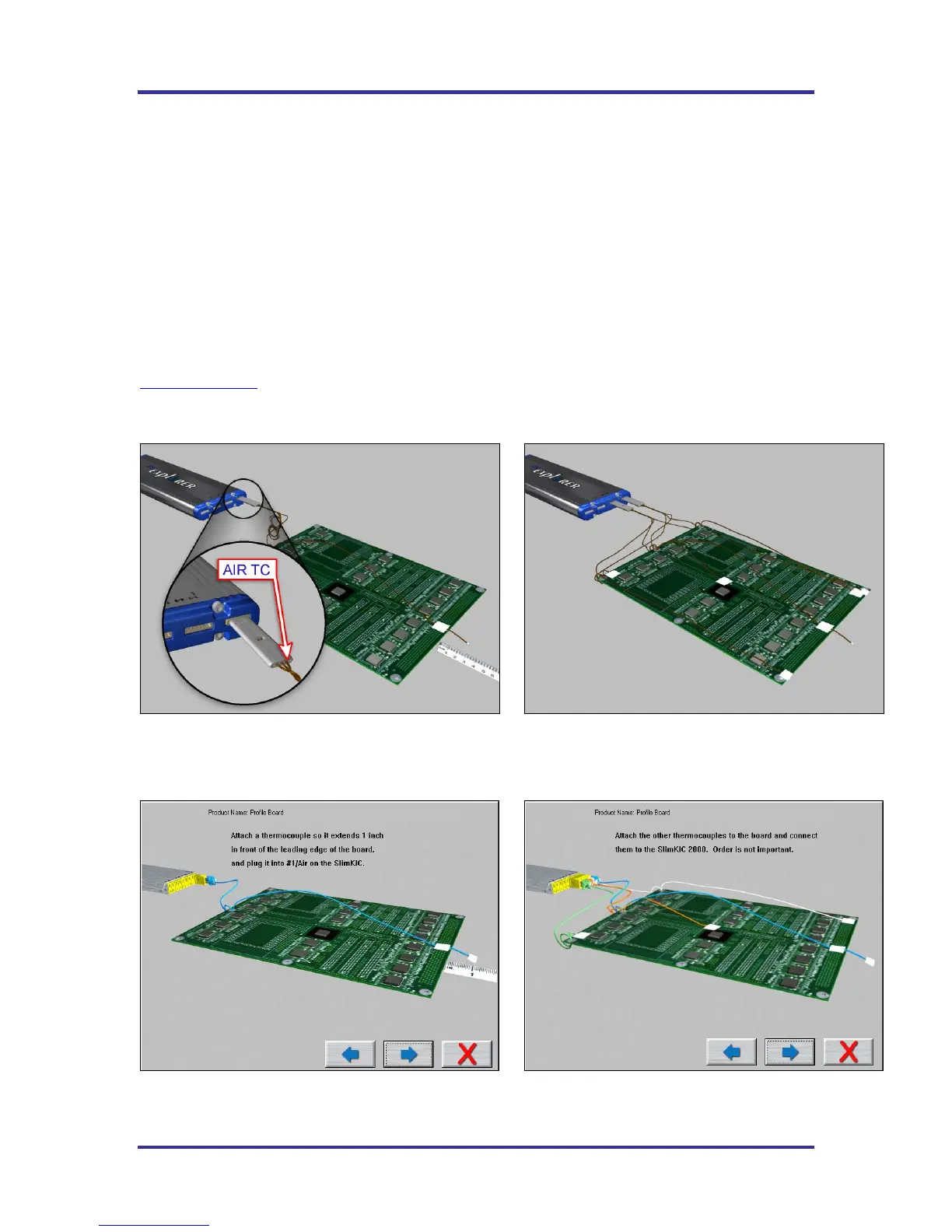
The next few screens, Run a Profile Screens # 4-6, visually demontrate attaching the thermocouples to the
board.
It is very important that you attach the first thermocouple (Air TC) so it extends 1-inch in front of the
leading edge of the board.
This Air Thermocouple MUST be plugged into the first channel on the SlimKIC 2000 or KIC Explorer.
Attach the rest of the thremocouples and plug them into the SlimKIC 2000 or KIC Explorer. Order is not
important, unless you plan on labeling where they are attached.
Depending on the selected Application type and or KIC profiler, the displayed graphics may differ. In any
case, always follow the on-screen directions. Contact KIC Technical support for assistance,
tech@kicmail.com
.
Example of KIC Explorer-Solder Reflow, Cure, and Wave Off - Application type specific graphics:
Example of SlimKIC 2000 -Solder Reflow, Cure, and Wave Off - Application type specific graphics:
Figure 46: Run a Profile screen #4
Figure 47: Run a Profile screen #5
Figure 48: Run a Profile screen #4
Figure 49: Run a Profile screen #5



 To Next Page