KIC 2000 v2.4.0.x
KIC 2000 User Manual 59
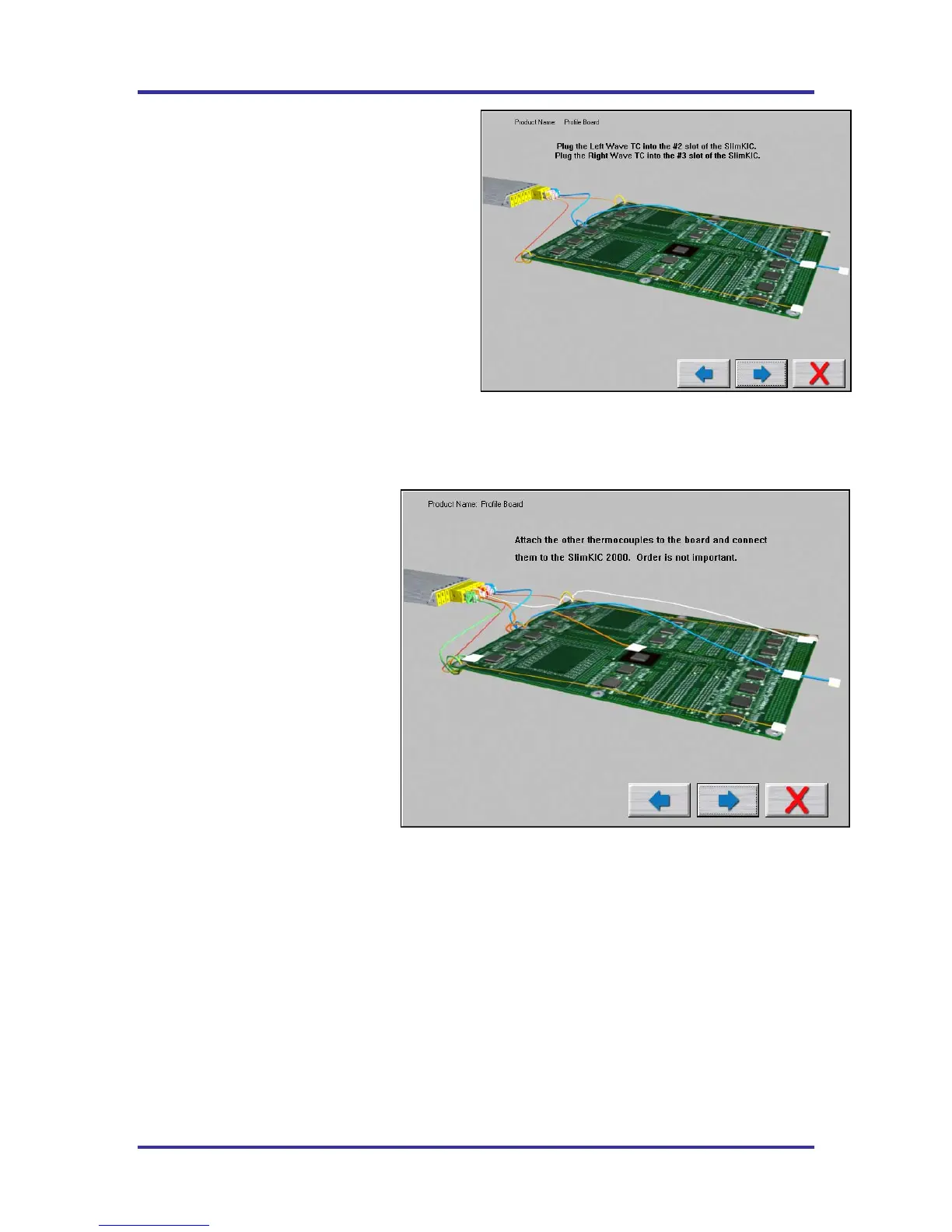
The next screen will depict the placement of the
Wave TC’s and instructs what slot/channel of the
KIC Profiler to connect each Wave TC to.
See Figure 92.
It is very important to follow these directions.
• Plug the Left-Wave TC into the #2 slot of
the KIC Profiler.
• Plug the Right-Wave TC into the #3 slot
of the KIC Profiler.
When you have properly connected your Wave
TC’s, select the Forward Arrow button to proceed.
Connecting Product TC’s
The next screen will depict placement
of the thermocouples used for
profiling the product (Product TC’s).
See Figure 93.
Product TC’s are connected to the
product in key locations across the
product. The selected locations need
represent the highest and lowest- mass
areas of the product or even specific
temperature sensitive components.
Once you have connected your
Product TC’s to your product, connect
them to the KIC profiler stating with
slot or TC #4.
Select the Forward Arrow button to
continue.
Figure 92: Run a Profile Screen #6 – Wave-On
Figure 93: Run a Profile Screen #6



 To Next Page