KIC 2000 v2.4.0.x
60 KIC 2000 User Manual
Selecting the thermocouples and starting a profile
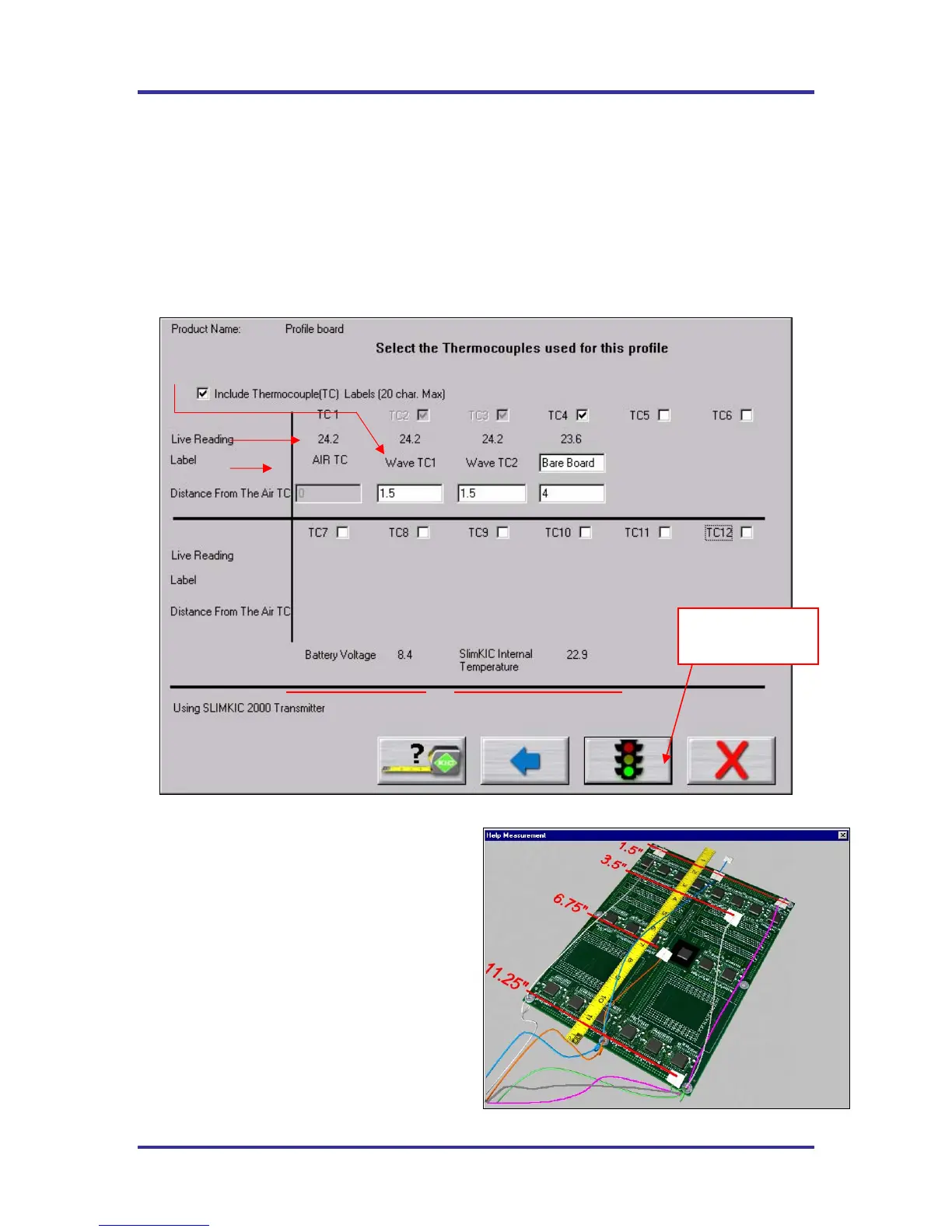
This screen displays the live readings from the KIC profiler for all thermocouples selected, as long as the
hardware is properly connected. See Figure 94. Make sure your KIC Profiler has a fresh battery and is
powered on.
Selecting Thermocouples - To select a thermocouple, check the box next to the thermocouple number.
The live temperature is displayed beneath each thermocouple label.
Thermocouple Labels - Optionally you can check the box to Include thermocouple labels. When this box
is checked you can type a text label for each selected thermocouple. 20 character maximum.
Figure 94: Run a Profile Screen #7
Distance from the Air TC – Measure and enter
the distance from the Air TC to each thermocouple
used, including the Wave TC’s.
Select the Help Measurement (Tape Measure Help)
button for an example of how to correctly measure
the distance from the Air TC. See Figure 95.
Figure 95: Wave-On TC measurements
Select this button
to start a profile.



 To Next Page