28 PMC-A
1.
Check that the AC line to be connected is compatible
with the product's rated input value.
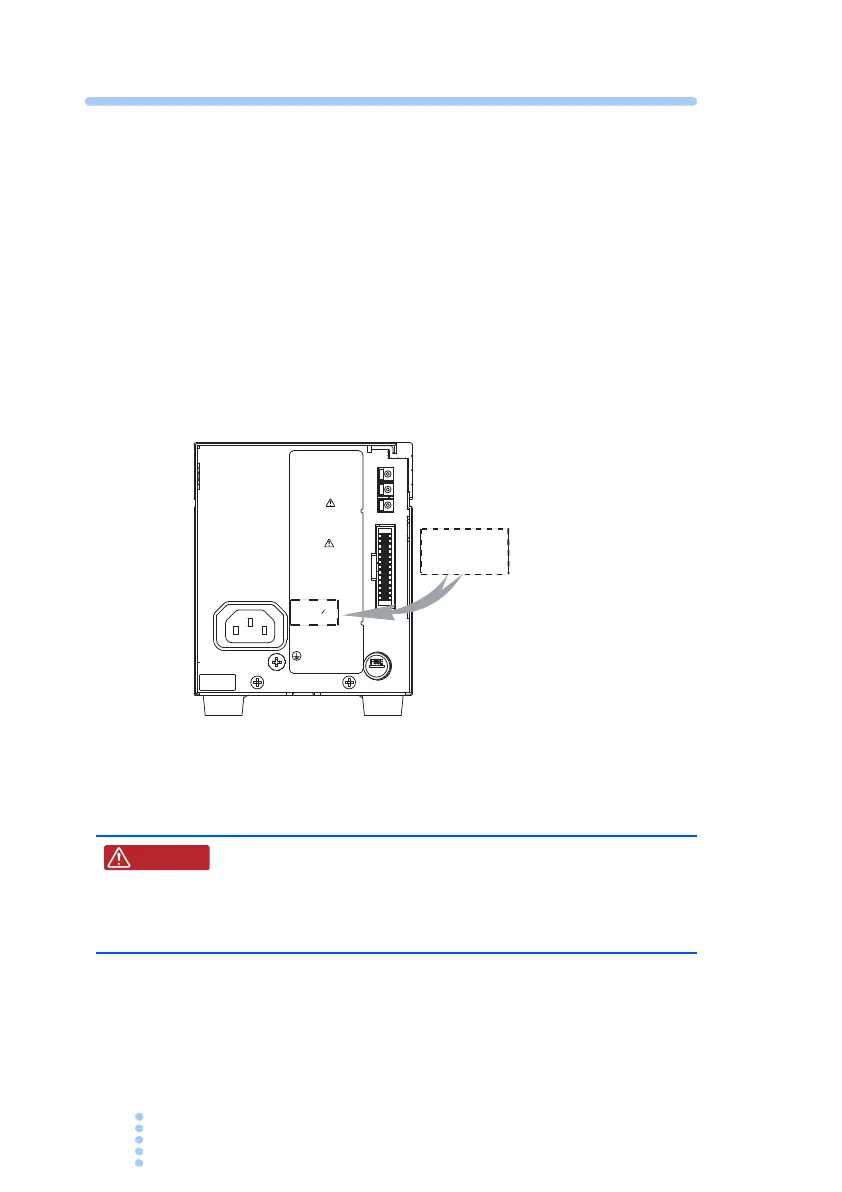
The product's nominal input rating is shown on the rear panel.
When it is filled in, as in
Fig. 2-3, the line voltage will be 100 V.
Input can be within +/– 10% of the nominal input voltage shown.
The frequency can be 50 Hz or 60 Hz.
2.
Turn off the POWER switch.
3.
Connect the power cord to the AC inlet (AC INPUT)
on the rear panel.
4.
Insert the power plug to an outlet.
Fig. 2-3
Confirmation
of nominal
input rating
2.6 Ground (Earth)
• Possible electric shock. The PMC-A is an IEC
Safety Class I equipment (equipment with a pro-
tective conductor terminal). Be sure to ground
the product to prevent electric shock.
Be sure to ground the unit for your safety.
Securely connect the protective conductor (earth) terminal on
the rear panel.
J
1
J
2
KIKUSUI
ELECTRONICS
CORP.
WARNING
FOR CONTINUED
PROTECTION AGAINST
FIRE HAZARD,
REPLACE ONLY WITH
SAME TYPE AND
RATING FUSE.
CAUTION
TO AVOID ELECTRIC
SHOCK, THE AC POWER
CABLE PROTECTIVE
GROUNDING CONDUCTOR
MUST BE CONNECTED
TO GROUND. DO NOT
REMOVE COVERS,
REFER SERVICING TO
QUALIFIED PERSONNEL.
INPUT
AC100V 50 60Hz
MAX 28 0VA
MADE IN CHINA
FUSE
AC250V
4A
(
S.B
)
1
2
3
INPUT
AC100V 50/60Hz
MAX
280
VA
W ARNING







 To Next Page