7-6 TOS5051A/5050A
Releasing the PROTECTION status
• The PROTECTION status cannot be released using the STOP command. For a
description on releasing the PROTECTION status, see , “3. Tester not in PRO-
TECTION status” on Page 5-6 .
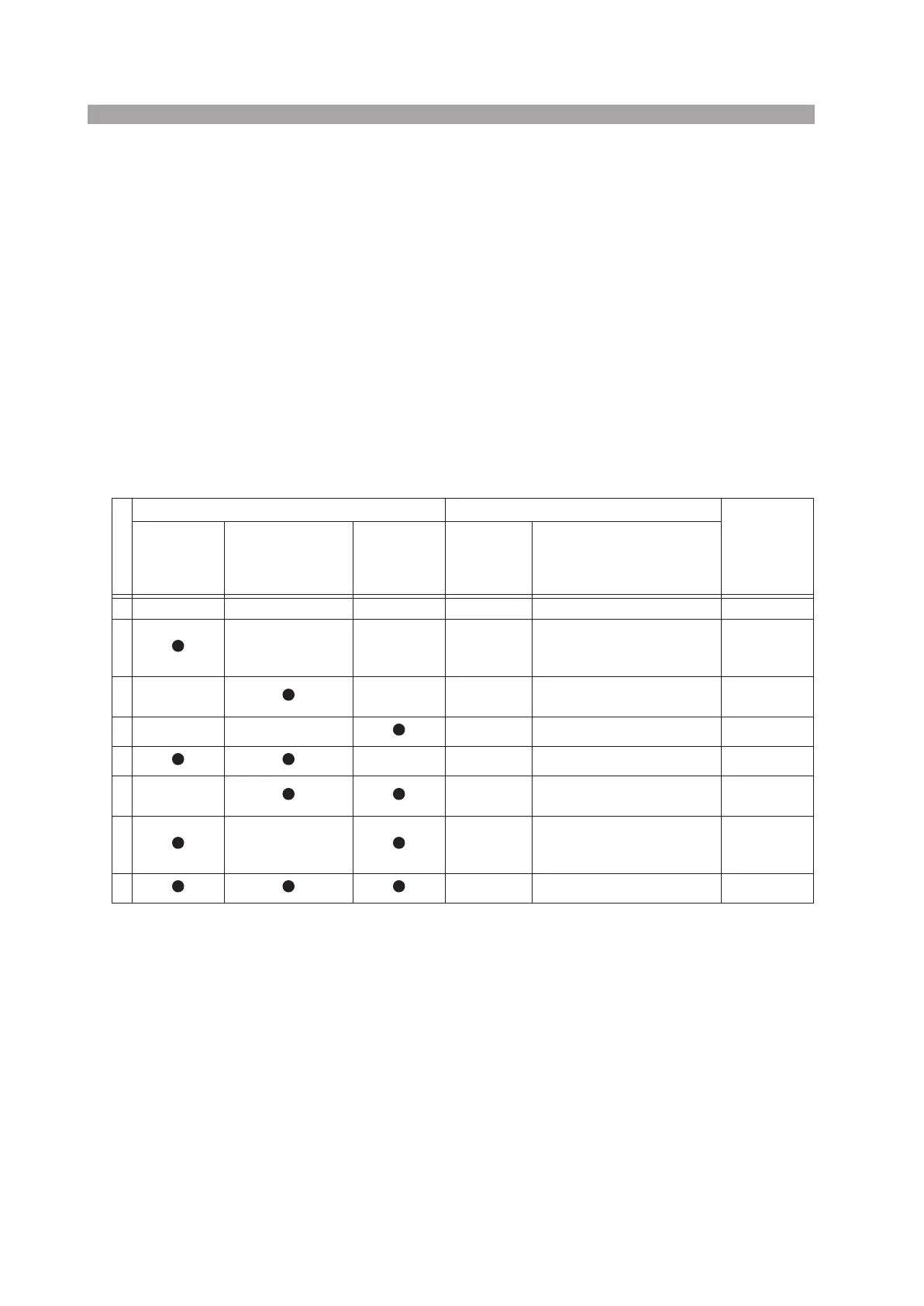
Test start operation and REMOTE message
• Table 7-4 indicates the enabled control sources for the various combinations of
the remote control source.
• Normally, when starting the test through the RS-232C, combination “d” in
Table 7-4 is the condition in which the REMOTE command is issued. However,
control through the RS-232C is also enabled for combination “h” if the
REMOTE command is issued.
• The REMOTE message on the display lights up only when remote control is
possible.
Table 7-4 Combinations of control sources
Combination
Remote control source START function
Display
REMOTE
message
Front panel
REMOTE
connector
Rear panel SIG-
NAL I/O connector
(RR ENABLE
signal at low level)
RS-232C
(issue the
REMOTE
command)
Control from
the panel
Enabled remote control sources
a Enabled — OFF
b Disabled
Control through the REMOTE
connector and SIGNAL I/O
connector are enabled
ON
c Disabled
Only control through the SIG-
NAL I/O connector is enabled
ON
d Disabled Only RS-232C control enabled ON
e Enabled None (panel only) OFF
f Disabled
Only control through the SIG-
NAL I/O connector is enabled
ON
g Disabled
Control through the REMOTE
connector and SIGNAL I/O
connector are enabled
ON
h Disabled Only RS-232C control enabled ON



 To Next Page