KINETEC CEM™
11/22
EN
USING THE HAND CONTROL
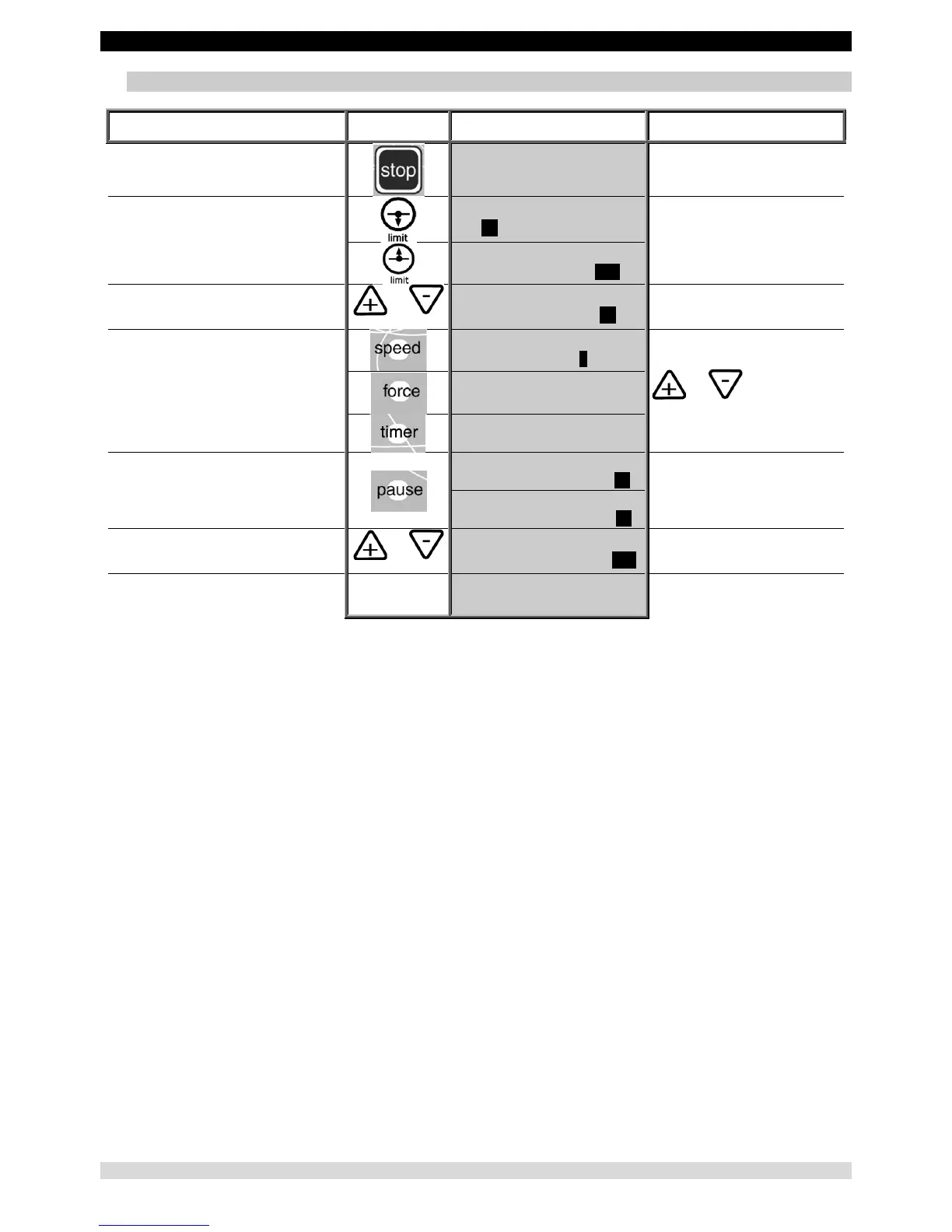
10. To set the parameters for a single movement
Beginning
Keys to
press
Display Remarks
To stop the unit
ELBOW MODULE
25 STOP 85 135
Check that the hand control is not
locked (See page 9).
To display the extension or flexion limit of
the movement
ELBOW MODULE
25 EXT 85 135
The value blinks.
ELBOW MODULE
40 FLEX 85 135
To change the limit if necessary
or
ELBOW MODULE
40 FLEX 85 60
The new value blinks.
To confirm the new value, press another
key
or wait more than 3 seconds for automatic
confirmation.
ELBOW MODULE
SPEED 2
While the value blinks press
the or key
to change if necessary.
ELBOW MODULE
FORCE _ _ _ _ _
ELBOW MODULE
TIMER 00H00MIN
Or
To display the pause at the extension or
flexion limit
ELBOW MODULE
PAUSE LOW 0s
Successive presses on this key
selects the pause at the extension
or flexion limit.
ELBOW MODULE
PAUSE HIGH 0s
To change the pause if necessary
or
ELBOW MODULE
PAUSE HIGH 15s
The new pause value blinks.
To confirm the new value press another key
or wait more than 3 seconds. The display
shows the selected mode
ELBOW MODULE
40 STOP 85 60
The unit is ready to start with the
new parameters.
Comments:
• The values in the display column are given as an example.


 To Next Page