KINETEC CEM™
14/22
EN
USING THE HAND CONTROL
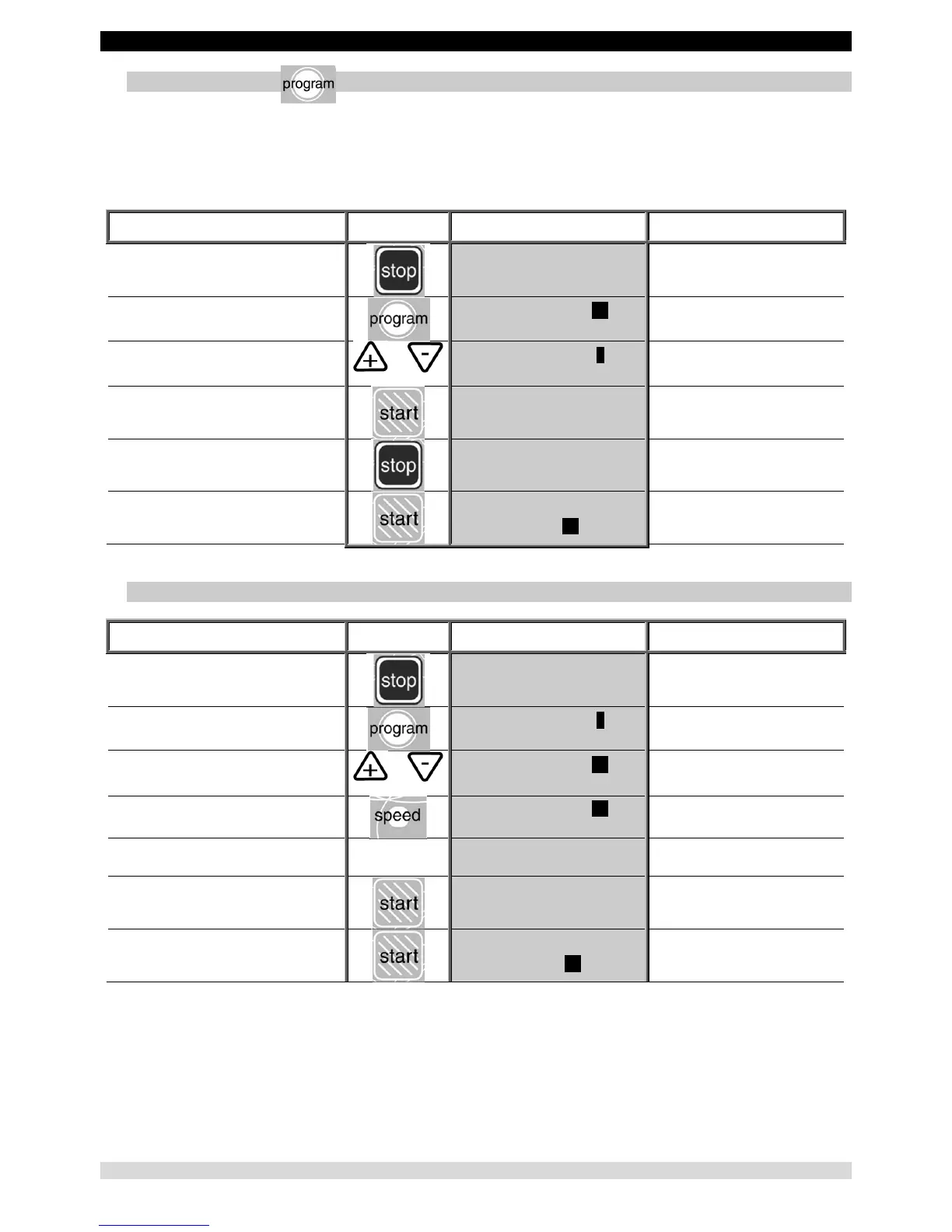
12. Using Programs
The device KINETEC CEM™ allows you to store up to 16 programs (numbered 1 to 16), including the type of movement,
ROM, speed, load, pauses and timer.
The original parameter values of the program are empty. These values can be modified and saved at any time (see ‘To
enter a program’, page 12)
Beginning
Keys to
press
Display Remarks
To stop the unit
ELBOW MODULE
10 STOP 0 110
Check that the hand control is not locked
(See page 9).
To access program mode
PROGRAM Nr10
20 EXT/FLEX 90
The program number blinks.
To change the program if necessary
or
PROGRAM Nr3
5 WARM UP 135
The new program number blinks.
To exit and confirm the selected program
WARM UP
5 STOP 0 135
The current parameters are those recorded
in program 3.
To exit without confirming the selected program
ELBOW MODULE
10 STOP 0 110
Back to the starting parameters.
To start the unit
WARM UP
5 STOP 37 135
The angle display changes with the current
movement.
13. Reading the values of a program: e.g. SPEED
Beginning
Keys to
press
Display Remarks
To stop the unit
ELBOW MODULE
10 STOP 0 110
Check that the hand control is not locked
(See page 9).
To access program mode
PROGRAM Nr3
5 WARM UP 135
The program number blinks.
To change the program if necessary
or
PROGRAM Nr10
20 EXT/FLEX 90
The new program number blinks.
To read the speed value
PROGRAM Nr10
SPEED: 2
Displays the speed value.
After 5 seconds or after pressing on another key
ELBOW MODULE
10 STOP 0 110
To exit and confirm the selected program
ELBOW MODULE
20 STOP 0 90
The current parameters are those recorded
in program 3.
To start the unit
ELBOW MODULE
20 RUN 35 90
The angle display changes with the current
movement.
Comments:
• The values in the display column are given as an example. They actually depend on the stored programs.
• The current movement parameters can be changed while using that program but no data will be stored in the original
program. See programming mode (page 12) to modify programs.


 To Next Page