KINETEC CEM™
15/22
EN
USING THE HAND CONTROL
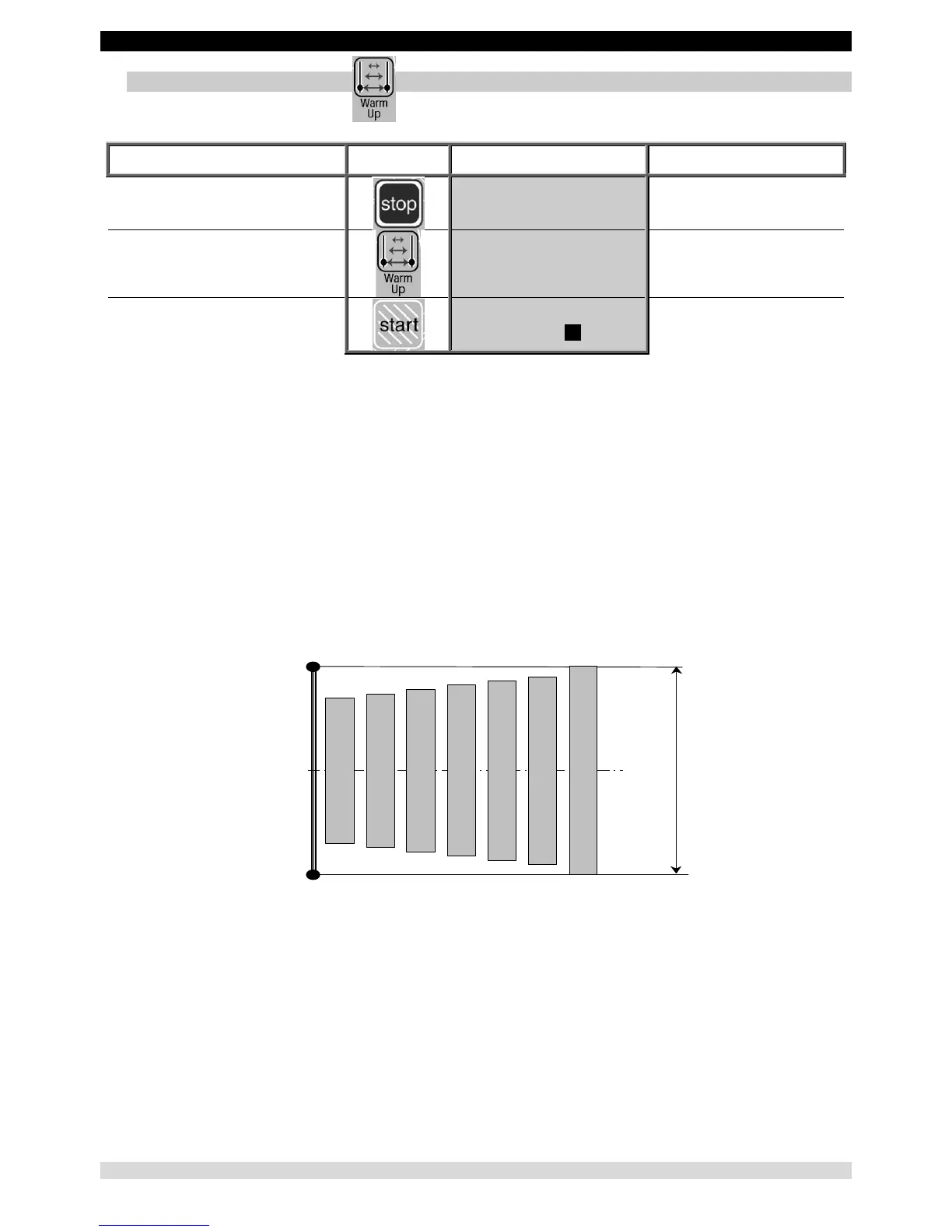
14. To use the WARM UP key
Beginning
Keys to
press
Display Remarks
To stop the unit
ELBOW MODULE
20 STOP 15 90
Check that the hand control
is not locked (See page 9).
To select Warm Up mode
WARM UP
20 STOP 15 90
To start the movement
WARM UP
20 RUN 15 90
The angle display changes
with the current movement.
Warm Up rules.
The device KINETEC CEM™ starts at 70% of the full ROM, increasing 5% of the range each full cycle until the pre-set ROM is
reached.
Note:
- The parameters should only be modified while the unit is stopped.
- Pauses and ByPass mode are not available during warm up cycles.
- The Warm Up cycles are only performed when the movement is first started.
- To start a new Warm Up session, press the "Warm Up" key twice.
- The calculation mode used enables the pre-set ROM to be reached in approximately seven full cycles.
Example:
For a Warm Up treatment with a pre-set ROM from 0° to 100°.
The first cycle starts with 15° to 85° to 15° and the values increase 5% each cycle.
100°
0°
50°
Cycle 1 (70%)
Cycle 2 (75%)
Cycle 3 (80%)
Cycle 4 (85%)
Cycle 5 (90%)
Cycle 6 (95%)
Cycle 7 (100%)
Amplitudes de mouvement programmées


 To Next Page