EasyManua.ls Logo

Kingston Technology MLWG2 - Unsupported File Formats; Open Unsupported Video In App; Email Unsupported Video; Copy URL for Unsupported Video

Kingston Technology MLWG2
25 pages
Print Icon
To Next Page IconTo Next Page
To Previous Page IconTo Previous Page
Loading...
Document No. 480-16FUM-002.A00
Kingston MobileLite Wireless G2
Page 20 of 25
Unsupported File Formats
The MobileLite app’s default video player can open all file formats supported by your mobile device. If you try to
open an unsupported format, follow the additional instructions on how to access different file formats using 3rd
party apps.
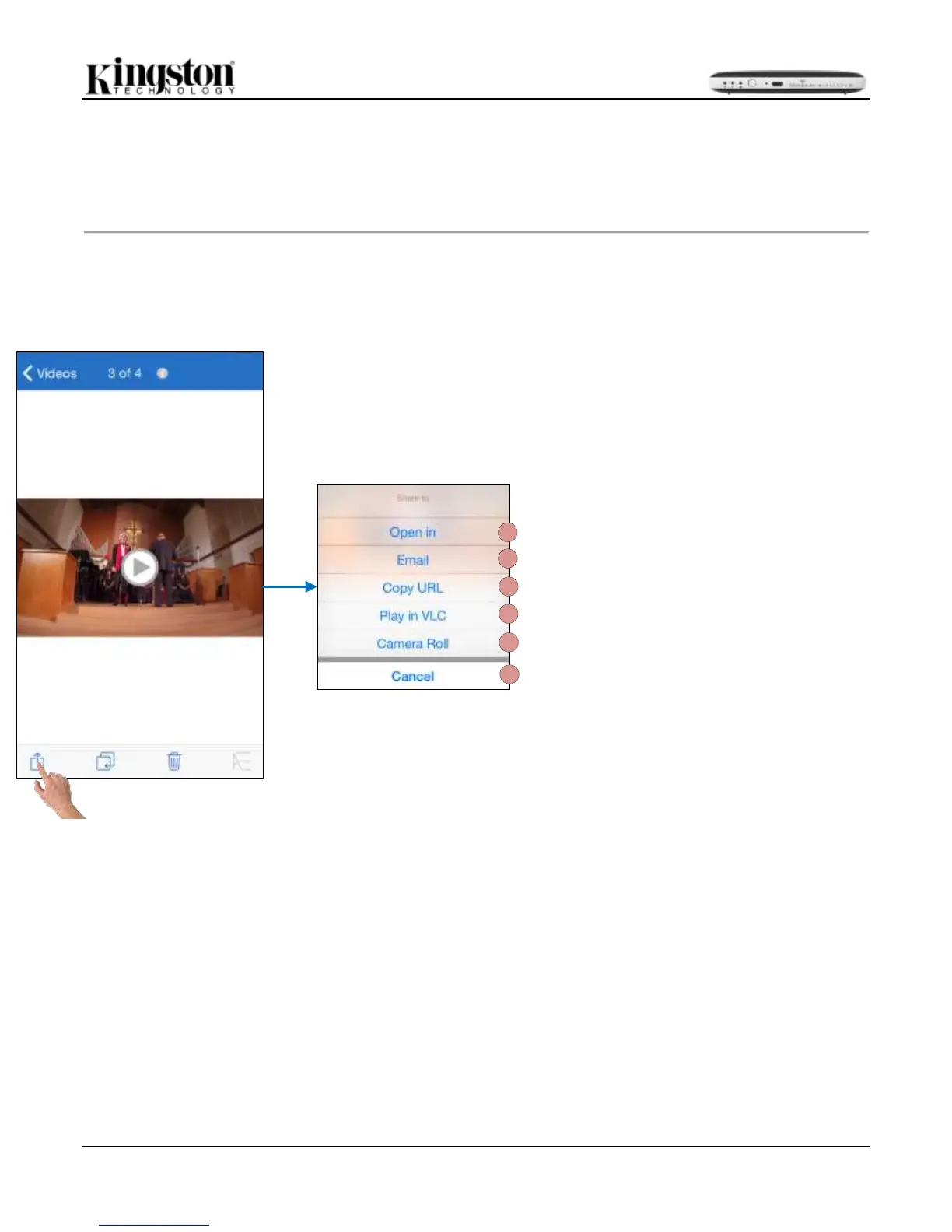
Select a video and tap on the share to icon. This will open the following options. See Figure 20.1:
A
B
C
D
E
F
Figure 20.1 Unsupported File Format Options
A. Open In: The video will be downloaded to the
iOS device and a third party app could be used
to play.
B. Email: A video could be shared by email. (10MB
max)
C. Copy URL: A copy of the videos URL will be
copied and could be pasted to a compatible third
party app.
D. Play in VLC: If the VLC video player app is
installed the selected video will play in the VLC
app. If the app is not installed the link will open
the app store to download the VLC app.
Downloading the app is optional.
E. Camera Roll: The video could be exported to
the iOS device.
F. Cancel: Cancels the ‘share to option.

Related product manuals