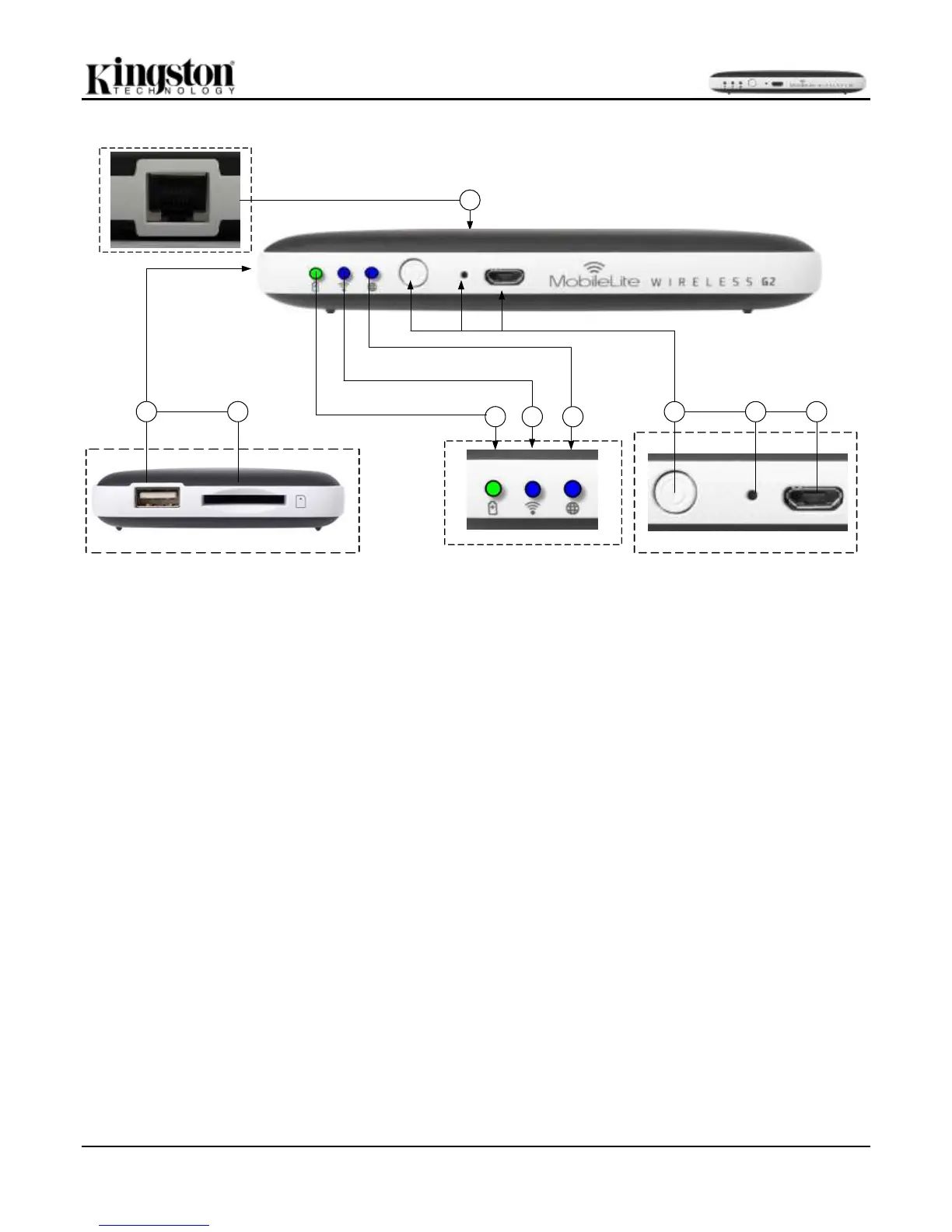
A. USB 2.0 Port - Allows you to connect an external USB Storage Device to MobileLite Wireless G2. It also
allows you to charge your mobile device.
B. SD Slot - Allows you to connect a memory card (SD/SDHC/SDXC or any microSD w/ adapter) to MobileLite
Wireless G2.
C. Battery LED/Power* - Indicates current battery status and current power state.
D. Wi-Fi LED - Indicates current status of Wi-Fi broadcast.
E. Bridged LED - Indicates whether or not MobileLite Wireless G2 is bridged to an Internet gateway via Wi-Fi or
Ethernet.
F. Power Button - Powers on or powers off the MobileLite Wireless G2 device. Short press (1 Second): Power
Bank Mode/Long press (3 seconds): Wi-Fi Mode.
G. Reset Button - Allows you to reset the MobileLite Wireless G2 device back to its original (default)
configuration. Hold button down for more than 10 seconds.
H. Micro-B USB Port - Allows you to charge MobileLite Wireless G2 or connect it to a standard USB port on
your computer for fast, easy data transfer. Each media expansion port will require its own drive letter if media is
inserted.
I. Ethernet port – Allows you to connect an Ethernet cable to create a hotspot for wireless Internet access. Wi-Fi
mode will temporarily disable while connected to Ethernet.



 To Next Page